Join us at FabCon Atlanta from March 16 - 20, 2026, for the ultimate Fabric, Power BI, AI and SQL community-led event. Save $200 with code FABCOMM.
Register now!The Power BI Data Visualization World Championships is back! Get ahead of the game and start preparing now! Learn more
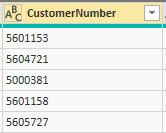
Is it possible to add "DK0010" in all rows in the column named CustomerNumber?
Solved! Go to Solution.
Column = CONCATENATE("DK0010",Customer[CustomerNumber])
You can achieve this with EDIT query - Select Customer ID Column - Transform -Format - ADD Prefix
@Anonymous
Create a New column
CustomerNumber = "DK0010"
Hi @Anonymous ,
Images posted by you are not visible, however, if you want to add a static value in a column.
Create a column and add function column = "DK0010"
this will create a new column with static value on all rows.
Regards,
Washivale
I hope the picture works now, but I need the values to be:
DK00105601153
DK00105604721
etc 🙂
You can achieve this with EDIT query - Select Customer ID Column - Transform -Format - ADD Prefix
Column = CONCATENATE("DK0010",Customer[CustomerNumber])
The Power BI Data Visualization World Championships is back! Get ahead of the game and start preparing now!
| User | Count |
|---|---|
| 39 | |
| 37 | |
| 33 | |
| 32 | |
| 29 |
| User | Count |
|---|---|
| 133 | |
| 88 | |
| 85 | |
| 68 | |
| 64 |