Get Fabric or SQL Certified for Free.
Get certified for free when you join Fabric Data Days 2026 and dive into Fabric, Power BI, SQL, AI, and other essential data skills.
Join now- Power BI forums
- Get Help with Power BI
- Desktop
- Service
- Report Server
- Power Query
- Mobile Apps
- Developer
- DAX Commands and Tips
- Custom Visuals Development Discussion
- Health and Life Sciences
- Power BI Spanish forums
- Translated Spanish Desktop
- Training and Consulting
- Instructor Led Training
- Dashboard in a Day for Women, by Women
- Galleries
- Data Stories Gallery
- Themes Gallery
- Contests Gallery
- QuickViz Gallery
- Quick Measures Gallery
- Visual Calculations Gallery
- Fabric Apps Gallery
- Notebook Gallery
- Translytical Task Flow Gallery
- TMDL Gallery
- R Script Showcase
- Webinars and Video Gallery
- Ideas
- Custom Visuals Ideas (read-only)
- Issues
- Issues
- Events
- Upcoming Events
July 28 - August 9 | Final Round of the Power BI Dataviz World Championships. This is your chance. Learn more
- Power BI forums
- Forums
- Get Help with Power BI
- Desktop
- Re: Combine Values into groups
- Subscribe to RSS Feed
- Mark Topic as New
- Mark Topic as Read
- Float this Topic for Current User
- Bookmark
- Subscribe
- Printer Friendly Page

- Mark as New
- Bookmark
- Subscribe
- Mute
- Subscribe to RSS Feed
- Permalink
- Report Inappropriate Content
Combine Values into groups
Hello,
We have a table containing "Job ID", "Job Type" and "Revenue" (and a lot more - not important).
The problem is we have 30+ job types, and we would like to put them into 4 groups.
The goal is to look at revenue per job type - so instead of revenue per 30+ job types, we would like to see the revenue per 4 combined types.
So lets say Job type 1-10 Should belong to "Jop Type A", Job type 11-20 should be "Job Type B" etc.
Is there an easy way for us to do that in this huge data table?
Thanks!
Solved! Go to Solution.


- Mark as New
- Bookmark
- Subscribe
- Mute
- Subscribe to RSS Feed
- Permalink
- Report Inappropriate Content
Right,
Creating a group following the link i posted before should work fine
Use grouping and binning in Power BI Desktop
In short, right click on the column -> New group, in group type choose list and than group them in any way you like
- Mark as New
- Bookmark
- Subscribe
- Mute
- Subscribe to RSS Feed
- Permalink
- Report Inappropriate Content
Hi,
You could try and create a group:
Use grouping and binning in Power BI Desktop
But as PattemManohar says posting some sample test data could be useful to give a accurate solution
- Mark as New
- Bookmark
- Subscribe
- Mute
- Subscribe to RSS Feed
- Permalink
- Report Inappropriate Content
Sample data:
| Job ID | Job Type | Revenue | NEW |
| 1 | Banana | 10 | Fruit |
| 2 | Apple | 4 | Fruit |
| 3 | Grape | 10 | Fruit |
| 4 | Red | 100 | Wine |
| 5 | White | 200 | Wine |
| 6 | Rosé | 150 | Wine |
| 7 | Red | 100 | Wine |
| 8 | Banana | 10 | Fruit |
| 9 | Apple | 10 | Fruit |
| 10 | Grape | 10 | Fruit |
| 11 | T-shirt | 200 | Clothes |
| 12 | Pants | 230 | Clothes |
| 13 | Pants | 250 | Clothes |
| 14 | T-shirt | 200 | Clothes |
| 15 | Banana | 10 | Fruit |
| 16 | Apple | 5 | Fruit |
| 17 | Grape | 7 | Fruit |
| 18 | Red | 120 | Wine |
| 19 | White | 200 | Wine |
| 20 | Rosé | 350 | Wine |
| 21 | Banana | 10 | Fruit |
| 22 | Apple | 5 | Fruit |
| 23 | Grape | 5 | Fruit |
| 24 | T-shirt | 100 | Clothes |
| 25 | Pants | 250 | Clothes |
So the "NEW" column is how I think it could be 🙂
- Mark as New
- Bookmark
- Subscribe
- Mute
- Subscribe to RSS Feed
- Permalink
- Report Inappropriate Content
Right,
Creating a group following the link i posted before should work fine
Use grouping and binning in Power BI Desktop
In short, right click on the column -> New group, in group type choose list and than group them in any way you like


- Mark as New
- Bookmark
- Subscribe
- Mute
- Subscribe to RSS Feed
- Permalink
- Report Inappropriate Content
@Gordonlilj In this case we need to group based on the total revenue (which is another field). So can't use normal grouping option.
Did I answer your question? Mark my post as a solution!
Proud to be a PBI Community Champion
- Mark as New
- Bookmark
- Subscribe
- Mute
- Subscribe to RSS Feed
- Permalink
- Report Inappropriate Content
Thanks @Anonymous for sample data.
Is NEW column is your expected output ? or that is what need to considered for JobType to calculate Revenue - Please confirm.
Did I answer your question? Mark my post as a solution!
Proud to be a PBI Community Champion
- Mark as New
- Bookmark
- Subscribe
- Mute
- Subscribe to RSS Feed
- Permalink
- Report Inappropriate Content
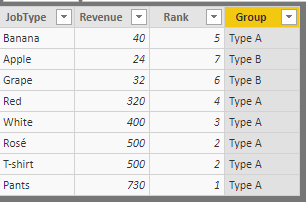
@Anonymous Hope this is what you are after..
Create a New Table as below
Test310Out = SUMMARIZE(Test310Groups,Test310Groups[JobType],"Revenue",SUM(Test310Groups[Revenue]))
Then, add Rank field to the above table as below
Rank = RANKX(Test310Out,Test310Out[Revenue],,DESC,Dense)
Finally, add a Grouping field based on the Revenue (which we have assigned Rank in above step)
Group = IF(Test310Out[Rank]<=5,"Type A",IF(Test310Out[Rank]<=10,"Type B","Other"))
Did I answer your question? Mark my post as a solution!
Proud to be a PBI Community Champion
- Mark as New
- Bookmark
- Subscribe
- Mute
- Subscribe to RSS Feed
- Permalink
- Report Inappropriate Content
@Anonymous Please post sample test data to suggest an accurate solution. But from the lines of your requirement, I suggest to create a Rank field which will give you the rank based on their Revenue and then use this Rank field to create a groups using DAX
Did I answer your question? Mark my post as a solution!
Proud to be a PBI Community Champion
Helpful resources

FabCon & SQLCon – Barcelona 2026
Join us in Barcelona for FabCon and SQLCon, the Fabric, Power BI, SQL, and AI community event. Save €200 with code FABCMTY200.

Fabric Community Sticker Challenge - Barcelona 2026
If you love stickers, then you will definitely want to check out our community sticker challenge, Barcelona edition!

Power BI Monthly Update - July 2026
Check out the July 2026 Power BI update to learn about new features.

Power BI DataViz World Championships - June 2026
A new Power BI DataViz World Championship is coming this June! Don't miss out on submitting your entry.

| User | Count |
|---|---|
| 25 | |
| 23 | |
| 22 | |
| 17 | |
| 14 |


| User | Count |
|---|---|
| 25 | |
| 24 | |
| 20 | |
| 19 | |
| 19 |


