cancel
Showing results for 
Search instead for 
Did you mean: 

The Power BI Data Visualization World Championships is back! It's time to submit your entry. Live now!

Reply
lotus22
Helper III
Helper III

Combine Rows in PowerQuery

I could use GroupBy but I only want to Combine data with column that has particular value? I want to only combine rows with value B. Off course there are other columns as well.


Value A

Value A

Value B

Value B

Value B

Value B

Value C

Value C

Value C

1 ACCEPTED SOLUTION
bcdobbs
Community Champion
Community Champion

Could you:


Make 2 reference copies of the initial query.


Filter 1 to just include B rows and the other to not include B rows.


Apply group by to the query with just B rows.


Append the queries back together.


Mark all the helper stages as do not load.


Ben Dobbs

LinkedIn | Twitter | Blog

Did I answer your question? Mark my post as a solution! This will help others on the forum!
Appreciate your Kudos!!

View solution in original post

3 REPLIES 3
mahoneypat
Microsoft Employee
Microsoft Employee

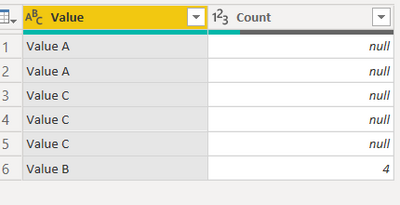
Here's one way to do it in the query editor.  To see how it works, just create a blank query, open the Advanced Editor and replace the text there with the M code below.


let
    Source = Table.FromRows(Json.Document(Binary.Decompress(Binary.FromText("i45WCkvMKU1VcFSK1YlWAhM4BJyoIOBMjEAsAA==", BinaryEncoding.Base64), Compression.Deflate)), let _t = ((type nullable text) meta [Serialized.Text = true]) in type table [Value = _t]),
    #"Changed Type" = Table.TransformColumnTypes(Source,{{"Value", type text}}),
    Split = Table.SelectRows(#"Changed Type", each ([Value] <> "")),
    #"Filtered Rows" = Table.SelectRows(Split, each ([Value] = "Value B")),
    #"Grouped Rows" = Table.Group(#"Filtered Rows", {"Value"}, {{"Count", each Table.RowCount(_), Int64.Type}}),
    Custom1 = Split,
    #"Filtered Rows1" = Table.SelectRows(Custom1, each ([Value] <> "Value B")),
    #"Appended Query" = Table.Combine({#"Filtered Rows1", #"Grouped Rows"})
in
    #"Appended Query"


mahoneypat_0-1639693299895.png


Pat


Did I answer your question? Mark my post as a solution! Kudos are also appreciated!

To learn more about Power BI, follow me on Twitter or subscribe on YouTube.


@mahoneypa HoosierBI on YouTube


bcdobbs
Community Champion
Community Champion

Could you:


Make 2 reference copies of the initial query.


Filter 1 to just include B rows and the other to not include B rows.


Apply group by to the query with just B rows.


Append the queries back together.


Mark all the helper stages as do not load.


Ben Dobbs

LinkedIn | Twitter | Blog

Did I answer your question? Mark my post as a solution! This will help others on the forum!
Appreciate your Kudos!!

Great clever IDEA!! thank you!!

Helpful resources

Announcements
Power BI DataViz World Championships

Power BI Dataviz World Championships

The Power BI Data Visualization World Championships is back! It's time to submit your entry.

December 2025 Power BI Update Carousel

Power BI Monthly Update - December 2025

Check out the December 2025 Power BI Holiday Recap!

FabCon Atlanta 2026 carousel

FabCon Atlanta 2026

Join us at FabCon Atlanta, March 16-20, for the ultimate Fabric, Power BI, AI and SQL community-led event. Save $200 with code FABCOMM.