cancel
Showing results for 
Search instead for 
Did you mean: 

The Power BI Data Visualization World Championships is back! It's time to submit your entry. Live now!

Reply
lotus22
Helper III
Helper III

Combine Rows in PowerQuery

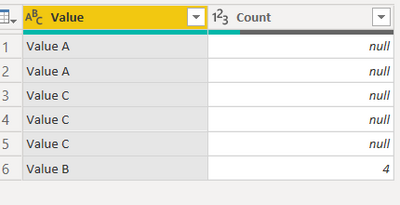
I could use GroupBy but I only want to Combine data with column that has particular value? I want to only combine rows with value B. Off course there are other columns as well.


Value A

Value A

Value B

Value B

Value B

Value B

Value C

Value C

Value C

1 ACCEPTED SOLUTION
bcdobbs
Community Champion
Community Champion

Could you:


Make 2 reference copies of the initial query.


Filter 1 to just include B rows and the other to not include B rows.


Apply group by to the query with just B rows.


Append the queries back together.


Mark all the helper stages as do not load.


Ben Dobbs

LinkedIn | Twitter | Blog

Did I answer your question? Mark my post as a solution! This will help others on the forum!
Appreciate your Kudos!!

View solution in original post

3 REPLIES 3
mahoneypat
Microsoft Employee
Microsoft Employee

Here's one way to do it in the query editor.  To see how it works, just create a blank query, open the Advanced Editor and replace the text there with the M code below.


let
    Source = Table.FromRows(Json.Document(Binary.Decompress(Binary.FromText("i45WCkvMKU1VcFSK1YlWAhM4BJyoIOBMjEAsAA==", BinaryEncoding.Base64), Compression.Deflate)), let _t = ((type nullable text) meta [Serialized.Text = true]) in type table [Value = _t]),
    #"Changed Type" = Table.TransformColumnTypes(Source,{{"Value", type text}}),
    Split = Table.SelectRows(#"Changed Type", each ([Value] <> "")),
    #"Filtered Rows" = Table.SelectRows(Split, each ([Value] = "Value B")),
    #"Grouped Rows" = Table.Group(#"Filtered Rows", {"Value"}, {{"Count", each Table.RowCount(_), Int64.Type}}),
    Custom1 = Split,
    #"Filtered Rows1" = Table.SelectRows(Custom1, each ([Value] <> "Value B")),
    #"Appended Query" = Table.Combine({#"Filtered Rows1", #"Grouped Rows"})
in
    #"Appended Query"


mahoneypat_0-1639693299895.png


Pat


Did I answer your question? Mark my post as a solution! Kudos are also appreciated!

To learn more about Power BI, follow me on Twitter or subscribe on YouTube.


@mahoneypa HoosierBI on YouTube


bcdobbs
Community Champion
Community Champion

Could you:


Make 2 reference copies of the initial query.


Filter 1 to just include B rows and the other to not include B rows.


Apply group by to the query with just B rows.


Append the queries back together.


Mark all the helper stages as do not load.


Ben Dobbs

LinkedIn | Twitter | Blog

Did I answer your question? Mark my post as a solution! This will help others on the forum!
Appreciate your Kudos!!

Great clever IDEA!! thank you!!

Helpful resources

Announcements
December 2025 Power BI Update Carousel

Power BI Monthly Update - December 2025

Check out the December 2025 Power BI Holiday Recap!

FabCon Atlanta 2026 carousel

FabCon Atlanta 2026

Join us at FabCon Atlanta, March 16-20, for the ultimate Fabric, Power BI, AI and SQL community-led event. Save $200 with code FABCOMM.