Join us at FabCon Atlanta from March 16 - 20, 2026, for the ultimate Fabric, Power BI, AI and SQL community-led event. Save $200 with code FABCOMM.
Register now!The Power BI Data Visualization World Championships is back! Get ahead of the game and start preparing now! Learn more
Hi All, I'm super-new to Power BI and sure could use some help, please.
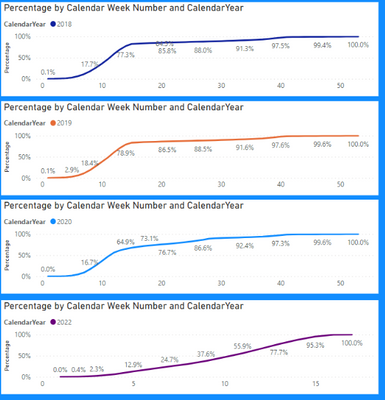
I'm trying to combine my three visuals below into one:
Here's a sample table of the data:
| Table1 | |||
| Process Count | A.Name | Process Created Date | CalendarYear |
| 1 | Company A | 1/23/2018 | 2018 |
| 5 | Company A | 1/24/2018 | 2018 |
| 7 | Company A | 1/29/2018 | 2018 |
| 4 | Company A | 1/30/2018 | 2018 |
| 1 | Company A | 1/31/2018 | 2018 |
| 10 | Company A | 2/5/2018 | 2018 |
The "Percentage" is based upon a calculated measure:
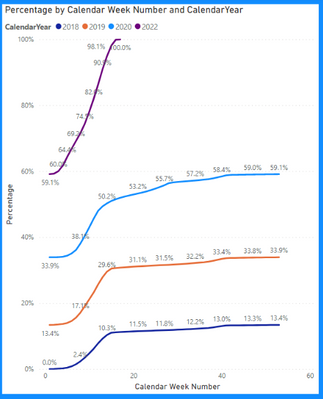
Below is what I initially came up with, which is not what I need, because 1) I need all
lines to start at 0%, and 2) I need 2018, 2019, and 2020 to end at 100%, just like in each of the separate visuals above.
You're help would be so much appreciated. TIA!
I hope I provided the necessary information to help, and clearly explained what I need.
Kind Regards, Rod
Solved! Go to Solution.
@Rod_D Maybe:
Percentage =
VAR __Year = MAX('Table1'[Calendar Year])
RETURN
CALCULATE(SUM('Table1'[Process Count]),FILTER(ALLSELECTED('Table1'),'Table1'[Calendar Year] = __Year && 'Table1'[Calendar Week Ending Date]<=MAX('Table1'[Calendar Week Ending Date])))/CALCULATE(SUM('Table1'[Process Count]),ALLSELECTED('Table1'),'Table1'[Calendar Year] = __Year)
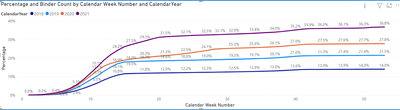
@Greg_Deckler Thank you for your help and huge step forward! Below is my current visual, based upon your guidance.
Is it possible for each calendar year to end at 100% by the end of their calendar year, instead of all the calendar years adding up to 100% (36.8+27.8+21.5+14 = 100%)? I think it's possible, but how to do it is beyond me, at this point. Thanks again. Sincerely.
@Rod_D Maybe:
Percentage =
VAR __Year = MAX('Table1'[Calendar Year])
RETURN
CALCULATE(SUM('Table1'[Process Count]),FILTER(ALLSELECTED('Table1'),'Table1'[Calendar Year] = __Year && 'Table1'[Calendar Week Ending Date]<=MAX('Table1'[Calendar Week Ending Date])))/CALCULATE(SUM('Table1'[Process Count]),ALLSELECTED('Table1'),'Table1'[Calendar Year] = __Year)
@Greg_Deckler I think this it! Thank you Thank you Thank you! I just need a couple of days to thoroughly QC my report, and then if everything looks good I will mark this as a solution. Many thanks again!!
@Rod_D So the basic issue that you have is that you need to add in a Year filter into your calculation. Like maybe:
"Percentage =
VAR __Year = MAX('Table1'[Calendar Year])
RETURN
CALCULATE(SUM('Table1'[Process Count]),FILTER(ALLSELECTED('Table1'),'Table1'[Calendar Year] = __Year && 'Table1'[Calendar Week Ending Date]<=MAX('Table1'[Calendar Week Ending Date])))/CALCULATE(SUM('Table1'[Process Count]),ALLSELECTED('Table1'))"
The Power BI Data Visualization World Championships is back! Get ahead of the game and start preparing now!
Check out the November 2025 Power BI update to learn about new features.
| User | Count |
|---|---|
| 59 | |
| 43 | |
| 42 | |
| 23 | |
| 17 |
| User | Count |
|---|---|
| 190 | |
| 122 | |
| 96 | |
| 66 | |
| 47 |