FabCon is coming to Atlanta
Join us at FabCon Atlanta from March 16 - 20, 2026, for the ultimate Fabric, Power BI, AI and SQL community-led event. Save $200 with code FABCOMM.
Register now!- Power BI forums
- Get Help with Power BI
- Desktop
- Service
- Report Server
- Power Query
- Mobile Apps
- Developer
- DAX Commands and Tips
- Custom Visuals Development Discussion
- Health and Life Sciences
- Power BI Spanish forums
- Translated Spanish Desktop
- Training and Consulting
- Instructor Led Training
- Dashboard in a Day for Women, by Women
- Galleries
- Data Stories Gallery
- Themes Gallery
- Contests Gallery
- QuickViz Gallery
- Quick Measures Gallery
- Visual Calculations Gallery
- Notebook Gallery
- Translytical Task Flow Gallery
- TMDL Gallery
- R Script Showcase
- Webinars and Video Gallery
- Ideas
- Custom Visuals Ideas (read-only)
- Issues
- Issues
- Events
- Upcoming Events
The Power BI Data Visualization World Championships is back! Get ahead of the game and start preparing now! Learn more
- Power BI forums
- Forums
- Get Help with Power BI
- Desktop
- Re: Column with line number in PBI table
- Subscribe to RSS Feed
- Mark Topic as New
- Mark Topic as Read
- Float this Topic for Current User
- Bookmark
- Subscribe
- Printer Friendly Page


- Mark as New
- Bookmark
- Subscribe
- Mute
- Subscribe to RSS Feed
- Permalink
- Report Inappropriate Content
Column with line number in PBI table
Hello,
I did a report with a table that ranks several brands my company sells, based on each brand income.
I would like to add a first column with the line numbers (ranking).
Is there a way to do so?
Thanks in advance
Jo
Solved! Go to Solution.


- Mark as New
- Bookmark
- Subscribe
- Mute
- Subscribe to RSS Feed
- Permalink
- Report Inappropriate Content
Hi @Jo_Chrq ,
You can also try
RANK = RANKX(ALL('Table'[Regions ],'Table'[Stores ]),CALCULATE(SUM('Table'[Revenue ])))
Regards,
Harsh Nathani
Did I answer your question? Mark my post as a solution! Appreciate with a Kudos!! (Click the Thumbs Up Button)


- Mark as New
- Bookmark
- Subscribe
- Mute
- Subscribe to RSS Feed
- Permalink
- Report Inappropriate Content
@Jo_Chrq , are you looking for serial no of line ?
Not there. You have to use Rank if possible. Vote for the idea -https://ideas.powerbi.com/ideas/idea/?ideaid=80612ec5-14a9-4929-a2ee-531943fa51d4
For Rank Refer these links
https://radacad.com/how-to-use-rankx-in-dax-part-2-of-3-calculated-measures
https://radacad.com/how-to-use-rankx-in-dax-part-1-of-3-calculated-columns
https://radacad.com/how-to-use-rankx-in-dax-part-3-of-3-the-finale
https://community.powerbi.com/t5/Community-Blog/Dynamic-TopN-made-easy-with-What-If-Parameter/ba-p/3...
- Mark as New
- Bookmark
- Subscribe
- Mute
- Subscribe to RSS Feed
- Permalink
- Report Inappropriate Content
Hi @amitchandak
Yes believe that's it.
If you consider the following table, I have the columns "Stores" and "Revenue" and basically I need to add the Rank column :
| Rank (column needed) | Stores | Revenue |
| 1 | Store B | 100€ |
| 2 | Store C | 95€ |
| 3 | Store A | 75€ |
- Mark as New
- Bookmark
- Subscribe
- Mute
- Subscribe to RSS Feed
- Permalink
- Report Inappropriate Content
Hi @Jo_Chrq ,
Create these 2 measures
Total Sales = SUM('Table'[Revenue])
RANK = RANKX(ALL('Table'[Stores]), [Total Sales],,DESC)
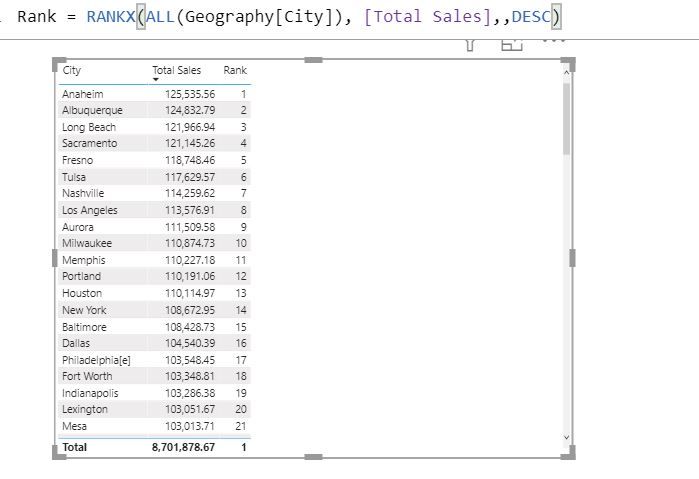
Regards,
Harsh Nathani
Did I answer your question? Mark my post as a solution! Appreciate with a Kudos!! (Click the Thumbs Up Button)
- Mark as New
- Bookmark
- Subscribe
- Mute
- Subscribe to RSS Feed
- Permalink
- Report Inappropriate Content
Thank you, I'm now getting really close but still have an issue.
The table actually has an extra column and the ranking I get is within these categories (btw I apologize for my poor English level ...)
Here's the result I get :
| Rank | Regions | Stores | Revenue |
1 | North | Store B | 100€ |
2 | North | Store C | 95€ |
| 1 | South | Store A | 75€ |
| 3 | North | Store F | 60€ |
| 2 | South | Store D | 55€ |
I would like to have the overall ranking, regardless the regions ...
Many thanks again
- Mark as New
- Bookmark
- Subscribe
- Mute
- Subscribe to RSS Feed
- Permalink
- Report Inappropriate Content
Hi @Jo_Chrq ,
RANK = RANKX(ALL('Table'),CALCULATE(SUM('Table'[Revenue ])))
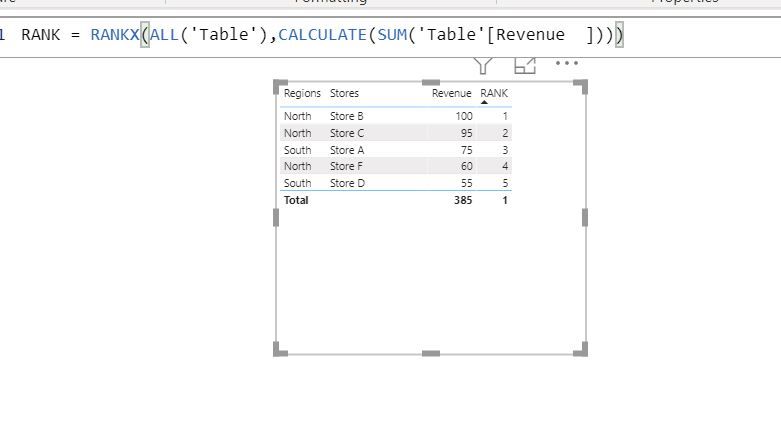
Regards,
Harsh Nathani
Did I answer your question? Mark my post as a solution! Appreciate with a Kudos!! (Click the Thumbs Up Button)
- Mark as New
- Bookmark
- Subscribe
- Mute
- Subscribe to RSS Feed
- Permalink
- Report Inappropriate Content
Hi @Jo_Chrq ,
You can also try
RANK = RANKX(ALL('Table'[Regions ],'Table'[Stores ]),CALCULATE(SUM('Table'[Revenue ])))
Regards,
Harsh Nathani
Did I answer your question? Mark my post as a solution! Appreciate with a Kudos!! (Click the Thumbs Up Button)
- Mark as New
- Bookmark
- Subscribe
- Mute
- Subscribe to RSS Feed
- Permalink
- Report Inappropriate Content

- Mark as New
- Bookmark
- Subscribe
- Mute
- Subscribe to RSS Feed
- Permalink
- Report Inappropriate Content
Hi @Jo_Chrq ,
Please share additonal details on your query. This is not helping at all.
https://community.powerbi.com/t5/Community-Blog/How-to-Get-Your-Question-Answered-Quickly/ba-p/38490
Thanks,
Pragati

Helpful resources

Power BI Dataviz World Championships
The Power BI Data Visualization World Championships is back! Get ahead of the game and start preparing now!

Power BI Monthly Update - November 2025
Check out the November 2025 Power BI update to learn about new features.

FabCon Atlanta 2026
Join us at FabCon Atlanta, March 16-20, for the ultimate Fabric, Power BI, AI and SQL community-led event. Save $200 with code FABCOMM.

| User | Count |
|---|---|
| 59 | |
| 46 | |
| 42 | |
| 23 | |
| 18 |


| User | Count |
|---|---|
| 192 | |
| 125 | |
| 99 | |
| 67 | |
| 48 |


