FabCon is coming to Atlanta
Join us at FabCon Atlanta from March 16 - 20, 2026, for the ultimate Fabric, Power BI, AI and SQL community-led event. Save $200 with code FABCOMM.
Register now!- Power BI forums
- Get Help with Power BI
- Desktop
- Service
- Report Server
- Power Query
- Mobile Apps
- Developer
- DAX Commands and Tips
- Custom Visuals Development Discussion
- Health and Life Sciences
- Power BI Spanish forums
- Translated Spanish Desktop
- Training and Consulting
- Instructor Led Training
- Dashboard in a Day for Women, by Women
- Galleries
- Data Stories Gallery
- Themes Gallery
- Contests Gallery
- QuickViz Gallery
- Quick Measures Gallery
- Visual Calculations Gallery
- Notebook Gallery
- Translytical Task Flow Gallery
- TMDL Gallery
- R Script Showcase
- Webinars and Video Gallery
- Ideas
- Custom Visuals Ideas (read-only)
- Issues
- Issues
- Events
- Upcoming Events
The Power BI Data Visualization World Championships is back! Get ahead of the game and start preparing now! Learn more
- Power BI forums
- Forums
- Get Help with Power BI
- Desktop
- create empty dates / hours
- Subscribe to RSS Feed
- Mark Topic as New
- Mark Topic as Read
- Float this Topic for Current User
- Bookmark
- Subscribe
- Printer Friendly Page

- Mark as New
- Bookmark
- Subscribe
- Mute
- Subscribe to RSS Feed
- Permalink
- Report Inappropriate Content
create empty dates / hours
Hi,
i'm quite new to Power BI, and i'm not really finding the right subject on the internet to help me.
I have a large set of data, and would like to transform it as follows
AS IS:
01/01/2018 08:01:05
01/01/2018 08:05:17
01/01/2018 08:08:56
01/01/2018 08:17:45
01/01/2018 09:01:43
TO BE
01/01/2018 - 08:00:00 - 3
01/01/2018 - 08:15:00 - 1
01/01/2018 - 08:30:00 - 0
01/01/2018 - 08:45:00 - 0
01/01/2018 - 09:00:00 - 1
Basically, i want to do 2 things:
1/ group data by 15 minutes (I already managed that by adding a new colon "kwartuur", and then merging "hour" with "Kwartuur")
2/ but I cannot figure out how to create the date/hour that is missing in the basic data set (8:30).
i tried to create a calendar and a time calendar, but from there, how am i supposed to merge both data sets?
Thanks in advance for you feedback !
Solved! Go to Solution.
- Mark as New
- Bookmark
- Subscribe
- Mute
- Subscribe to RSS Feed
- Permalink
- Report Inappropriate Content
i've found a bit of a solution :)!
for those who have the same issue as me, I did the following
- create date calendar:
https://kohera.be/blog/power-bi/how-to-create-a-date-table-in-power-bi-in-2-simple-steps/
- create time calendar: https://kohera.be/blog/power-bi/how-to-create-a-time-table-in-power-bi-in-a-few-simple-steps/
slightly adapted:
- link tables:
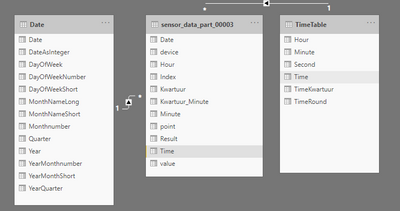
- create table using Date and Kwartuur from the created tables:
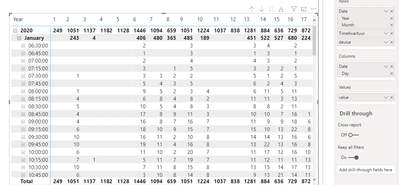
i'm still struggling with the fact that he is only showing me the hours where there was input (so for example, nothing before 6:30), but i'm already a bit more on track
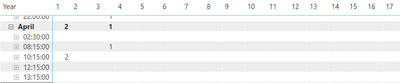
thanks for the advice, it put me on the right track !


- Mark as New
- Bookmark
- Subscribe
- Mute
- Subscribe to RSS Feed
- Permalink
- Report Inappropriate Content
Hi @Lindserke ,
You can follow these steps to try:
1. Create an index column in power query editor, close and apply it.
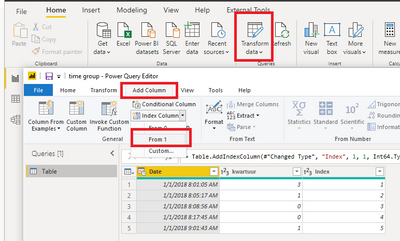
2. Create this calculated column:
Result =
VAR _minute =
    SWITCH ( MOD ( [Index], 4 ), 1, 0, 2, 15, 3, 30, 0, 45 )
VAR _time =
    FORMAT ( TIME ( HOUR ( 'Table'[Date] ), _minute, 0 ), "hh:nn:ss" )
RETURN
    DATE ( YEAR ( 'Table'[Date] ), MONTH ( 'Table'[Date] ), DAY ( 'Table'[Date] ) ) & "-" & _time & "-" & 'Table'[kwartuur]
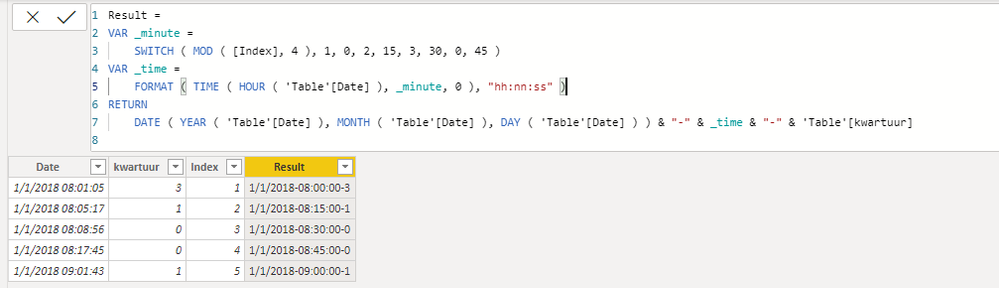
Attached a sample file in the below, hopes to help you.
Best Regards,
Yingjie Li
If this post helps then please consider Accept it as the solution to help the other members find it more quickly.
- Mark as New
- Bookmark
- Subscribe
- Mute
- Subscribe to RSS Feed
- Permalink
- Report Inappropriate Content
hi @v-yingjl ,
thanks for the reply,
however, i'm still not able to get this thing to work...
i tried to upload my sample file, so you can maybe get a quick glance of what i'm doing, and seeing what i'm not doing correct, but i dont find a way to upload a file...
- Mark as New
- Bookmark
- Subscribe
- Mute
- Subscribe to RSS Feed
- Permalink
- Report Inappropriate Content
Hi @Lindserke ,
If you want to upload the sample file in the community, you can upload the file to somewhere can store files like OneDrive for Business etc. first, then share the link in the community, it will allow us to better help you solve the issue. One point you should note is that please replace the sensitive information in the sample file.
Best Regards,
Yingjie Li
- Mark as New
- Bookmark
- Subscribe
- Mute
- Subscribe to RSS Feed
- Permalink
- Report Inappropriate Content
i've found a bit of a solution :)!
for those who have the same issue as me, I did the following
- create date calendar:
https://kohera.be/blog/power-bi/how-to-create-a-date-table-in-power-bi-in-2-simple-steps/
- create time calendar: https://kohera.be/blog/power-bi/how-to-create-a-time-table-in-power-bi-in-a-few-simple-steps/
slightly adapted:
- link tables:
- create table using Date and Kwartuur from the created tables:
i'm still struggling with the fact that he is only showing me the hours where there was input (so for example, nothing before 6:30), but i'm already a bit more on track
thanks for the advice, it put me on the right track !


- Mark as New
- Bookmark
- Subscribe
- Mute
- Subscribe to RSS Feed
- Permalink
- Report Inappropriate Content
@Lindserke , I would recommend separate date and time and create date and time dimension table
Date = [Date time].date
Date = [Date time].time
https://kohera.be/blog/power-bi/how-to-create-a-time-table-in-power-bi-in-a-few-simple-steps/
To get the best of the time intelligence function. Make sure you have a date calendar and it has been marked as the date in model view. Also, join it with the date column of your fact/s. Refer :
https://radacad.com/creating-calendar-table-in-power-bi-using-dax-functions
https://www.archerpoint.com/blog/Posts/creating-date-table-power-bi
https://www.sqlbi.com/articles/creating-a-simple-date-table-in-dax/
See if my webinar on Time Intelligence can help: https://community.powerbi.com/t5/Webinars-and-Video-Gallery/PowerBI-Time-Intelligence-Calendar-WTD-Y...
Appreciate your Kudos.
- Mark as New
- Bookmark
- Subscribe
- Mute
- Subscribe to RSS Feed
- Permalink
- Report Inappropriate Content
Hi @amitchandak,
thanks for the quick reply. Data is split by date and hour, i should have specified that one 🙂
I indeed created calendar / time table as suggested by Kohera.be.
but when i'm making a matrix, i'm only seeing the "used" dates/times, and not the empty ones... plus, i'm seeing the exact time, not the "kwartuur"
maybe i'm doing something wrong with the connections?
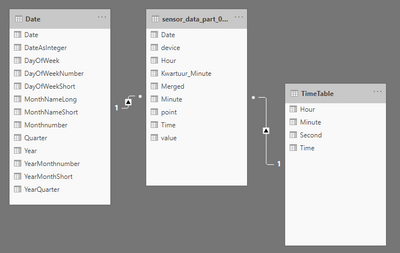

i'm not sure how to make this work.

Helpful resources

Power BI Dataviz World Championships
The Power BI Data Visualization World Championships is back! Get ahead of the game and start preparing now!

Power BI Monthly Update - December 2025
Check out the December 2025 Power BI Holiday Recap!

FabCon Atlanta 2026
Join us at FabCon Atlanta, March 16-20, for the ultimate Fabric, Power BI, AI and SQL community-led event. Save $200 with code FABCOMM.

| User | Count |
|---|---|
| 39 | |
| 37 | |
| 33 | |
| 32 | |
| 29 |


| User | Count |
|---|---|
| 133 | |
| 88 | |
| 85 | |
| 68 | |
| 64 |


