cancel
Showing results for 
Search instead for 
Did you mean: 

The Power BI Data Visualization World Championships is back! Get ahead of the game and start preparing now! Learn more

Reply
Anonymous
Not applicable

Column value displaced

Hi, first post!

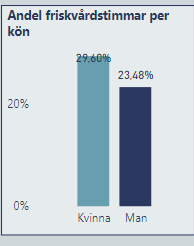
I have this chart below which pushes one number outside and one not. I have chosen "Outside end" which has no effect on the left value, only the right I have also tried to elongate the chart but it doesn't respond to this either. What is causing this and how do I fix it?


HR_Kolumnfel.PNG

1 ACCEPTED SOLUTION
mauriciosotero
Resolver III
Resolver III

Hi, welcome to the community!!!


Probably is because the first data label is near the top of the chart. A workaround is to set manually the end of y-axis to a bigger number.


If this helps, I apreciate you give a kudo and mark as the solution. Thanks

View solution in original post

1 REPLY 1
mauriciosotero
Resolver III
Resolver III

Hi, welcome to the community!!!


Probably is because the first data label is near the top of the chart. A workaround is to set manually the end of y-axis to a bigger number.


If this helps, I apreciate you give a kudo and mark as the solution. Thanks

Helpful resources

Announcements
Power BI DataViz World Championships

Power BI Dataviz World Championships

The Power BI Data Visualization World Championships is back! Get ahead of the game and start preparing now!

December 2025 Power BI Update Carousel

Power BI Monthly Update - December 2025

Check out the December 2025 Power BI Holiday Recap!

FabCon Atlanta 2026 carousel

FabCon Atlanta 2026

Join us at FabCon Atlanta, March 16-20, for the ultimate Fabric, Power BI, AI and SQL community-led event. Save $200 with code FABCOMM.

Top Solution Authors