Join us in Barcelona for FabCon and SQLCon, September 28 - October 1, 2026.
This is best Fabric, Power BI, SQL and AI community event. How do we know? The last event sold out! Save €200 with code FABCMTY200.
Register now- Power BI forums
- Get Help with Power BI
- Desktop
- Service
- Report Server
- Power Query
- Mobile Apps
- Developer
- DAX Commands and Tips
- Custom Visuals Development Discussion
- Health and Life Sciences
- Power BI Spanish forums
- Translated Spanish Desktop
- Training and Consulting
- Instructor Led Training
- Dashboard in a Day for Women, by Women
- Galleries
- Data Stories Gallery
- Themes Gallery
- Contests Gallery
- QuickViz Gallery
- Quick Measures Gallery
- Visual Calculations Gallery
- Fabric Apps Gallery
- Notebook Gallery
- Translytical Task Flow Gallery
- TMDL Gallery
- R Script Showcase
- Webinars and Video Gallery
- Ideas
- Custom Visuals Ideas (read-only)
- Issues
- Issues
- Events
- Upcoming Events
July 28 - August 9 | Final Round of the Power BI Dataviz World Championships. This is your chance. Learn more
- Power BI forums
- Forums
- Get Help with Power BI
- Desktop
- Re: Column selection based on Filter
- Subscribe to RSS Feed
- Mark Topic as New
- Mark Topic as Read
- Float this Topic for Current User
- Bookmark
- Subscribe
- Printer Friendly Page

- Mark as New
- Bookmark
- Subscribe
- Mute
- Subscribe to RSS Feed
- Permalink
- Report Inappropriate Content
Column selection based on Filter
Dear Power BI community,
I am having a hard time setting a dynamic filter on a report.
I am trying to use a filter in order to set a measure, it is a single selection filter.
Selected = if(HASONEVALUE('Table['Name]);SELECTEDVALUE('Table[Name]);"ALL")
I am getting the selected filter through this and using switch to select a column based on the selection
SWITCH([Selected];"ALL";MAX(Table[Name1]);MAX(Table[Name2]))
I would like to use a column if nothing is selected (Table[Name1]) and the other column (Table[Name2]) for any single selection filter.
I tried as well with the following measures
Selected = COUNTROWS(FILTERS('Table['Name])) this is to get how many filters are selected in the visual
I am then setting this condition using the above measure
IF ([Selected] > 1 ; MAX(Table[Name1]) ; MAX('Table'[Name2]))
Both are always returing the same column regardless of the condition.
Appreciate your help
Solved! Go to Solution.
- Mark as New
- Bookmark
- Subscribe
- Mute
- Subscribe to RSS Feed
- Permalink
- Report Inappropriate Content
Hi @Farwest ,
Please try to complete the following steps to achieve your requirement:
1. Create one dimension table for name field(Group 1,Group 2,Group 3 etc. )
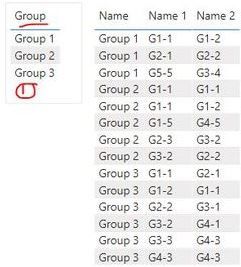
2. Create the relationship between two tables using field "Group" in Groups table and "Name" field in Table

3. Create a measure and drag the related fields onto the visual as below screen shot
Measure = IF(ISFILTERED('Groups'[Group]),MAX('Table'[Name 2]),MAX('Table'[Name 1]))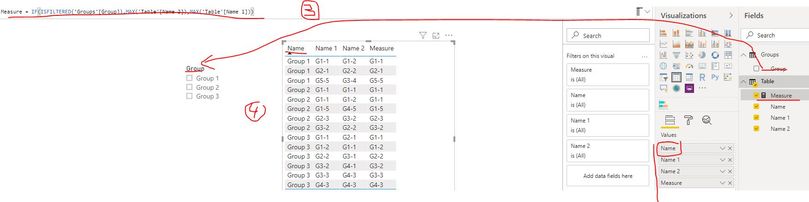
Best Regards
Rena

- Mark as New
- Bookmark
- Subscribe
- Mute
- Subscribe to RSS Feed
- Permalink
- Report Inappropriate Content
Even i'm having a similar requirement ..
Whenver user select single value from slicer in a dynamic table then we should filter out null records but whenever use select more than 1 column then display all values in every columns (no need to filter out.) Any idea how to achieve this ?


- Mark as New
- Bookmark
- Subscribe
- Mute
- Subscribe to RSS Feed
- Permalink
- Report Inappropriate Content
I think measure selection you can do like -https://community.powerbi.com/t5/Desktop/Slicer-MTD-QTD-YTD-to-filter-dates-using-the-slicer/td-p/50...
For axis/column , you might have to use bookmarks as of now
https://radacad.com/bookmarks-and-buttons-making-power-bi-charts-even-more-interactive
- Mark as New
- Bookmark
- Subscribe
- Mute
- Subscribe to RSS Feed
- Permalink
- Report Inappropriate Content
Thanks @amitchandak
This actually works better, but I still have a problem.
This works when I define the selected Filter Value "Selected", but I am trying to:
if only one filter is selected then get 'Table' [Name 1] otherwise (all selected) get 'Table' [Name 2] (this is a single filter selection anyway)
- Mark as New
- Bookmark
- Subscribe
- Mute
- Subscribe to RSS Feed
- Permalink
- Report Inappropriate Content
@Farwest ,
Try like
IF(isfiltered('Table' [Name]) && HASONEFILTER('Table' [Name]);
SWITCH(SELECTEDVALUE('Table' [Name]);
"Selected"; MAXX('Table' [Name 1]);
MAXX('Table' [Name 2])
);
MAXX('Table' [Name 2])
)
- Mark as New
- Bookmark
- Subscribe
- Mute
- Subscribe to RSS Feed
- Permalink
- Report Inappropriate Content
Tried out as well but not really reaching the expected result.
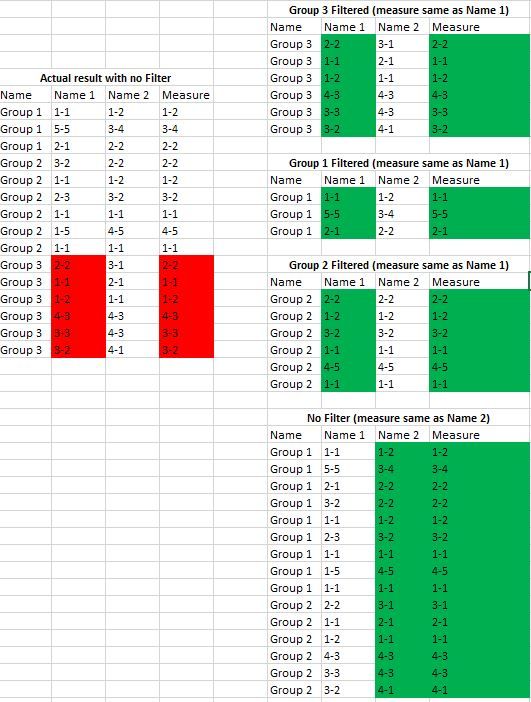
I am adding more details to better exlain the case, the result I have today is a bit different.
When no filter is selected group 3 is still showing Name 1 table where it should be Name 2 as per the DAX on previous post.
Every time one group is filtered I would liket o get Table[Name 1]
Every time no filter is selected I would like to get Table [Name 2]
I have hundreds of groups so I don't want to enter them one by on in the SWITCH like SWITCH(SELECTEDVALUE('Table' [Name]);
"Group 1"; ...."Group 2";...
- Mark as New
- Bookmark
- Subscribe
- Mute
- Subscribe to RSS Feed
- Permalink
- Report Inappropriate Content
Hi @Farwest ,
Please try to complete the following steps to achieve your requirement:
1. Create one dimension table for name field(Group 1,Group 2,Group 3 etc. )
2. Create the relationship between two tables using field "Group" in Groups table and "Name" field in Table
3. Create a measure and drag the related fields onto the visual as below screen shot
Measure = IF(ISFILTERED('Groups'[Group]),MAX('Table'[Name 2]),MAX('Table'[Name 1]))
Best Regards
Rena
Helpful resources

FabCon & SQLCon – Barcelona 2026
Join us in Barcelona for FabCon and SQLCon, the Fabric, Power BI, SQL, and AI community event. Save €200 with code FABCMTY200.

Fabric Community Sticker Challenge - Barcelona 2026
If you love stickers, then you will definitely want to check out our community sticker challenge, Barcelona edition!

Power BI Monthly Update - July 2026
Check out the July 2026 Power BI update to learn about new features.

Power BI DataViz World Championships - June 2026
A new Power BI DataViz World Championship is coming this June! Don't miss out on submitting your entry.

| User | Count |
|---|---|
| 25 | |
| 23 | |
| 19 | |
| 18 | |
| 14 |


| User | Count |
|---|---|
| 24 | |
| 20 | |
| 20 | |
| 19 | |
| 18 |


