This time we’re going bigger than ever. Fabric, Power BI, SQL, AI and more. We're covering it all. You won't want to miss it.
Learn moreDid you hear? There's a new SQL AI Developer certification (DP-800). Start preparing now and be one of the first to get certified. Register now
I have made a calculate column:
Inactive Group = Calculate( IF('.....'[Days in-active] < 30; "< 30 days"; IF( '.....'[Days in-active] < 90; "30 < 90 days"; IF('.....'[Days in-acitve] < 365; "90 < 365 days"; "> 365 days"))))
Now I become de coloms as follow:
< 30 days | > 365 days | 30 < 90 days | 90 < 365 days
It should be:
< 30 days | 30 < 90 days | 90 < 365 days | > 365 days
How can I do that?
Must I something change in the formula?
Solved! Go to Solution.
Hey,
you can't change the order by changing your formula. The default order is derived from the values of signs representing the character code.
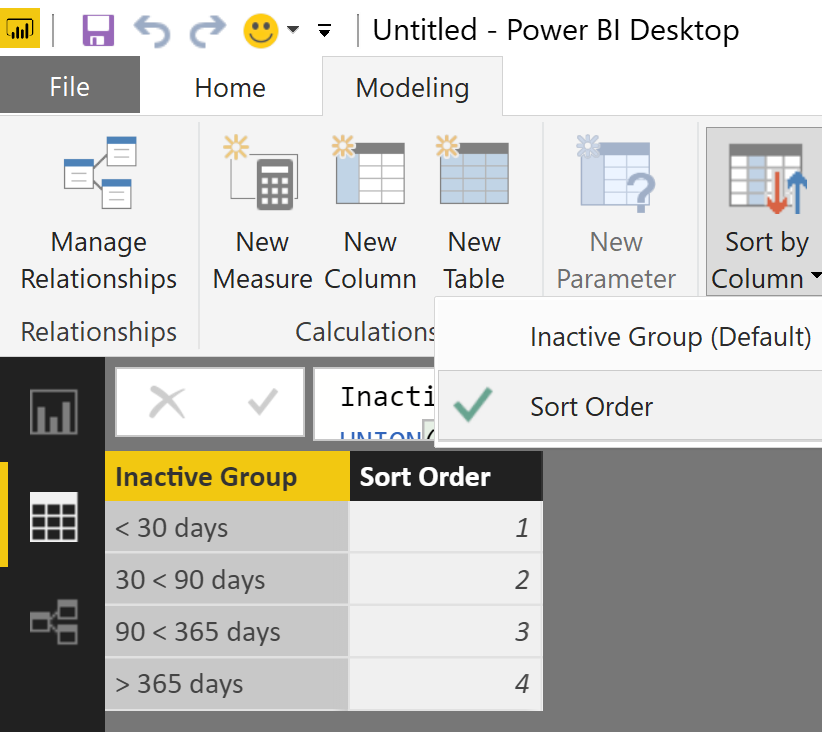
For this reason I would recommend to create a new table in the modeling section using this DAX statement
Inactive Group =
UNION(
ROW("Inactive Group", "< 30 days", "Sort Order", 1)
,ROW("Inactive Group", "30 < 90 days", "Sort Order", 2)
,ROW("Inactive Group", "90 < 365 days", "Sort Order", 3)
,ROW("Inactive Group", "> 365 days", "Sort Order", 4)
)Next change the default order, goto the model pane mark the column of "Inactive Group" and choose colum to sort by
In the relationship pane connect the columns with the new table on the one side and your calculated column on the many side. Hide your calculated column from report view and just use the column from the new table.
Hope this helps
Hey,
you can't change the order by changing your formula. The default order is derived from the values of signs representing the character code.
For this reason I would recommend to create a new table in the modeling section using this DAX statement
Inactive Group =
UNION(
ROW("Inactive Group", "< 30 days", "Sort Order", 1)
,ROW("Inactive Group", "30 < 90 days", "Sort Order", 2)
,ROW("Inactive Group", "90 < 365 days", "Sort Order", 3)
,ROW("Inactive Group", "> 365 days", "Sort Order", 4)
)Next change the default order, goto the model pane mark the column of "Inactive Group" and choose colum to sort by
In the relationship pane connect the columns with the new table on the one side and your calculated column on the many side. Hide your calculated column from report view and just use the column from the new table.
Hope this helps
Hi Tom
In this case the headers are numeric and special charachters, what if I want to move one column left or right?
Check out the April 2026 Power BI update to learn about new features.
Sign up to receive a private message when registration opens and key events begin.
If you have recently started exploring Fabric, we'd love to hear how it's going. Your feedback can help with product improvements.
| User | Count |
|---|---|
| 34 | |
| 31 | |
| 25 | |
| 20 | |
| 16 |
| User | Count |
|---|---|
| 61 | |
| 49 | |
| 28 | |
| 23 | |
| 23 |