Don't miss your chance to take the Fabric Data Engineer (DP-600) exam for FREE! Find out how by watching the DP-600 session on-demand now through April 28th.
Learn moreJoin the FabCon + SQLCon recap series. Up next: Power BI, Real-Time Intelligence, IQ and AI, and Data Factory take center stage. All sessions are available on-demand after the live show. Register now
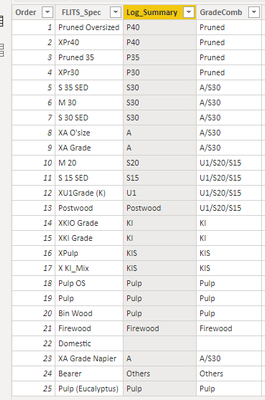
I have a table like this, where i have organised my FLITS_Spec by order.
So if i plot my FLITS_Spec on x axis and some other related volume on y axis it plots perfectly in that order i want (i.e. Pruned Oversized, XPr40, Pruned35....)
I am hoping to create a graph with Log_summary organised by the same order (i.ee. P40, P35, P30, S30....) but everytime i create a graph (x axis is Log_Summary, y axis is some related table in volume), the order would default back to alphabetical rather than by the custom order.
Question is do i have to create another table with no duplicates and link the 2, or is there a way to get around this without having another table?
Solved! Go to Solution.
Hi @Anonymous , not sure if am clear about what you are trying to do, but one way to do it, is to sort in Power Query, the way you would like to se it, and then add an index column. Then going back to Power BI, you can use the column sort by on the ribbon, and sort the log col by the index column.
Let me know if you have any questions.
If this solves your issues, please mark it as the solution, so that others can find it easily. Kudos 👍are nice too.
Nathaniel
Proud to be a Super User!
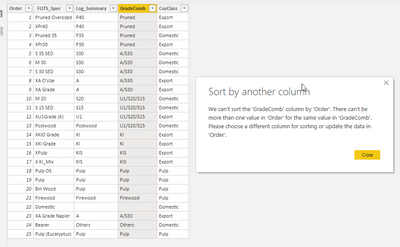
It has multiple orders for same GradeComb in the table, it's not possible to custom a sort order column to have the GradeComb column sorted by this numeric column.
In your case, like the previous commenter said, you cannot use the same sort order field as for the initial field (since values likely aren't distinct). However, that doesn't need to stop you from creating a new sorting field!
For example, create a table that looks like:
GradeComb SortOrder
Purned 1
A/30 2
Pulp 3
Then, link this table to your existing table. Then, in the existing table, create a new field called "Sort Order for States" that is just =related(SortOrderTable[SortOrder]).
Then, that field becomes the one you can use to sort your groups using the "Sort by column" button in the modeling tab.
Hi @Anonymous , not sure if am clear about what you are trying to do, but one way to do it, is to sort in Power Query, the way you would like to se it, and then add an index column. Then going back to Power BI, you can use the column sort by on the ribbon, and sort the log col by the index column.
Let me know if you have any questions.
If this solves your issues, please mark it as the solution, so that others can find it easily. Kudos 👍are nice too.
Nathaniel
Proud to be a Super User!
Hi @Nathaniel_C , thanks for that - yep i do have an index column for the table (see the first column order). but it only works if i want to organise my second column (FLITS_Spec) and if i try to use the same index column for my third column (Log_summary) it tells me it can't sort.
i am guessing i can get around it by creating another table for Log_summary and unique index column but just wonder if i can get around this?
Check out the April 2026 Power BI update to learn about new features.
If you have recently started exploring Fabric, we'd love to hear how it's going. Your feedback can help with product improvements.
A new Power BI DataViz World Championship is coming this June! Don't miss out on submitting your entry.
| User | Count |
|---|---|
| 43 | |
| 35 | |
| 35 | |
| 21 | |
| 15 |
| User | Count |
|---|---|
| 63 | |
| 58 | |
| 28 | |
| 27 | |
| 25 |