cancel
Showing results for 
Search instead for 
Did you mean: 

Did you hear? There's a new SQL AI Developer certification (DP-800). Start preparing now and be one of the first to get certified. Register now

Reply
Anonymous
Not applicable

Column/linechart variance

Hey


Setup:

Compare revenue of several products. 

Column: Revenue, per year, multiple products

Line: Variance Y-t-Y


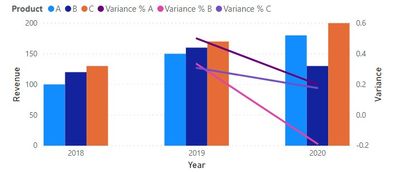
Now the problem is that I only get 1 line. If multiple objects selected, it just takes the total variance and not the individual variance per object. 

For example. 3 products, 3 years.

For each year, 3 columns, one per product. 3 lines throughout the chart for the variance. 


Thanks a lot! 

1 ACCEPTED SOLUTION
v-jingzhang
Community Support
Community Support

Hi @Anonymous 

In this case, you need to create individual measures for different products. For example:

Variance % A = 
VAR thisYear = SELECTEDVALUE('Table'[Year])
VAR thisYearRevenue = CALCULATE(SUM('Table'[Revenue]),ALLEXCEPT('Table','Table'[Year]),'Table'[Product]="A")
VAR lastYearRevenue = CALCULATE(SUM('Table'[Revenue]),ALL('Table'),'Table'[Year]=thisYear-1,'Table'[Product]="A")
RETURN
DIVIDE(thisYearRevenue-lastYearRevenue,lastYearRevenue)

Change the product name in the measure to create multiple measures for multiple lines in the chart. Here is a pbix file for reference.

021001.jpg


Regards,
Community Support Team _ Jing Zhang
If this post helps, please consider Accept it as the solution to help other members find it.

View solution in original post

3 REPLIES 3
v-jingzhang
Community Support
Community Support

Hi @Anonymous 

In this case, you need to create individual measures for different products. For example:

Variance % A = 
VAR thisYear = SELECTEDVALUE('Table'[Year])
VAR thisYearRevenue = CALCULATE(SUM('Table'[Revenue]),ALLEXCEPT('Table','Table'[Year]),'Table'[Product]="A")
VAR lastYearRevenue = CALCULATE(SUM('Table'[Revenue]),ALL('Table'),'Table'[Year]=thisYear-1,'Table'[Product]="A")
RETURN
DIVIDE(thisYearRevenue-lastYearRevenue,lastYearRevenue)

Change the product name in the measure to create multiple measures for multiple lines in the chart. Here is a pbix file for reference.

021001.jpg


Regards,
Community Support Team _ Jing Zhang
If this post helps, please consider Accept it as the solution to help other members find it.

Anonymous
Not applicable

Thanks ! 

parry2k
Super User
Super User

@Anonymous Read this post to get your answer quickly.

https://community.powerbi.com/t5/Community-Blog/How-to-Get-Your-Question-Answered-Quickly/ba-p/38490


Subscribe to the @PowerBIHowTo YT channel for an upcoming video on List and Record functions in Power Query!!

Learn Power BI and Fabric - subscribe to our YT channel - Click here: @PowerBIHowTo

If my solution proved useful, I'd be delighted to receive Kudos. When you put effort into asking a question, it's equally thoughtful to acknowledge and give Kudos to the individual who helped you solve the problem. It's a small gesture that shows appreciation and encouragement! ❤


Did I answer your question? Mark my post as a solution. Proud to be a Super User! Appreciate your Kudos 🙂
Feel free to email me with any of your BI needs.

Helpful resources

Announcements
April Power BI Update Carousel

Power BI Monthly Update - April 2026

Check out the April 2026 Power BI update to learn about new features.

Fabric SQL PBI Data Days

Data Days 2026 coming soon!

Sign up to receive a private message when registration opens and key events begin.

New to Fabric survey Carousel

New to Fabric Survey

If you have recently started exploring Fabric, we'd love to hear how it's going. Your feedback can help with product improvements.

Power BI DataViz World Championships carousel

Power BI DataViz World Championships - June 2026

A new Power BI DataViz World Championship is coming this June! Don't miss out on submitting your entry.