Join us in Barcelona for FabCon and SQLCon, September 28 - October 1, 2026.
This is best Fabric, Power BI, SQL and AI community event. How do we know? The last event sold out! Save €200 with code FABCMTY200.
Register now- Power BI forums
- Get Help with Power BI
- Desktop
- Service
- Report Server
- Power Query
- Mobile Apps
- Developer
- DAX Commands and Tips
- Custom Visuals Development Discussion
- Health and Life Sciences
- Power BI Spanish forums
- Translated Spanish Desktop
- Training and Consulting
- Instructor Led Training
- Dashboard in a Day for Women, by Women
- Galleries
- Data Stories Gallery
- Themes Gallery
- Contests Gallery
- QuickViz Gallery
- Quick Measures Gallery
- Visual Calculations Gallery
- Fabric Apps Gallery
- Notebook Gallery
- Translytical Task Flow Gallery
- TMDL Gallery
- R Script Showcase
- Webinars and Video Gallery
- Ideas
- Custom Visuals Ideas (read-only)
- Issues
- Issues
- Events
- Upcoming Events
The Fabric community is upgrading! Read all of the details including the timeline and what you can expect. Learn more
- Power BI forums
- Forums
- Get Help with Power BI
- Desktop
- Re: Column + line chart
- Subscribe to RSS Feed
- Mark Topic as New
- Mark Topic as Read
- Float this Topic for Current User
- Bookmark
- Subscribe
- Printer Friendly Page

- Mark as New
- Bookmark
- Subscribe
- Mute
- Subscribe to RSS Feed
- Permalink
- Report Inappropriate Content
Column + line chart
Hello,
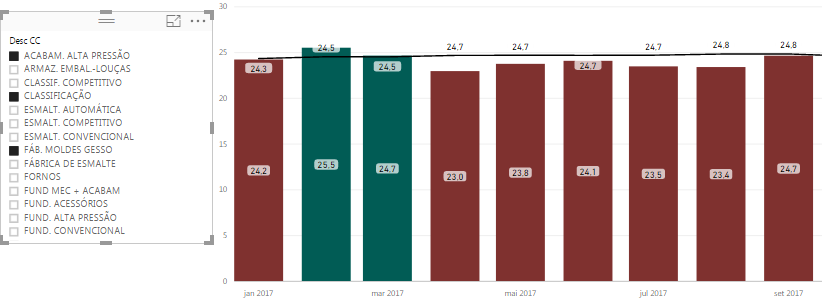
I have a chart with Columns (Month results) + lines (month goals).
Someone knows how to put a color conditional for de columns when its up or down the goal line? Like, green for values upper than goals, and red for down?

Solved! Go to Solution.
- Mark as New
- Bookmark
- Subscribe
- Mute
- Subscribe to RSS Feed
- Permalink
- Report Inappropriate Content
Problem solved!
Just for information, I created 2 new measures, conditioned (Productive good = IF([Productive3]>[Goal3];[Produtictive3];0) and (Productive bad = IF([Productive3]<[Goal3];[Produtictive3];0).
Ps: Indicators MUST be in Measures with Sum function
Ex. [Productive3] = DIVIDE ([Production3];[Worked hours3];0)]
[Production 3] = SUM (Plan1[Production]);
[Worked hours3] = SUM (Plan1[Worked hours])
[Goal3] = SUM (Plan1[Goal])
- Mark as New
- Bookmark
- Subscribe
- Mute
- Subscribe to RSS Feed
- Permalink
- Report Inappropriate Content
Problem solved!
Just for information, I created 2 new measures, conditioned (Productive good = IF([Productive3]>[Goal3];[Produtictive3];0) and (Productive bad = IF([Productive3]<[Goal3];[Produtictive3];0).
Ps: Indicators MUST be in Measures with Sum function
Ex. [Productive3] = DIVIDE ([Production3];[Worked hours3];0)]
[Production 3] = SUM (Plan1[Production]);
[Worked hours3] = SUM (Plan1[Worked hours])
[Goal3] = SUM (Plan1[Goal])
- Mark as New
- Bookmark
- Subscribe
- Mute
- Subscribe to RSS Feed
- Permalink
- Report Inappropriate Content
i have that same issue. I couldn't understand how did you solve that. Could you please share pbix if you have ? or tell again ?
Thanks.
- Mark as New
- Bookmark
- Subscribe
- Mute
- Subscribe to RSS Feed
- Permalink
- Report Inappropriate Content
I just created 2 new measures. The first is for the results bigger than goal, and the second is for results smaller than goal.
So, instead of plot the result measure, plot the 2 new measures and the goal, and define a color for each measures (in my case, green for good and red for bad).
- Mark as New
- Bookmark
- Subscribe
- Mute
- Subscribe to RSS Feed
- Permalink
- Report Inappropriate Content
Thank you so much. i got it !

- Mark as New
- Bookmark
- Subscribe
- Mute
- Subscribe to RSS Feed
- Permalink
- Report Inappropriate Content
I did it and it works but it shows like this:
How can I make the chart show only a single bar, the one with actual values?
- Mark as New
- Bookmark
- Subscribe
- Mute
- Subscribe to RSS Feed
- Permalink
- Report Inappropriate Content
Hello Lucas,
probably is the type of chart that you choose.
Look like you selected Line and clustered column chart, when I choose Line and Stacked Column chart.
- Mark as New
- Bookmark
- Subscribe
- Mute
- Subscribe to RSS Feed
- Permalink
- Report Inappropriate Content
Thank you! You were right!
- Mark as New
- Bookmark
- Subscribe
- Mute
- Subscribe to RSS Feed
- Permalink
- Report Inappropriate Content
I did it and it works but it shows like this:
How can I make the chart show only a single bar, the one with actual values?


- Mark as New
- Bookmark
- Subscribe
- Mute
- Subscribe to RSS Feed
- Permalink
- Report Inappropriate Content
First thing is , is your goal line fixed..?
If yes, use the same column Productive... and put it in the colorSaturation field and go to data color section. Select the diverging option and put the center value as you goal line value.
Hope this solves your problem.
- Mark as New
- Bookmark
- Subscribe
- Mute
- Subscribe to RSS Feed
- Permalink
- Report Inappropriate Content
Unfortunately my goal line isn't fixed...
And in the Column + line chart option there is no ColorSaturation option =/
- Mark as New
- Bookmark
- Subscribe
- Mute
- Subscribe to RSS Feed
- Permalink
- Report Inappropriate Content
Hello,
Well I have a Collum (month values) + Line (month goals) chart.
Someone knows how to put a conditional to change the collor of the columns of my chart, if it up (green) or down (red) the line?
Thx.

Helpful resources

FabCon & SQLCon – Barcelona 2026
Join us in Barcelona for FabCon and SQLCon, the Fabric, Power BI, SQL, and AI community event. Save €200 with code FABCMTY200.

Power BI DataViz World Championships - June 2026
A new Power BI DataViz World Championship is coming this June! Don't miss out on submitting your entry.

| User | Count |
|---|---|
| 27 | |
| 22 | |
| 20 | |
| 18 | |
| 14 |


| User | Count |
|---|---|
| 25 | |
| 20 | |
| 20 | |
| 20 | |
| 20 |


