Join us in Barcelona for FabCon and SQLCon, September 28 - October 1, 2026.
This is best Fabric, Power BI, SQL and AI community event. How do we know? The last event sold out! Save €200 with code FABCMTY200.
Register now- Power BI forums
- Get Help with Power BI
- Desktop
- Service
- Report Server
- Power Query
- Mobile Apps
- Developer
- DAX Commands and Tips
- Custom Visuals Development Discussion
- Health and Life Sciences
- Power BI Spanish forums
- Translated Spanish Desktop
- Training and Consulting
- Instructor Led Training
- Dashboard in a Day for Women, by Women
- Galleries
- Data Stories Gallery
- Themes Gallery
- Contests Gallery
- QuickViz Gallery
- Quick Measures Gallery
- Visual Calculations Gallery
- Fabric Apps Gallery
- Notebook Gallery
- Translytical Task Flow Gallery
- TMDL Gallery
- R Script Showcase
- Webinars and Video Gallery
- Ideas
- Custom Visuals Ideas (read-only)
- Issues
- Issues
- Events
- Upcoming Events
The Fabric community is now in read-only for platform upgrade. Learn more
- Power BI forums
- Forums
- Get Help with Power BI
- Desktop
- Re: Column comparison
- Subscribe to RSS Feed
- Mark Topic as New
- Mark Topic as Read
- Float this Topic for Current User
- Bookmark
- Subscribe
- Printer Friendly Page

- Mark as New
- Bookmark
- Subscribe
- Mute
- Subscribe to RSS Feed
- Permalink
Column comparison
Hi everybody,
i'm completely unfamiliar with PowerBI and just started using ist two days ago. I am getting a list of product names every month. That list is constantly growing and already to big to open it in Excel. I tried to open it with Notepad ++ and split it into different sheets but that doesn't work, either...
What I want to do is, upload the lists that come in every month and compare it to one from the month before and see which names are still in the list and which ones disappeared. Is that possible? I tried to do it with a Related function and joins, but it won't work out...
Can anyone help me out?
Solved! Go to Solution.



- Mark as New
- Bookmark
- Subscribe
- Mute
- Subscribe to RSS Feed
- Permalink
You should be able to do this in M code, just a simple join (Merge) query.
Follow on LinkedIn
@ me in replies or I'll lose your thread!!!
Instead of a Kudo, please vote for this idea
Become an expert!: Enterprise DNA
External Tools: MSHGQM
YouTube Channel!: Microsoft Hates Greg
Latest book!: DAX For Humans
DAX is easy, CALCULATE makes DAX hard...
- Mark as New
- Bookmark
- Subscribe
- Mute
- Subscribe to RSS Feed
- Permalink
How and where can I do that exactly? I was able to join the two tables, but the result was incorrect
- Mark as New
- Bookmark
- Subscribe
- Mute
- Subscribe to RSS Feed
- Permalink
You could use Merge queries feature.
Sample data:
Product name for Jan
| Product Name |
|---|
| A |
| B |
| C |
| D |
| E |
| F |
| G |
| H |
| I |
| J |
| K |
| L |
Product name for Feb
| Product Name |
|---|
| B |
| D |
| E |
| F |
| G |
| Y |
| I |
| J |
| K |
| M |
Edit query>Merge queries
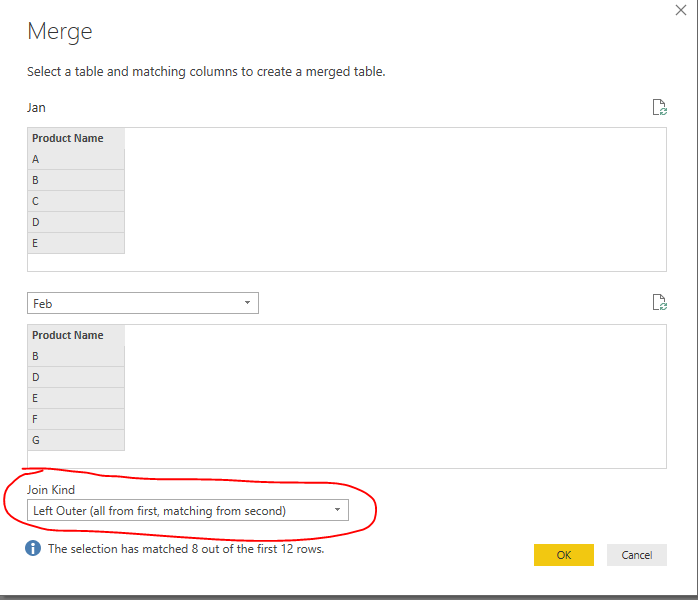
Results
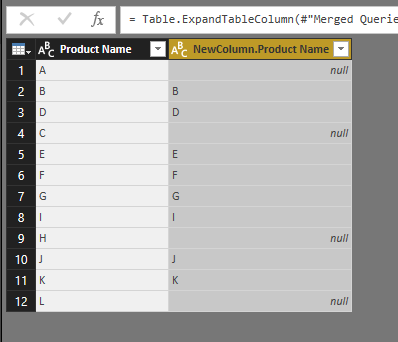
For the null row which indicates the product names disappear, for the rows that have values, it indicates the product names are still in the list.
Reference
https://powerbi.microsoft.com/en-us/documentation/powerbi-desktop-shape-and-combine-data/
Regards,
Charlie Liao
- Mark as New
- Bookmark
- Subscribe
- Mute
- Subscribe to RSS Feed
- Permalink
Hey Charlie,
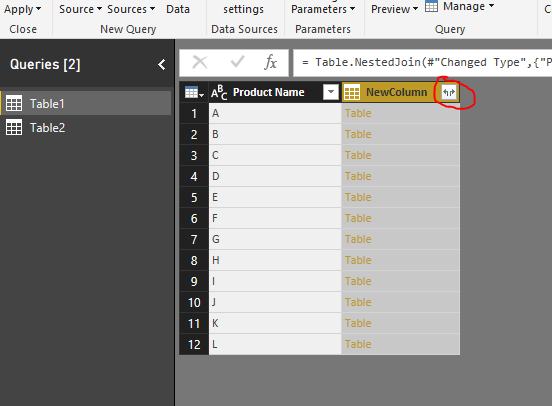
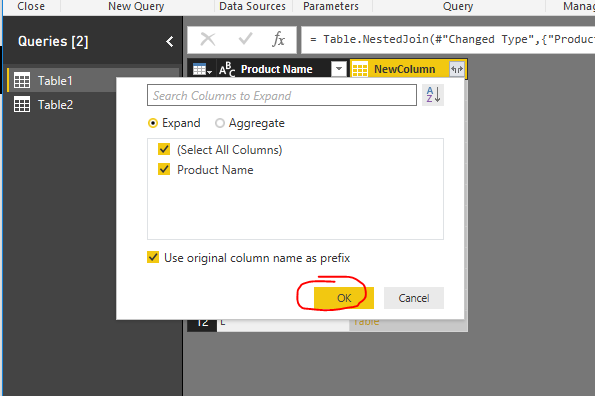
thank you so much for your reply! I tried to put whatever comes out of the in a new table with merge as new query (My PowerBi is in German, not sure whether translation is correct) because when I just tried to merge the queries this appeared:

This is the code that is displayed: = Table.NestedJoin(#"March",{"Names"},#"April",{"Names"},"NewColumn",JoinKind.LeftOuter)
So I don't really understand why PowerBi is just adding a new column? And there is only the expression "Table" in it?
When i put it in a new empty query it worked better, but now of course I can't really see the names that disappeared, but only the names that matched in both columns...
= Table.NestedJoin(#"March",{"Names"},#"April",{"Names"},"NewColumn.1",JoinKind.LeftOuter)
- Mark as New
- Bookmark
- Subscribe
- Mute
- Subscribe to RSS Feed
- Permalink
That was exactly, what I was looking for! Thank you so much

Helpful resources

FabCon & SQLCon – Barcelona 2026
Join us in Barcelona for FabCon and SQLCon, the Fabric, Power BI, SQL, and AI community event. Save €200 with code FABCMTY200.

Power BI DataViz World Championships - June 2026
A new Power BI DataViz World Championship is coming this June! Don't miss out on submitting your entry.

| User | Count |
|---|---|
| 23 | |
| 22 | |
| 14 | |
| 14 | |
| 13 |


| User | Count |
|---|---|
| 47 | |
| 39 | |
| 24 | |
| 20 | |
| 20 |


