Join us at FabCon Atlanta from March 16 - 20, 2026, for the ultimate Fabric, Power BI, AI and SQL community-led event. Save $200 with code FABCOMM.
Register now!Vote for your favorite vizzies from the Power BI Dataviz World Championship submissions. Vote now!
Hi All,
I have a column chart visual in which I want to show all the data points without the need to scroll. Is that possible?
Please see the attached screenshot for detail.
Thank you.
Solved! Go to Solution.
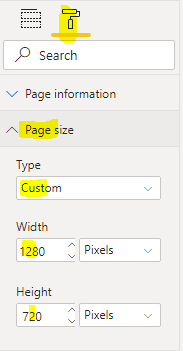
Your only option is to either reduce the column size and padding, or increase the size of the report canvas.
Br,
J
@Anonymous , You can reduce the width of the bar.
You can put the top N filter and reduce the no of data points
or try pagination like
https://www.fourmoo.com/2017/10/31/power-bi-how-to-do-pagination-in-power-bi-reports/
@Anonymous , You can reduce the width of the bar.
You can put the top N filter and reduce the no of data points
or try pagination like
https://www.fourmoo.com/2017/10/31/power-bi-how-to-do-pagination-in-power-bi-reports/
Your only option is to either reduce the column size and padding, or increase the size of the report canvas.
Br,
J
Vote for your favorite vizzies from the Power BI World Championship submissions!
If you love stickers, then you will definitely want to check out our Community Sticker Challenge!
Check out the January 2026 Power BI update to learn about new features.
| User | Count |
|---|---|
| 56 | |
| 53 | |
| 40 | |
| 17 | |
| 16 |
| User | Count |
|---|---|
| 122 | |
| 108 | |
| 44 | |
| 32 | |
| 26 |