Don't miss your chance to take the Fabric Data Engineer (DP-600) exam for FREE! Find out how by attending the DP-600 session on April 23rd (pacific time), live or on-demand.
Learn moreNext up in the FabCon + SQLCon recap series: The roadmap for Microsoft SQL and Maximizing Developer experiences in Fabric. All sessions are available on-demand after the live show. Register now
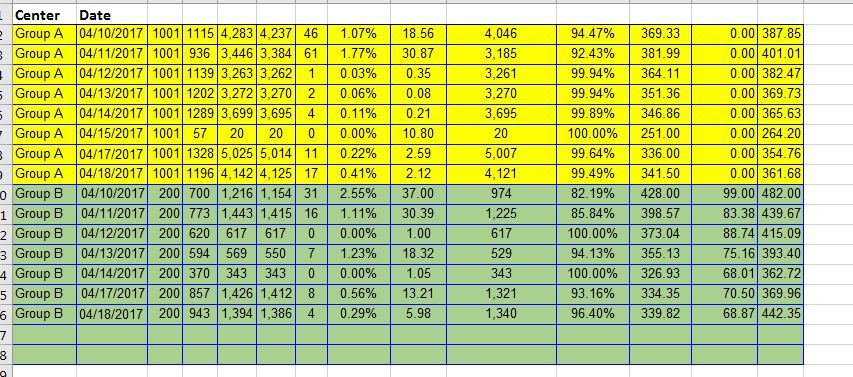
I'm putting together a dashboard for call center data where the centers in question are not open on Sundays. I've imported the data from a spreadsheet where there isn't a row for Sundays (picture attached). In Excel, the bar charts just don't include dates that aren't there. In PowerBI, the visualizations are automatically adding in a column for the dates not present with a blank/0 value. In the attached images, the date being added is Sunday Apr 16.
I've made sure that "Show items with no data" is not checked. I've tried to set various filters to only show data where the value is greater than 0, or is not blank/empty. Nothing seems to work to remove those columns.
Solved! Go to Solution.
Please go to Format pane - X-Axis - Type, change from Continuous to Categorical.
Best Regards,
Herbert
Please go to Format pane - X-Axis - Type, change from Continuous to Categorical.
Best Regards,
Herbert
If you have recently started exploring Fabric, we'd love to hear how it's going. Your feedback can help with product improvements.
A new Power BI DataViz World Championship is coming this June! Don't miss out on submitting your entry.
Share feedback directly with Fabric product managers, participate in targeted research studies and influence the Fabric roadmap.
| User | Count |
|---|---|
| 48 | |
| 45 | |
| 41 | |
| 20 | |
| 17 |
| User | Count |
|---|---|
| 69 | |
| 63 | |
| 32 | |
| 31 | |
| 23 |