cancel
Showing results for 
Search instead for 
Did you mean: 

The Power BI Data Visualization World Championships is back! Get ahead of the game and start preparing now! Learn more

Reply
jtmag1
New Member

Column chart adding dates not present in data

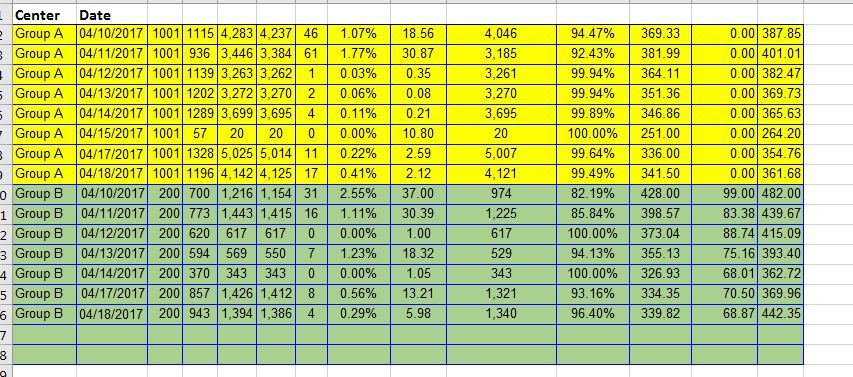
I'm putting together a dashboard for call center data where the centers in question are not open on Sundays.  I've imported the data from a spreadsheet where there isn't a row for Sundays (picture attached).  In Excel, the bar charts just don't include dates that aren't there.  In PowerBI, the visualizations are automatically adding in a column for the dates not present with a blank/0 value.  In the attached images, the date being added is Sunday Apr 16.  


I've made sure that "Show items with no data" is not checked.  I've tried to set various filters to only show data where the value is greater than 0, or is not blank/empty.  Nothing seems to work to remove those columns.


PowerBIexample.JPGPowerBIexample2.JPG

1 ACCEPTED SOLUTION
v-haibl-msft
Microsoft Employee
Microsoft Employee

@jtmag1


Please go to Format pane - X-Axis - Type, change from Continuous to Categorical.


Best Regards,
Herbert

View solution in original post

2 REPLIES 2
v-haibl-msft
Microsoft Employee
Microsoft Employee

@jtmag1


Please go to Format pane - X-Axis - Type, change from Continuous to Categorical.


Best Regards,
Herbert

Thank you very much @v-haibl-msft.  Problem solved.

Helpful resources

Announcements
Power BI DataViz World Championships

Power BI Dataviz World Championships

The Power BI Data Visualization World Championships is back! Get ahead of the game and start preparing now!

December 2025 Power BI Update Carousel

Power BI Monthly Update - December 2025

Check out the December 2025 Power BI Holiday Recap!

FabCon Atlanta 2026 carousel

FabCon Atlanta 2026

Join us at FabCon Atlanta, March 16-20, for the ultimate Fabric, Power BI, AI and SQL community-led event. Save $200 with code FABCOMM.