Don't miss your chance to take the Fabric Data Engineer (DP-700) exam on us!
Learn moreNext up in the FabCon + SQLCon recap series: The roadmap for Microsoft SQL and Maximizing Developer experiences in Fabric. All sessions are available on-demand after the live show. Register now
Hi,
I want to update a column, in which i want to get updated column with these condition
| Row | User ID | Manager | Associate | Expected |
| 1 | a | Alpha | b | Beta |
| 2 | b | Beta | b | Beta |
| 3 | c | Charlie | c | Charlie |
| 4 | d | Alpha | d | Alpha |
| 5 | e | Alpha | f | Gamma |
| 6 | f | Gamma | f | Gamma |
| 7 | g | Xeta | g | Xeta |
| 8 | h | Beta | h | Beta |
| 9 | i | Gamma | x | |
| 10 | j | Charlie | y | |
| 11 | b | Alpha | b | Alpha |
a) in Row 1 and 5, user id and associate are different but in expected column it is showing the result of manager belongs to associate not user id.
b) in row 9 and 10, user id and associate are not matching. Where as the associate value are unique not belong to any of the manager so it should show as blank
c) in row 11, the user id and assciate are worked under two different manager but still it should show the value of respective manager value.
Sharing the output i am getting
| S. No | User ID | Manager | Associate | My Result |
1 | a | Alpha | b | Beta |
| 2 | b | Beta | b | Beta |
| 3 | c | Charlie | c | Charlie |
| 4 | d | Alpha | d | Alpha |
| 5 | e | Alpha | f | Gamma |
| 6 | f | Gamma | f | Gamma |
| 7 | g | Xeta | g | Xeta |
| 8 | h | Beta | h | Beta |
| 9 | i | Gamma | x | |
| 10 | j | Charlie | y | |
| 11 | b | Alpha | b | Beta |
I am using this condition
My Result= MAXX(FILTER(table,table[User ID]= EARLIER(table[Associate])),table[Manager])
but in my row 11 it is showing the value of Beta which i want to be Alpha. The User ID is common for two different manager but still its printing the value of first one.
Please share some input.
Thank You
Solved! Go to Solution.
Hi @Anya_T ,
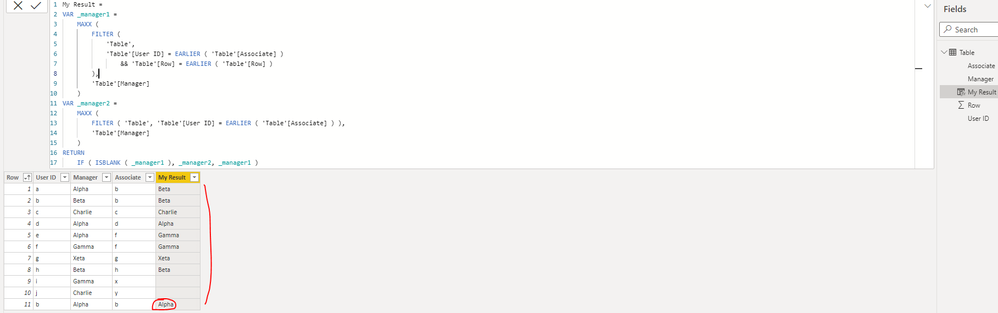
Please update the formula of your calculated column [My Result] as below(the part with red font is new added):
|
My Result =
VAR _manager1 =
MAXX (
FILTER (
'Table',
'Table'[User ID] = EARLIER ( 'Table'[Associate] )
&& 'Table'[Row] = EARLIER ( 'Table'[Row] )
),
'Table'[Manager]
)
VAR _manager2 =
MAXX (
FILTER ( 'Table', 'Table'[User ID] = EARLIER ( 'Table'[Associate] ) ),
'Table'[Manager]
)
RETURN
IF ( ISBLANK ( _manager1 ), _manager2, _manager1 )
|
Best Regards
Hi,
Is there any other way to do that?
Hi @Anya_T ,
Please update the formula of your calculated column [My Result] as below(the part with red font is new added):
|
My Result =
VAR _manager1 =
MAXX (
FILTER (
'Table',
'Table'[User ID] = EARLIER ( 'Table'[Associate] )
&& 'Table'[Row] = EARLIER ( 'Table'[Row] )
),
'Table'[Manager]
)
VAR _manager2 =
MAXX (
FILTER ( 'Table', 'Table'[User ID] = EARLIER ( 'Table'[Associate] ) ),
'Table'[Manager]
)
RETURN
IF ( ISBLANK ( _manager1 ), _manager2, _manager1 )
|
Best Regards
If you have recently started exploring Fabric, we'd love to hear how it's going. Your feedback can help with product improvements.
A new Power BI DataViz World Championship is coming this June! Don't miss out on submitting your entry.
Share feedback directly with Fabric product managers, participate in targeted research studies and influence the Fabric roadmap.
| User | Count |
|---|---|
| 53 | |
| 45 | |
| 44 | |
| 20 | |
| 19 |
| User | Count |
|---|---|
| 73 | |
| 71 | |
| 34 | |
| 33 | |
| 31 |