cancel
Showing results for 
Search instead for 
Did you mean: 

The Power BI Data Visualization World Championships is back! Get ahead of the game and start preparing now! Learn more

Reply
Anya_T
Frequent Visitor

Column Update

Hi,


I want to update a column, in which i want to get updated column with these condition

RowUser IDManagerAssociateExpected 
1aAlphabBeta
2bBetabBeta
3cCharliecCharlie
4dAlphadAlpha
5eAlphafGamma
6fGammafGamma
7gXetagXeta
8hBetahBeta
9iGammax 
10jCharliey 
11bAlphabAlpha

a) in Row 1 and 5, user id and associate are different but in expected column it is showing the result of manager belongs to associate not user id.

b) in row 9 and 10, user id and associate are not matching. Where as the associate value are unique not belong to any of the manager so it should show as blank

c) in row 11, the user id and assciate are worked under two different manager but still it should show the value of respective manager value.


Sharing the output i am getting

S. NoUser IDManagerAssociateMy Result

1

aAlphabBeta
2bBetabBeta
3cCharliecCharlie
4dAlphadAlpha
5eAlphafGamma
6fGammafGamma
7gXetagXeta
8hBetahBeta
9iGammax 
10jCharliey 
11bAlphabBeta

I am using this condition

My Result= MAXX(FILTER(table,table[User ID]= EARLIER(table[Associate])),table[Manager])


but in my row 11 it is showing the value of Beta which i want to be Alpha. The User ID is common for two different manager but still its printing the value of first one.


Please share some input.


Thank You


1 ACCEPTED SOLUTION
Anonymous
Not applicable

Hi @Anya_T ,

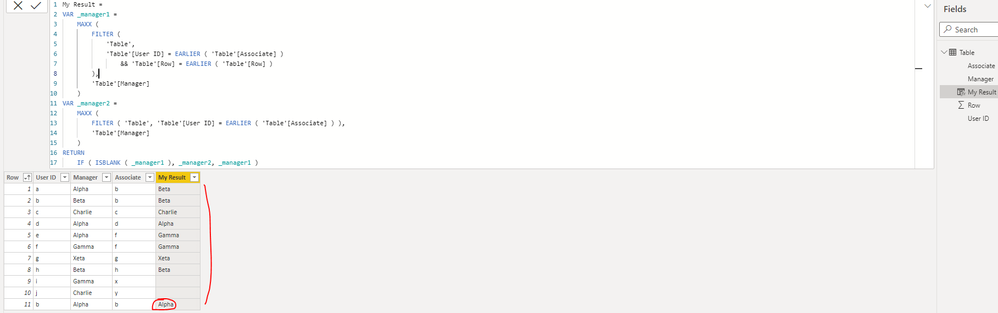
Please update the formula of your calculated column [My Result] as below(the part with red font is new added):

My Result =
VAR _manager1 =
MAXX (
FILTER (
'Table',
'Table'[User ID] = EARLIER ( 'Table'[Associate] )
&& 'Table'[Row] = EARLIER ( 'Table'[Row] )
),
'Table'[Manager]
)
VAR _manager2 =
MAXX (
FILTER ( 'Table', 'Table'[User ID] = EARLIER ( 'Table'[Associate] ) ),
'Table'[Manager]
)
RETURN
IF ( ISBLANK ( _manager1 ), _manager2, _manager1 )

yingyinr_1-1629710498921.png

Best Regards

View solution in original post

3 REPLIES 3
amitchandak
Super User
Super User

@Anya_T , As per data user Id of 11 is b and Beta is max for that, That is why it showing beta

Share with Power BI Enthusiasts: Full Power BI Video (20 Hours) YouTube
Microsoft Fabric Series 60+ Videos YouTube
Microsoft Fabric Hindi End to End YouTube

Hi,


Is there any other way to do that?

Anonymous
Not applicable

Hi @Anya_T ,

Please update the formula of your calculated column [My Result] as below(the part with red font is new added):

My Result =
VAR _manager1 =
MAXX (
FILTER (
'Table',
'Table'[User ID] = EARLIER ( 'Table'[Associate] )
&& 'Table'[Row] = EARLIER ( 'Table'[Row] )
),
'Table'[Manager]
)
VAR _manager2 =
MAXX (
FILTER ( 'Table', 'Table'[User ID] = EARLIER ( 'Table'[Associate] ) ),
'Table'[Manager]
)
RETURN
IF ( ISBLANK ( _manager1 ), _manager2, _manager1 )

yingyinr_1-1629710498921.png

Best Regards

Helpful resources

Announcements
Power BI DataViz World Championships

Power BI Dataviz World Championships

The Power BI Data Visualization World Championships is back! Get ahead of the game and start preparing now!

December 2025 Power BI Update Carousel

Power BI Monthly Update - December 2025

Check out the December 2025 Power BI Holiday Recap!

FabCon Atlanta 2026 carousel

FabCon Atlanta 2026

Join us at FabCon Atlanta, March 16-20, for the ultimate Fabric, Power BI, AI and SQL community-led event. Save $200 with code FABCOMM.