cancel
Showing results for 
Search instead for 
Did you mean: 

Did you hear? There's a new SQL AI Developer certification (DP-800). Start preparing now and be one of the first to get certified. Register now

Reply
hackfifi
Helper V
Helper V

% Column Total - Measure

Hello - I am trying to replicate the "show value as....Percent of Column Total" as a "MEASURE". 

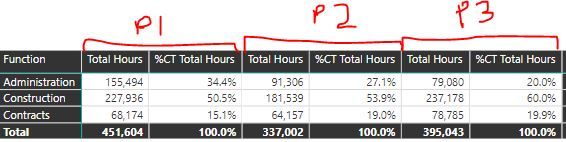
The measure should NOT change based on FILTERS i.e. for example in Project P1, "Administration" function should be 34.4% even if the function filter deselects "Construction" & "Contracts"

I need the measure to be able to plot this on a graph, hence the "show value as....Percent of Column Total" is not helpful when the data is filtered.


I have used the below measure, with no luck:

ProjectHrs = sum(Data[Total Hours])
AllProjectTotalHrs = CALCULATE(sum(Data[Total Hours]),ALL(Data[Project]))

% Function = DIVIDE([ProjectHrs],[AllProjectTotalHrs])


% Column Measure.JPG


Data Table:


FUNCTIONP1 P2P3
 Administration                        155,494                          91,306           79,080
 Construction                        227,936                        181,539         237,178
 Contracts                          68,174                          64,157           78,785

Any advise is much appreciated.

1 ACCEPTED SOLUTION
AlB
Community Champion
Community Champion

Hello @hackfifi

Maybe

AllProjectTotalHrs = CALCULATE(sum(Data[Total Hours]),ALL(Data[FUNCTION]) )

Please mark the resolved question when you are finished and consider giving a thumbs up if the posts are useful.

Contact me privately for assistance with any large-scale BI needs, tutoring, etc.

Bless you

SU18_powerbi_badge

View solution in original post

1 REPLY 1
AlB
Community Champion
Community Champion

Hello @hackfifi

Maybe

AllProjectTotalHrs = CALCULATE(sum(Data[Total Hours]),ALL(Data[FUNCTION]) )

Please mark the resolved question when you are finished and consider giving a thumbs up if the posts are useful.

Contact me privately for assistance with any large-scale BI needs, tutoring, etc.

Bless you

SU18_powerbi_badge

Helpful resources

Announcements
April Power BI Update Carousel

Power BI Monthly Update - April 2026

Check out the April 2026 Power BI update to learn about new features.

Fabric SQL PBI Data Days

Data Days 2026 coming soon!

Sign up to receive a private message when registration opens and key events begin.

New to Fabric survey Carousel

New to Fabric Survey

If you have recently started exploring Fabric, we'd love to hear how it's going. Your feedback can help with product improvements.

Power BI DataViz World Championships carousel

Power BI DataViz World Championships - June 2026

A new Power BI DataViz World Championship is coming this June! Don't miss out on submitting your entry.