cancel
Showing results for 
Search instead for 
Did you mean: 

July 7 - July 17 | Round 2 of the Power BI Dataviz World Championships. Don't miss your chance! Learn more

Reply
Anonymous
Not applicable

Color picker

Hi there!

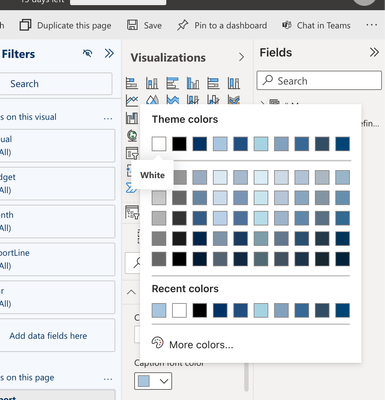
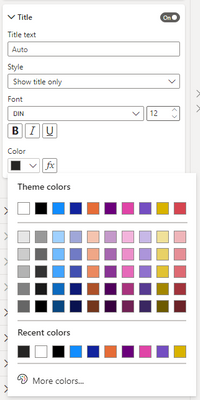
I'm creating my own visuals and couldn't find the right place in the documentation how to add 'revert to default' button to the color picker in capabilities.json file. On figure 1 we have this button, I would like to have the same button in the color picker on figure 2

Screenshot 2022-04-04 at 14.43.04.pngScreenshot 2022-04-04 at 14.44.12.png


@dm-p Could you help me with it? Or any idea? 🙏🙏

Regards

1 ACCEPTED SOLUTION
dm-p
Super User
Super User

Hi @Anonymous,

There are no capabilities for this I believe it's a (somewhat irritating) regression in the colour picker from before it got overhauled in core Power BI (early last year IRRC) - it always used to have a 'reset to default' and now it only seems to be present in the conditional formatting dialog. This can be confirmed by checking any of the core visual colour properties, e.g., from the core line chart:

dmp_0-1649107738560.png

There is an idea for MS to add it back here.

Regards,

Daniel


Did I answer your question? Mark my post as a solution!

Proud to be a Super User!


On how to ask a technical question, if you really want an answer (courtesy of SQLBI)


View solution in original post

3 REPLIES 3
VFXPro
Advocate II
Advocate II

This is so stupid... there is no way to revert back to "blank/null" once you picked a color.

dm-p
Super User
Super User

Hi @Anonymous,

There are no capabilities for this I believe it's a (somewhat irritating) regression in the colour picker from before it got overhauled in core Power BI (early last year IRRC) - it always used to have a 'reset to default' and now it only seems to be present in the conditional formatting dialog. This can be confirmed by checking any of the core visual colour properties, e.g., from the core line chart:

dmp_0-1649107738560.png

There is an idea for MS to add it back here.

Regards,

Daniel


Did I answer your question? Mark my post as a solution!

Proud to be a Super User!


On how to ask a technical question, if you really want an answer (courtesy of SQLBI)


Anonymous
Not applicable

Thanks, Daniel for replying to me

Helpful resources

Announcements
FabCon and SQLCon Barcelona 2026

FabCon & SQLCon – Barcelona 2026

Join us in Barcelona for FabCon and SQLCon, the Fabric, Power BI, SQL, and AI community event. Save €200 with code FABCMTY200.

60 days of Data Days Carousel

Data Days 2026

Join Fabric Data Days 2026: 60 days of free live/on-demand sessions, challenges, study groups, and certification opportunities.

Power BI DataViz World Championships carousel

Power BI DataViz World Championships - June 2026

A new Power BI DataViz World Championship is coming this June! Don't miss out on submitting your entry.