Get certified for free when you join Fabric Data Days 2026 and dive into Fabric, Power BI, SQL, AI, and other essential data skills.
Join nowData Days is here! Join us now for 60+ days of learning, challenges, and connection. Learn more
Hi Team,
Anyone having the idea how to achieve the below scenario .
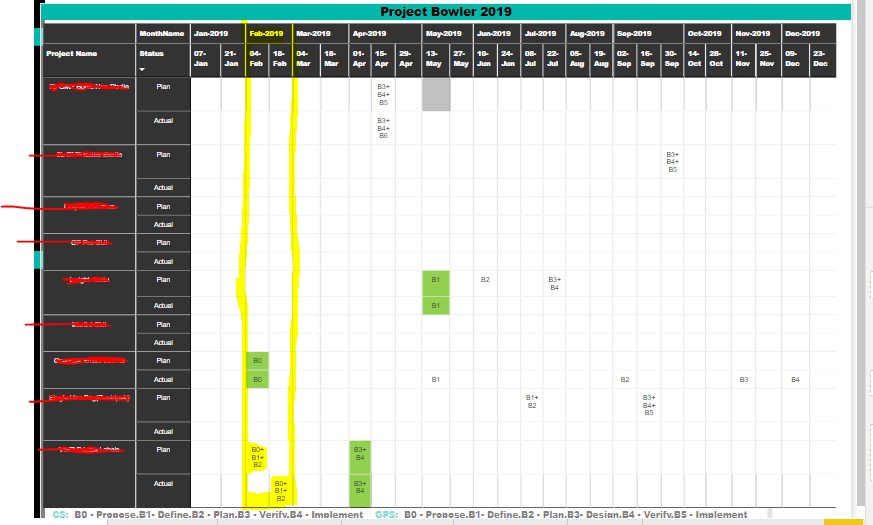
Currently I am creating the 3 measures for giving color(Green) condition based on Measure(Actual vs Plan) value. It is working as expected at date level but our client requirement is when ever month level if is equal then we have to show the Green color. Please find below highlighted area Feb month level both actual and plan
both are same.
Actual = CALCULATE(SELECTEDVALUE('Sheet1'[Value]),'Sheet1'[Status]="Actual")
Plan = CALCULATE(SELECTEDVALUE('Sheet1'[Value]),'Sheet1'[Status]="Plan")
Actual Vs Plan = IF([Actual] =""|| [Plan]="",2,IF([Actual]=[Plan],1,0))
So you're saying that the entire month of Feb should be highlighted yellow because every project's Plan is the same as it's actual within the month? Or just the bottom two cells? How is all this data stored in tables?
If you could anonymize your data and share the .pbix, it would greatly help us determine the best way to accomplish your goal. Even just relevant dummy data in the same model as yours would be very helpful in getting towards a result.
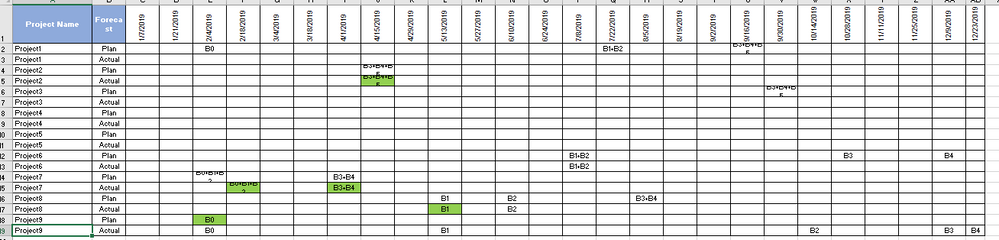
Hi Cmcmahan, Yes you are correct with in same if it is equal then we need to show Green color. Do u have any idea how to attach the pbix file and excle file here. For time being find below screen shot of excel data. Using below data i have unpivot the data and prepared the eariler screen shot reprot.
Hi everyone ,
if Anyone having the idea about this scenario please share your thoughts.
Don't miss out on Data Days, June 15 through August 7. Learn Fabric, Power BI, SQL, AI and more.
Check out the May 2026 Power BI update to learn about new features.
| User | Count |
|---|---|
| 23 | |
| 21 | |
| 20 | |
| 18 | |
| 13 |
| User | Count |
|---|---|
| 58 | |
| 50 | |
| 38 | |
| 31 | |
| 27 |