cancel
Showing results for 
Search instead for 
Did you mean: 

July 7 - July 17 | Round 2 of the Power BI Dataviz World Championships. Don't miss your chance! Learn more

Reply
Anonymous
Not applicable

Color/circle setting in MapBox

Hello.

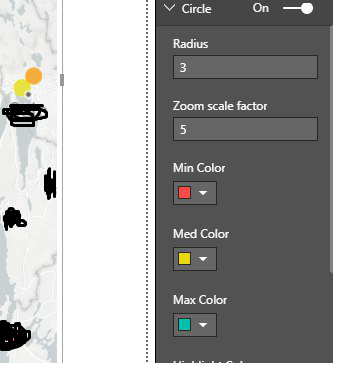
I'm working with the mapbox visualization. The case is such that I have chosen three colors (screenshot attached). This color shows how much a item is filled. Represents the fill rate of an object.

Green color = Lots of space
Yellow color = Half full
Red color = Soon full

map box.png

The problem is that I will only show these three colors, but the scaling will not be correct. As you can see on the screenshot attached, the scaling changes colors when it approaches one of the selected colors. Such as orange in this case. I only want to show the selected three colors? How can this be achived?
Thank you in advance.

1 ACCEPTED SOLUTION
v-jiascu-msft
Microsoft Employee
Microsoft Employee

Hi @Anonymous,


There could be more than three values. How can the MapBox know which is small, which is big? Since you just need three colors, we can group the values like below. 

Measure 12 =
VAR total =
    SUM ( Table34[Index] )
RETURN
    IF ( total < 30, 1, IF ( total < 90, 2, 3 ) ) // adjust the values to your needs.

Color_circle_setting_in_Map_Box


Best Regards,

Dale

Community Support Team _ Dale
If this post helps, then please consider Accept it as the solution to help the other members find it more quickly.

View solution in original post

2 REPLIES 2
v-jiascu-msft
Microsoft Employee
Microsoft Employee

Hi @Anonymous,


There could be more than three values. How can the MapBox know which is small, which is big? Since you just need three colors, we can group the values like below. 

Measure 12 =
VAR total =
    SUM ( Table34[Index] )
RETURN
    IF ( total < 30, 1, IF ( total < 90, 2, 3 ) ) // adjust the values to your needs.

Color_circle_setting_in_Map_Box


Best Regards,

Dale

Community Support Team _ Dale
If this post helps, then please consider Accept it as the solution to help the other members find it more quickly.
Anonymous
Not applicable

Thanx alot for ur help! Works perfectly. 

Cheers Mate

Helpful resources

Announcements
FabCon and SQLCon Barcelona 2026

FabCon & SQLCon – Barcelona 2026

Join us in Barcelona for FabCon and SQLCon, the Fabric, Power BI, SQL, and AI community event. Save €200 with code FABCMTY200.

60 days of Data Days Carousel

Data Days 2026

Join Fabric Data Days 2026: 60 days of free live/on-demand sessions, challenges, study groups, and certification opportunities.

Power BI DataViz World Championships carousel

Power BI DataViz World Championships - June 2026

A new Power BI DataViz World Championship is coming this June! Don't miss out on submitting your entry.