Join us at FabCon Atlanta from March 16 - 20, 2026, for the ultimate Fabric, Power BI, AI and SQL community-led event. Save $200 with code FABCOMM.
Register now!The Power BI Data Visualization World Championships is back! Get ahead of the game and start preparing now! Learn more
Hello.
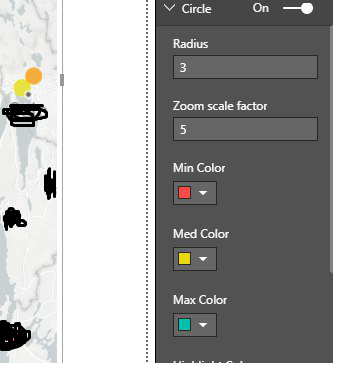
I'm working with the mapbox visualization. The case is such that I have chosen three colors (screenshot attached). This color shows how much a item is filled. Represents the fill rate of an object.
Green color = Lots of space
Yellow color = Half full
Red color = Soon full
The problem is that I will only show these three colors, but the scaling will not be correct. As you can see on the screenshot attached, the scaling changes colors when it approaches one of the selected colors. Such as orange in this case. I only want to show the selected three colors? How can this be achived?
Thank you in advance.
Solved! Go to Solution.
Hi @Anonymous,
There could be more than three values. How can the MapBox know which is small, which is big? Since you just need three colors, we can group the values like below.
Measure 12 =
VAR total =
SUM ( Table34[Index] )
RETURN
IF ( total < 30, 1, IF ( total < 90, 2, 3 ) ) // adjust the values to your needs.
Best Regards,
Dale
Hi @Anonymous,
There could be more than three values. How can the MapBox know which is small, which is big? Since you just need three colors, we can group the values like below.
Measure 12 =
VAR total =
SUM ( Table34[Index] )
RETURN
IF ( total < 30, 1, IF ( total < 90, 2, 3 ) ) // adjust the values to your needs.
Best Regards,
Dale
Thanx alot for ur help! Works perfectly.
Cheers Mate
The Power BI Data Visualization World Championships is back! Get ahead of the game and start preparing now!
| User | Count |
|---|---|
| 41 | |
| 38 | |
| 36 | |
| 31 | |
| 28 |
| User | Count |
|---|---|
| 128 | |
| 88 | |
| 79 | |
| 68 | |
| 63 |