This time we’re going bigger than ever. Fabric, Power BI, SQL, AI and more. We're covering it all. You won't want to miss it.
Learn moreDid you hear? There's a new SQL AI Developer certification (DP-800). Start preparing now and be one of the first to get certified. Register now
Hi,
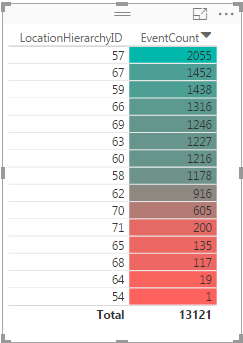
I am trying to create a table like this:
But when I create a table, I can't seem to get the color to show based on the value. Basically I want the same thing which goes from 0-100 and red to green. I couldn't find any thresholds where I can set colors or anything in the table visual.
Does anyone know how to achieve this?
Thanks!
Solved! Go to Solution.
That screnshot has actually been taken from Power BI, and I figured out how to do it. It's called 'conditional formatting' and can be found in the drop down menu for 'fields'
I have also look´t on this and what I have seen,
you can not get that in Power BI yet, like you have in Ecxel,
but what I read it will come sone,
I hope:-)
You have a Visiual that can get you a card with color "Card with States by SQLBI"
Best regards
Totte67
That screnshot has actually been taken from Power BI, and I figured out how to do it. It's called 'conditional formatting' and can be found in the drop down menu for 'fields'
Thanks, then I also got the solution 🙂
It look´s like Excel but now when I looked at it again I saw it was in Power BI.
Best regards
Totte67
Check out the April 2026 Power BI update to learn about new features.
Sign up to receive a private message when registration opens and key events begin.
If you have recently started exploring Fabric, we'd love to hear how it's going. Your feedback can help with product improvements.
| User | Count |
|---|---|
| 36 | |
| 33 | |
| 31 | |
| 21 | |
| 16 |
| User | Count |
|---|---|
| 66 | |
| 55 | |
| 31 | |
| 24 | |
| 23 |