cancel
Showing results for 
Search instead for 
Did you mean: 

The Power BI Data Visualization World Championships is back! Get ahead of the game and start preparing now! Learn more

Reply

Color Saturation not showing in bing map visual on latest power BI APP

Hi Power BI Gurus,


I was looking for color saturation on map and came up with this link and found comparing my latest desktop that same visual as of today not provinding color saturation.


Any ideas if there are some settings i'm missing will be appreciated?


Thanks,

Harry

1 ACCEPTED SOLUTION
TeigeGao
Solution Sage
Solution Sage

Hi @HarsimranPWRBI ,

It looks like that you haven't updated your PowerBI Desktop for long time, this feature has changed since the Power BI Desktop November 2018.

That has finally changed this month, as we’ve upgraded all the generally available visuals that previously used color saturation to have the same conditional formatting experience as table and matrix currently has. This means you’ll have access to all three types of formatting currently available: Color by color scales, Color by rules, and Color by field. As mentioned, this change impacts all visuals which previously had color saturation which includes:

All variants of column and bar charts
Funnel chart
Bubble & filled maps
Treemap
Scatter chart

For more information, please refer to this blog: https://powerbi.microsoft.com/en-us/blog/power-bi-desktop-november-2018-feature-summary/#conditional...

Best Regards,

Teige

View solution in original post

3 REPLIES 3
TeigeGao
Solution Sage
Solution Sage

Hi @HarsimranPWRBI ,

It looks like that you haven't updated your PowerBI Desktop for long time, this feature has changed since the Power BI Desktop November 2018.

That has finally changed this month, as we’ve upgraded all the generally available visuals that previously used color saturation to have the same conditional formatting experience as table and matrix currently has. This means you’ll have access to all three types of formatting currently available: Color by color scales, Color by rules, and Color by field. As mentioned, this change impacts all visuals which previously had color saturation which includes:

All variants of column and bar charts
Funnel chart
Bubble & filled maps
Treemap
Scatter chart

For more information, please refer to this blog: https://powerbi.microsoft.com/en-us/blog/power-bi-desktop-november-2018-feature-summary/#conditional...

Best Regards,

Teige

Hi @TeigeGao ,


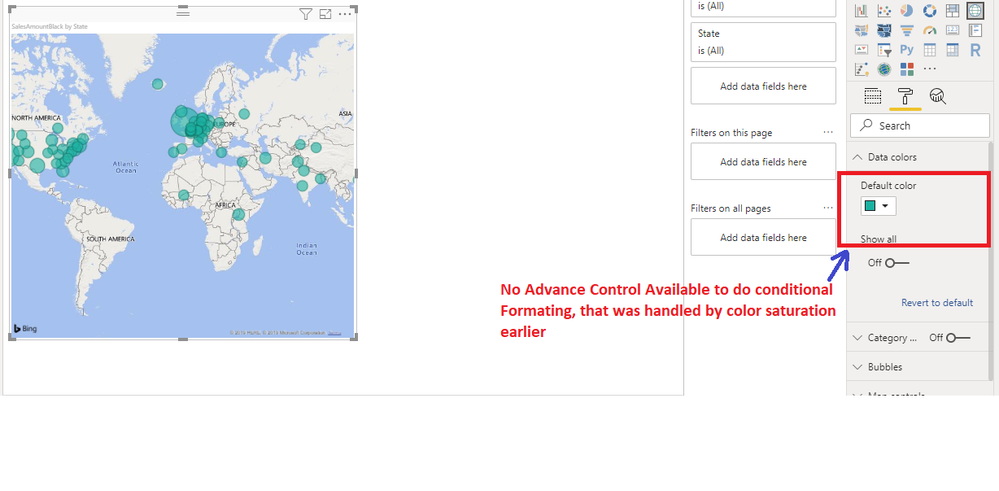
You are correct they've removed color saturation, but for Map there's no advance control under Data Colors to do conditional formatting too.

MissingAdvanceControlForConditionalFormating2.png


Regards,

Harry

Anonymous
Not applicable

Hi: 

I am trying to use the color saturation on a "Map" visual. I have a "Slicer" with different 'Pipeline' to see related pipeline info on the map. I am trying to make some "bubble" on the map have a certain color (red) depending on another field 'Significance' [it has value 1,2,3,4,5] describing criticalilty of an event in that location. When I go to "Format" pane to do color saturation- the 'Data Color' just shows the colors for different bubles representing different 'Pipeline's. I can't find

1. how to choose 'Significance' to do conditional formating [e.g color saturation]

2. Also in Map, when I use 'Significance' field for Size- it shows average/min/max/count [not just the value by itself]

Any help would be greatly appreciated! Thanks. 🙂

Helpful resources

Announcements
Power BI DataViz World Championships

Power BI Dataviz World Championships

The Power BI Data Visualization World Championships is back! Get ahead of the game and start preparing now!

December 2025 Power BI Update Carousel

Power BI Monthly Update - December 2025

Check out the December 2025 Power BI Holiday Recap!

FabCon Atlanta 2026 carousel

FabCon Atlanta 2026

Join us at FabCon Atlanta, March 16-20, for the ultimate Fabric, Power BI, AI and SQL community-led event. Save $200 with code FABCOMM.