cancel
Showing results for 
Search instead for 
Did you mean: 

Learn from the best! Meet the four finalists headed to the FINALS of the Power BI Dataviz World Championships! Register now

Reply
Anonymous
Not applicable

Color My World

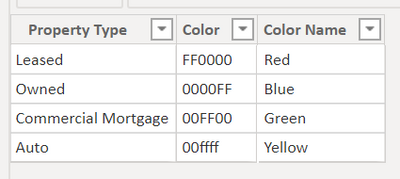
I have made this table to color the dots on the map I have created.


redridgie_0-1620908368448.png

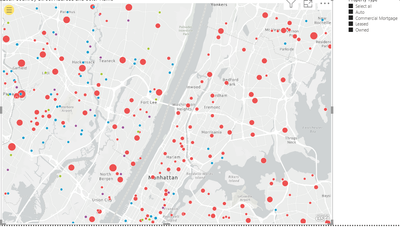
However, the colors that are shown on the maps are not the same ones that are specified in the hex codes:


Property TypeColor codeColor I am ExoectubgColor on Map
LeasedFF0000RedGreen
Owned0000FFBluePurple
Commercial Morgtage00FF00GreenBlue
Auto00FFFFCyanRed

redridgie_1-1620908606890.png


Please help me fix this problem.

4 REPLIES 4
HashamNiaz
Solution Sage
Solution Sage

Hi !

Please share the Data Model diagram, seem you are using another table which has fact information & that is mapped to status table.


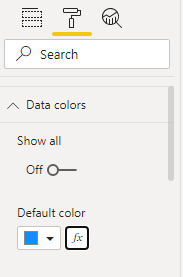
In Power BI - Map chart, go to format, expand Data colors -> press (fx) and use format by [field vaue] to provide data fill colors.


Data ColorsData ColorsData Colors2Data Colors2

Regards,

Hasham

Anonymous
Not applicable

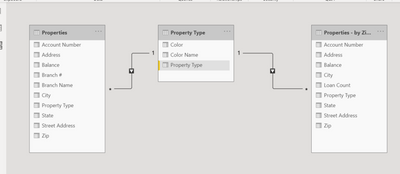
Here you go.  I don't see a problem with the data model, though...


redridgie_0-1620911978256.png


Hi !

Thanks, the model diagram will help us understand how you are plotting the map chart.


You can create a measure lie below;


Property Color = SWITCH( TRUE(),
                MAX(Property Type[Property Type]) = "Leased", 1,
                MAX(Property Type[Property Type]) = "Owned", 2,
                MAX(Property Type[Property Type]) = "Commercial Mortgage", 3,
                MAX(Property Type[Property Type]) = "Auto", 4,
                5
)


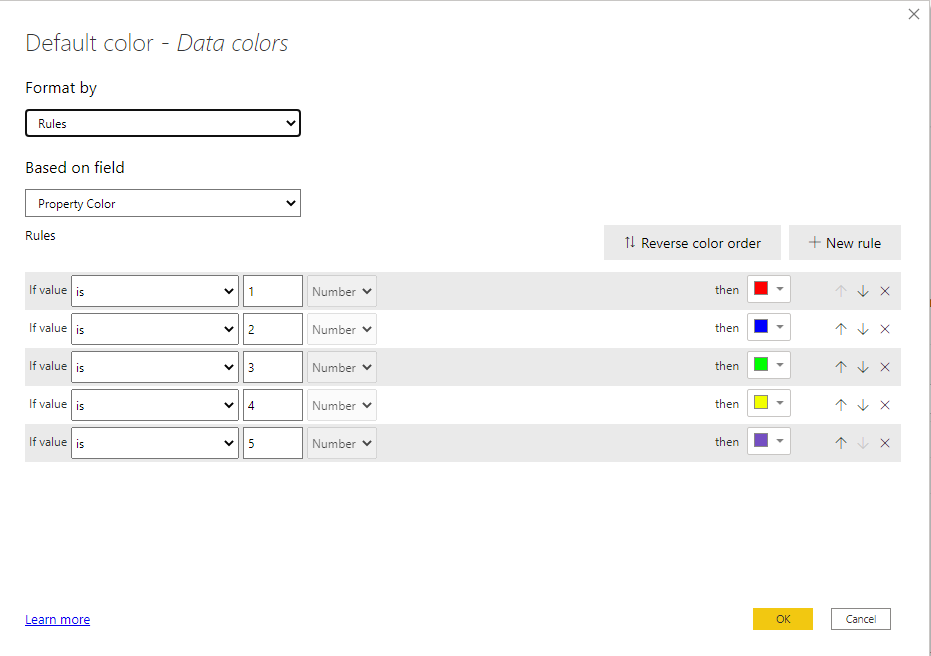
Now, in the Data Color option, choose format by Rules as shown below;


Colors3Colors3


Hope this will work for you.


Regards,

Hasham

amitchandak
Super User
Super User

@Anonymous , are you able to show dots for each Property Type.

If so either with the measure of column ((hex code need to with #)


Example measure you create one and use that in conditional formatting with the field value option. But that option will not be there with a legend


Brand Color = Switch( true(),
max('Item'[brand]) = "Brand 1" , "red",
max('Item'[brand]) = "Brand 2" , "blue",
max('Item'[brand]) = "Brand 3" , "green",
max('Item'[brand]) = "Brand 4" , "gray",
max('Item'[brand]) = "Brand 5" , "yellow",
max('Item'[brand]) = "Brand 6" , "orange",
max('Item'[brand]) = "Brand 7" , "brown",
max('Item'[brand]) = "Brand 8" , "Cyan",
max('Item'[brand]) = "Brand 9" , "Tan",
max('Item'[brand]) = "Brand 10" , "Violet",
max('Item'[brand]) = "Brand 11" , "Gold",
"silver"
)
Share with Power BI Enthusiasts: Full Power BI Video (20 Hours) YouTube
Microsoft Fabric Series 60+ Videos YouTube
Microsoft Fabric Hindi End to End YouTube

Helpful resources

Announcements
Power BI DataViz World Championships carousel

Power BI DataViz World Championships - June 2026

A new Power BI DataViz World Championship is coming this June! Don't miss out on submitting your entry.

Join our Fabric User Panel

Join our Fabric User Panel

Share feedback directly with Fabric product managers, participate in targeted research studies and influence the Fabric roadmap.

March Power BI Update Carousel

Power BI Community Update - March 2026

Check out the March 2026 Power BI update to learn about new features.