cancel
Showing results for 
Search instead for 
Did you mean: 

Try your skills in the Power BI Dataviz World Championship! Round one ends June 26. Join now

Reply
OneWithQuestion
Post Prodigy
Post Prodigy

Clustered Column Chart: Reverse X axis?

I have a clustered column chart that is showing project priorites.


I have the priority field as a whole number in the model.


However, the X axis is high to low so priority 0 is on the right. 


I want it set low to high so X starts with the 0 and moves up to higher numbers as you go right.


I can't find anyway to flip it and I can't flip the sort order by clicking the visual and sorting.


Am I missing something?

1 ACCEPTED SOLUTION
MFelix
Super User
Super User

Hi @OneWithQuestion,


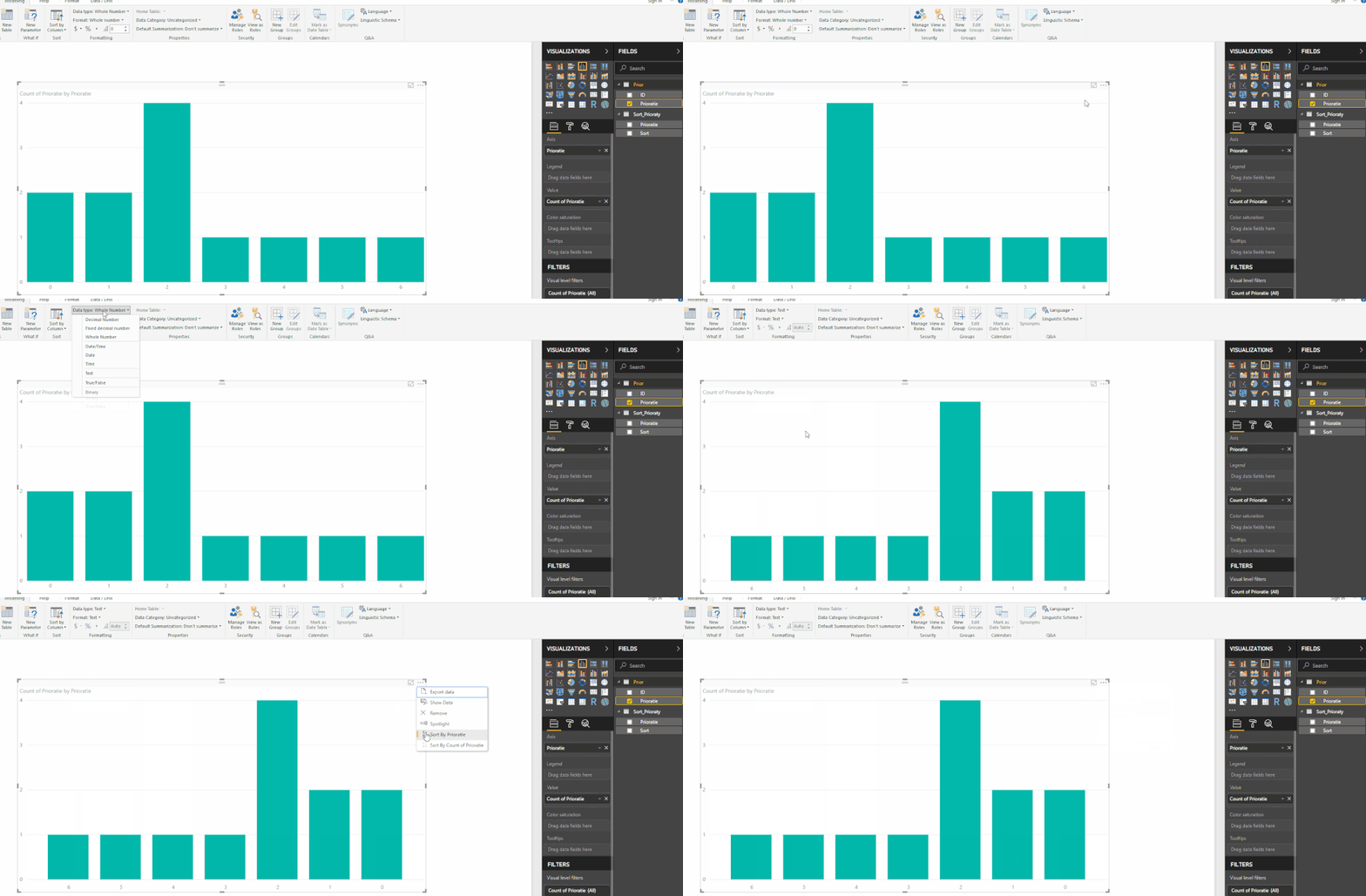
If you change the format of the prioratie column to text this will give you the option to sort the x-axis in the clustered column chart.

priorat.gif


If you are using the prioratie column to make some calculations and need to have it as a number a work around would be to create a dimension table for prioraties with one field as number with prioraties and a Sort column with the reverse values but formatted as text then relate the two tables and use the Sort column instead of the prioraties column on your visual.


Regards,

MFelix


Regards

Miguel Félix


Did I answer your question? Mark my post as a solution!

Proud to be a Super User!

Check out my blog: Power BI em Português


View solution in original post

1 REPLY 1
MFelix
Super User
Super User

Hi @OneWithQuestion,


If you change the format of the prioratie column to text this will give you the option to sort the x-axis in the clustered column chart.

priorat.gif


If you are using the prioratie column to make some calculations and need to have it as a number a work around would be to create a dimension table for prioraties with one field as number with prioraties and a Sort column with the reverse values but formatted as text then relate the two tables and use the Sort column instead of the prioraties column on your visual.


Regards,

MFelix


Regards

Miguel Félix


Did I answer your question? Mark my post as a solution!

Proud to be a Super User!

Check out my blog: Power BI em Português


Helpful resources

Announcements
Fabric Data Days is here Carousel

Data Days 2026

Don't miss out on Data Days, June 15 through August 7. Learn Fabric, Power BI, SQL, AI and more.

May Power BI Update Carousel

Power BI Monthly Update - May 2026

Check out the May 2026 Power BI update to learn about new features.

Power BI DataViz World Championships carousel

Power BI DataViz World Championships - June 2026

A new Power BI DataViz World Championship is coming this June! Don't miss out on submitting your entry.