cancel
Showing results for 
Search instead for 
Did you mean: 

We've captured the moments from FabCon & SQLCon that everyone is talking about, and we are bringing them to the community, live and on-demand. Starts on April 14th. Register now

Reply
Anonymous
Not applicable

Clustered Bar Values

Hello Everyone!


I want to display some values in Clustered Bar Chart. My table has three columns and data is available in following format.


|Column 1| Column 2| Column 3|

|exp 1       | 23.2         | 23-3-2016|
|exp 2       | 43.2         | 24-2018   |

|exp 3       | 63.2         | 21-2-2018|

|exp 1       | 13.2         | 23-8-2018|

|exp 1       | 32.2         | 20-3-2018|

|exp 2       | 93.2         | 2-3-2017|


Now what i want to do is to Use the clustered bar and on the Y-Axis i want  to display TWO values of  Column 1 and on the X-Axis i want to display the range of Column 2 which will be different values.


I also want to change the values on Y-Axis using the slicer dropdown or list. There can be one dedicated drop down for one value and one for another.


Looking forward to your help.

4 REPLIES 4
Michiel
Resolver III
Resolver III

I'm not sure I get what you're looking for, but you can include Column 1 on the Y-axis, SUM([Column 2]) as value (X-axis), and add a slicer containing Column 1 with multi-select.

And you could change the measure into something like 

IF(DISTINCTCOUNT([Column 1])=2, SUM([Column 2]) )

to only show the chart when exactly two Column 1 values are selected.

Anonymous
Not applicable

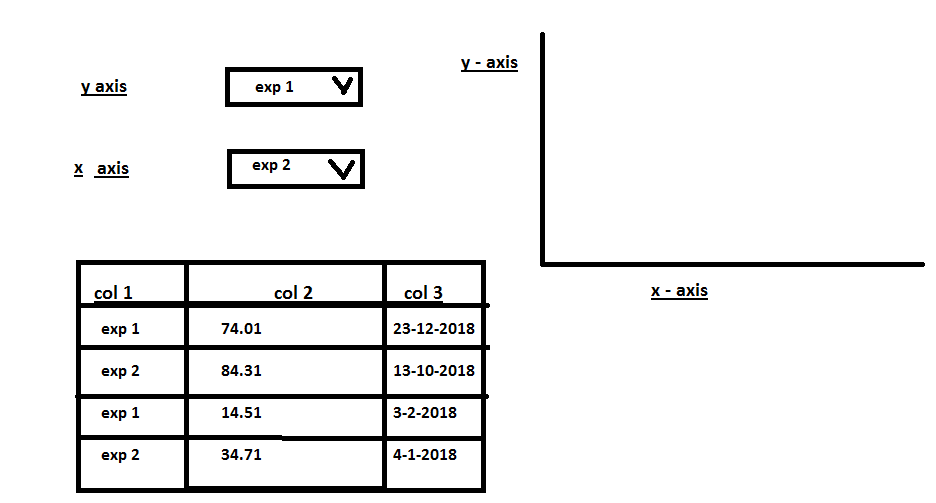
@Michiel Dear, i want to achieve this. Is it possible? i want to change values on x and y axis using slicer. These values are available in one column on different rows.


pic2.png

Still not getting it. This is still a bar chart as in your first question? In the Y-axis slicer, you could select e.g. 'exp 1' and 'exp 2' as I mentioned earlier. Don't see how you would select a col1 value in the second slicer for the X-axis, though. I assume the value in the chart will be the sum of the values in col 2?

Anonymous
Not applicable


@Michiel 


Yes VALUE will be sum or average of the values in the col 2. 

As far as the chart is concerned, Yes i am refering to a bar chart. Is there any possible way to select dynammic x-axis and y-axis through slicers?


Helpful resources

Announcements
New to Fabric survey Carousel

New to Fabric Survey

If you have recently started exploring Fabric, we'd love to hear how it's going. Your feedback can help with product improvements.

Power BI DataViz World Championships carousel

Power BI DataViz World Championships - June 2026

A new Power BI DataViz World Championship is coming this June! Don't miss out on submitting your entry.

Join our Fabric User Panel

Join our Fabric User Panel

Share feedback directly with Fabric product managers, participate in targeted research studies and influence the Fabric roadmap.

March Power BI Update Carousel

Power BI Community Update - March 2026

Check out the March 2026 Power BI update to learn about new features.