Join us at FabCon Atlanta from March 16 - 20, 2026, for the ultimate Fabric, Power BI, AI and SQL community-led event. Save $200 with code FABCOMM.
Register now!The Power BI Data Visualization World Championships is back! Get ahead of the game and start preparing now! Learn more
Hi All,
I'm trying to sort the clustered bar chart based with below sample dataset in Power Bi,
| Customer | Group | Sales |
| AA | A | 500 |
| AB | A | 50 |
| AC | A | 200 |
| AD | A | 2000 |
| BB | B | 1000 |
| BQ | B | 500 |
| BA | B | 400 |
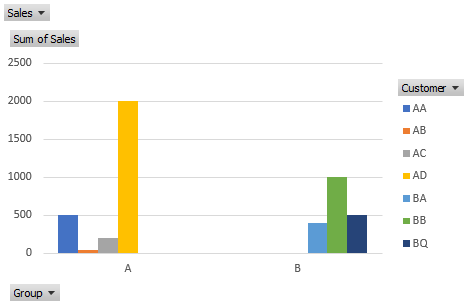
The original chart available in Power Bi will be looking like this, and only limited sorting options are available (by Sales / by Customers' name alphabetically.
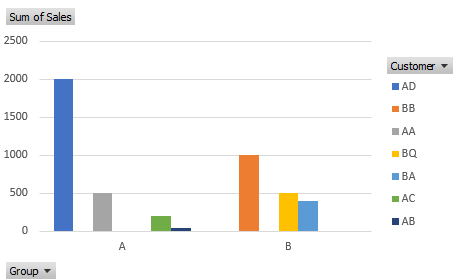
**I generated similar output by using excel
I'm trying to achieve sorting like below. Sort the sales in descending orders within each customer groups. Couldn't find any solutions through online so far, appreaciate that if someone could help to advice on this.
Thanks in advance!
Solved! Go to Solution.
Hi @Anonymous ,
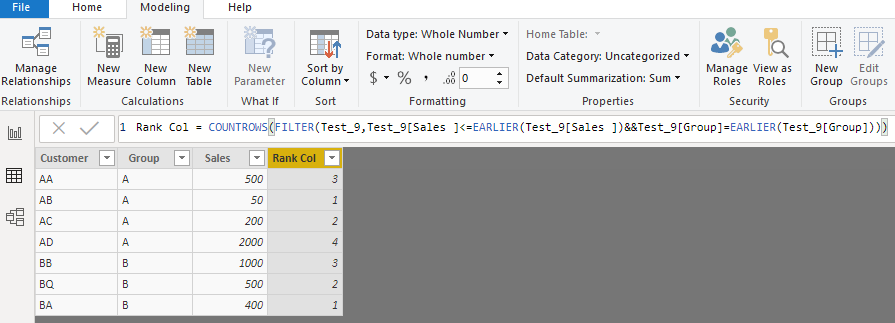
Add a calculated column to above sample dataset.
Rank Col =
COUNTROWS (
FILTER (
Test_9,
Test_9[Sales ] <= EARLIER ( Test_9[Sales ] )
&& Test_9[Group] = EARLIER ( Test_9[Group] )
)
)
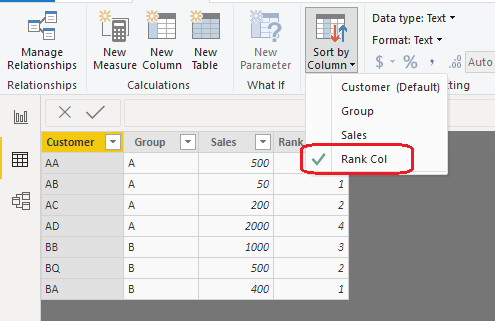
Choose [Customer] field, click "Sort by Column", choose "Rank Col" from the list.
Chart preview.
Best regards,
Yuliana Gu
Hi @Anonymous ,
Add a calculated column to above sample dataset.
Rank Col =
COUNTROWS (
FILTER (
Test_9,
Test_9[Sales ] <= EARLIER ( Test_9[Sales ] )
&& Test_9[Group] = EARLIER ( Test_9[Group] )
)
)
Choose [Customer] field, click "Sort by Column", choose "Rank Col" from the list.
Chart preview.
Best regards,
Yuliana Gu
Thanks a lot for the recommendations. It's a good idea but unfortunately it won't work for my case as the "Sales" is a measures.
Hi JOO13,
You can create a condtitional column (Sort_Order). For example in your case
AD =1
AA =2
AC =3
AB =4
BB =5
BQ =6
BA =7
Create a condtional column as per the above format and then do sorting of Customer with respect to Sort_Order Column. I hope your issue will be resolved using this approach.
Thanks for the recommendations. It's a good idea but unfortunately it won't work for my case as "Sales" is a Measure.
The Power BI Data Visualization World Championships is back! Get ahead of the game and start preparing now!
| User | Count |
|---|---|
| 40 | |
| 36 | |
| 34 | |
| 31 | |
| 27 |
| User | Count |
|---|---|
| 136 | |
| 103 | |
| 66 | |
| 65 | |
| 56 |