Get Fabric or SQL Certified for Free.
Get certified for free when you join Fabric Data Days 2026 and dive into Fabric, Power BI, SQL, AI, and other essential data skills.
Join now- Power BI forums
- Get Help with Power BI
- Desktop
- Service
- Report Server
- Power Query
- Mobile Apps
- Developer
- DAX Commands and Tips
- Custom Visuals Development Discussion
- Health and Life Sciences
- Power BI Spanish forums
- Translated Spanish Desktop
- Training and Consulting
- Instructor Led Training
- Dashboard in a Day for Women, by Women
- Galleries
- Data Stories Gallery
- Themes Gallery
- Contests Gallery
- QuickViz Gallery
- Quick Measures Gallery
- Visual Calculations Gallery
- Fabric Apps Gallery
- Notebook Gallery
- Translytical Task Flow Gallery
- TMDL Gallery
- R Script Showcase
- Webinars and Video Gallery
- Ideas
- Custom Visuals Ideas (read-only)
- Issues
- Issues
- Events
- Upcoming Events
July 28 - August 9 | Final Round of the Power BI Dataviz World Championships. This is your chance. Learn more
- Power BI forums
- Forums
- Get Help with Power BI
- Desktop
- Re: Circular reference calculation
- Subscribe to RSS Feed
- Mark Topic as New
- Mark Topic as Read
- Float this Topic for Current User
- Bookmark
- Subscribe
- Printer Friendly Page

- Mark as New
- Bookmark
- Subscribe
- Mute
- Subscribe to RSS Feed
- Permalink
- Report Inappropriate Content
Circular reference calculation
Column A: Initial stock
Column B: Production
Column C: Market
Column 😧 Min(A+B,C)
Column E: A+B - D
This all works ok, but the opening stock for each row in Column A needs to be Column E from the previous period.
So Column A (row n) = Column E (row n-1)
Of course when I try to create this I land up with a circular error( E is dependant on A)
This is of course a trivial excel calculation - the question is ... can it be done in powerbi in some way ?
Solved! Go to Solution.


- Mark as New
- Bookmark
- Subscribe
- Mute
- Subscribe to RSS Feed
- Permalink
- Report Inappropriate Content
Generally recursive calculations can be replicated non-recursively using a combination of cumulative measures, as measures and calculated columns can't self-reference.
See sample model here:
https://www.dropbox.com/s/9zqbq4gvhsg9bba/Circular%20reference%20calculation.pbix?dl=0
This is the output:
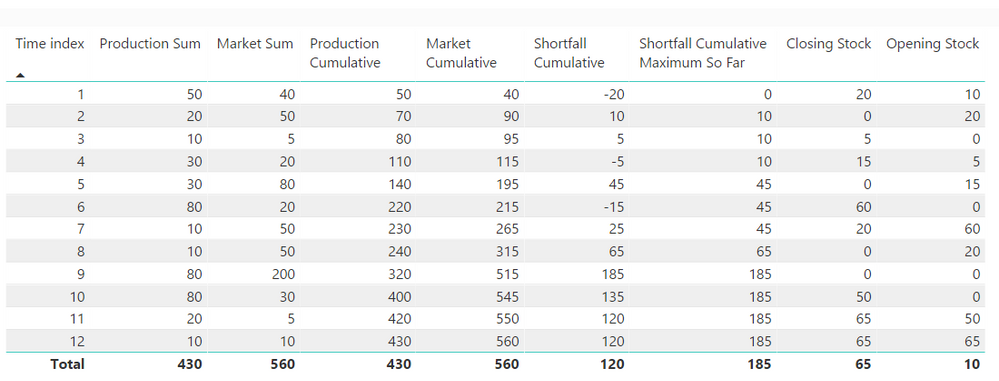
To produce this, let's suppose these are your two source tables:
'Initial Stock' table

Data table
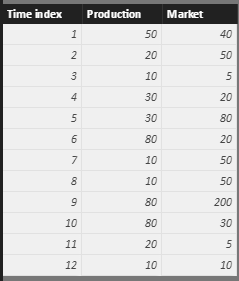
Then this series of measures will produce your closing and opening stock by period:
Initial Stock Measure =
SUM ( 'Initial Stock'[Intial Stock] )
// This measure should be constant over time and represents Stock at time zero

Production Sum =
SUM ( Data[Production] )

Market Sum =
SUM ( Data[Market] )

Production Cumulative =
CALCULATE (
	[Production Sum],
	FILTER (
		ALL ( Data[Time index] ),
		Data[Time index] <= MAX ( Data[Time index] )
	)
)

Market Cumulative =
CALCULATE (
	[Market Sum],
	FILTER (
		ALL ( Data[Time index] ),
		Data[Time index] <= MAX ( Data[Time index] )
	)
)

Shortfall Cumulative =
[Market Cumulative] - ( [Initial Stock Measure] + [Production Cumulative] )

Shortfall Cumulative Maximum So Far =
MAX (
	MAXX (
		FILTER (
			ALL ( Data[Time index] ),
			Data[Time index] <= MAX ( Data[Time index] )
		),
		[Shortfall Cumulative]
	),
	0
)

Closing Stock =
[Initial Stock Measure] + [Production Cumulative] - [Market Cumulative] + [Shortfall Cumulative Maximum So Far]

Opening Stock =
CALCULATE (
	[Closing Stock],
	FILTER (
		ALL ( Data[Time index] ),
		Data[Time index] = MIN ( Data[Time index] ) - 1
	)
)
Anyway, this is just an example to illustrate it can be done 🙂
- Mark as New
- Bookmark
- Subscribe
- Mute
- Subscribe to RSS Feed
- Permalink
- Report Inappropriate Content
Generally recursive calculations can be replicated non-recursively using a combination of cumulative measures, as measures and calculated columns can't self-reference.
See sample model here:
https://www.dropbox.com/s/9zqbq4gvhsg9bba/Circular%20reference%20calculation.pbix?dl=0
This is the output:
To produce this, let's suppose these are your two source tables:
'Initial Stock' table
Data table
Then this series of measures will produce your closing and opening stock by period:
Initial Stock Measure =
SUM ( 'Initial Stock'[Intial Stock] )
// This measure should be constant over time and represents Stock at time zero

Production Sum =
SUM ( Data[Production] )

Market Sum =
SUM ( Data[Market] )

Production Cumulative =
CALCULATE (
	[Production Sum],
	FILTER (
		ALL ( Data[Time index] ),
		Data[Time index] <= MAX ( Data[Time index] )
	)
)

Market Cumulative =
CALCULATE (
	[Market Sum],
	FILTER (
		ALL ( Data[Time index] ),
		Data[Time index] <= MAX ( Data[Time index] )
	)
)

Shortfall Cumulative =
[Market Cumulative] - ( [Initial Stock Measure] + [Production Cumulative] )

Shortfall Cumulative Maximum So Far =
MAX (
	MAXX (
		FILTER (
			ALL ( Data[Time index] ),
			Data[Time index] <= MAX ( Data[Time index] )
		),
		[Shortfall Cumulative]
	),
	0
)

Closing Stock =
[Initial Stock Measure] + [Production Cumulative] - [Market Cumulative] + [Shortfall Cumulative Maximum So Far]

Opening Stock =
CALCULATE (
	[Closing Stock],
	FILTER (
		ALL ( Data[Time index] ),
		Data[Time index] = MIN ( Data[Time index] ) - 1
	)
)
Anyway, this is just an example to illustrate it can be done 🙂


- Mark as New
- Bookmark
- Subscribe
- Mute
- Subscribe to RSS Feed
- Permalink
- Report Inappropriate Content
Awesome approach !!
- Mark as New
- Bookmark
- Subscribe
- Mute
- Subscribe to RSS Feed
- Permalink
- Report Inappropriate Content
Great approach. However, I see that the "back order" are shortshipped, therefore some orders (market) are lost and we have 65 units at the end. What do we need to change in the formulas to allow stock to be shipped at a later date when available ? (therefore end with a zero closing stock). Tks
- Mark as New
- Bookmark
- Subscribe
- Mute
- Subscribe to RSS Feed
- Permalink
- Report Inappropriate Content
Much appreciated!


- Mark as New
- Bookmark
- Subscribe
- Mute
- Subscribe to RSS Feed
- Permalink
- Report Inappropriate Content
You should not write these as columns - use measures instead. Do you have some way to identify the order of the rows? E.g. A date? You will need this - power pivot is a database, not a spreadsheet and hence there's is no Implied order of the rows.
* Matt is an 8 times Microsoft MVP (Power BI) and author of the Power BI Book Supercharge Power BI.
I will not give you bad advice, even if you unknowingly ask for it.
- Mark as New
- Bookmark
- Subscribe
- Mute
- Subscribe to RSS Feed
- Permalink
- Report Inappropriate Content
And yes the table has a date column. I could also generate an index.

Helpful resources

Fabric Community Sticker Challenge - Barcelona 2026
If you love stickers, then you will definitely want to check out our community sticker challenge, Barcelona edition!

Power BI Monthly Update - July 2026
Check out the July 2026 Power BI update to learn about new features.

Power BI DataViz World Championships - June 2026
A new Power BI DataViz World Championship is coming this June! Don't miss out on submitting your entry.

| User | Count |
|---|---|
| 26 | |
| 22 | |
| 22 | |
| 20 | |
| 18 |


| User | Count |
|---|---|
| 35 | |
| 28 | |
| 21 | |
| 19 | |
| 17 |


