Get certified for free when you join Fabric Data Days 2026 and dive into Fabric, Power BI, SQL, AI, and other essential data skills.
Join nowJuly 7 - July 17 | Round 2 of the Power BI Dataviz World Championships. Don't miss your chance! Learn more
I need to display the Circular Unichar code for Green and Red
Solved! Go to Solution.
Hi @Anonymous
Whne i use UNICHAR(127761) , i meet the same error as you did.
But it can work if i use
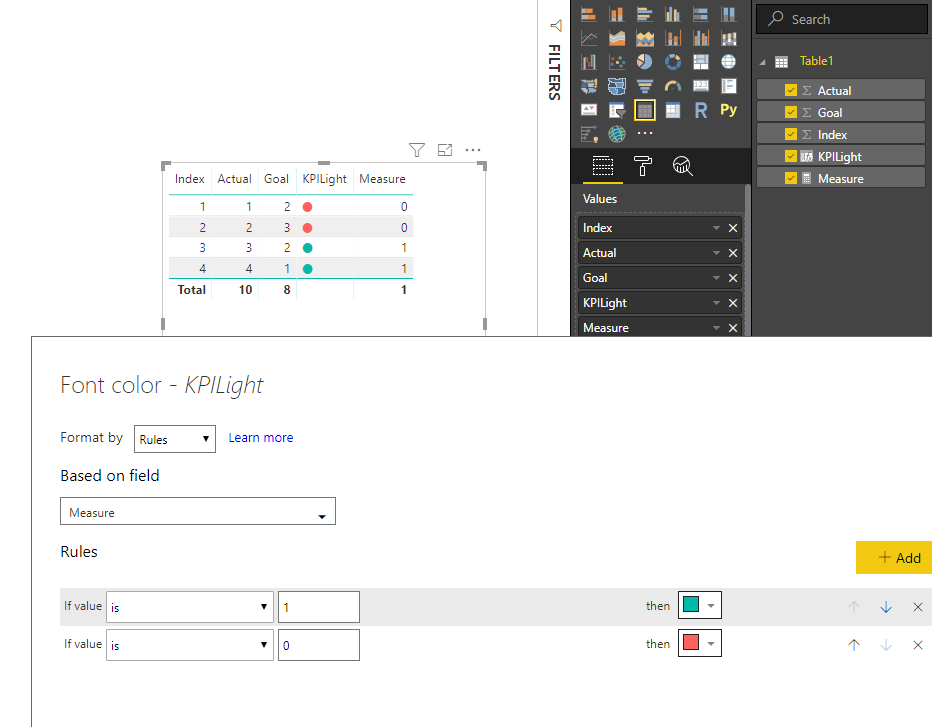
KPILight = UNICHAR(11044)
Please refer to my pbix for more details.
Best Regards
Maggie
Community Support Team _ Maggie Li
If this post helps, then please consider Accept it as the solution to help the other members find it more quickly.
Hey mate, try this number: 128308
Should work. : )
When I am using (11044) the size of the circle is very small and while I'm doing conditional formating the color changes for the circle.
If I use another UNICHAR value the color is not changing. Thanks in Advance
Hi @Anonymous
Whne i use UNICHAR(127761) , i meet the same error as you did.
But it can work if i use
KPILight = UNICHAR(11044)
Please refer to my pbix for more details.
Best Regards
Maggie
Community Support Team _ Maggie Li
If this post helps, then please consider Accept it as the solution to help the other members find it more quickly.
Hi,
It worked for me. But When I use UNICHAR(11044) instead of UNICHAR(122761), the size of the circle is geeting smaller. Is there anyway that I can get the same size as UNICHAR(122761). Please assist with it. Thank you.
@Anonymous Add a new column into your table as below
KPILight = UNICHAR(127761)
Then do Conditional Formatting based on your criteria for Font Colours.
Proud to be a PBI Community Champion
tried creating thea same using excel as source .. but when added the conditional formatting on the Font Color .. the coolor did not changed
Join us in Barcelona for FabCon and SQLCon, the Fabric, Power BI, SQL, and AI community event. Save €200 with code FABCMTY200.
Join Fabric Data Days 2026: 60 days of free live/on-demand sessions, challenges, study groups, and certification opportunities.
| User | Count |
|---|---|
| 22 | |
| 22 | |
| 18 | |
| 17 | |
| 13 |
| User | Count |
|---|---|
| 63 | |
| 50 | |
| 46 | |
| 41 | |
| 39 |