Join us at FabCon Atlanta from March 16 - 20, 2026, for the ultimate Fabric, Power BI, AI and SQL community-led event. Save $200 with code FABCOMM.
Register now!The Power BI Data Visualization World Championships is back! It's time to submit your entry. Live now!
I need to display the Circular Unichar code for Green and Red
Solved! Go to Solution.
Hi @Anonymous
Whne i use UNICHAR(127761) , i meet the same error as you did.
But it can work if i use
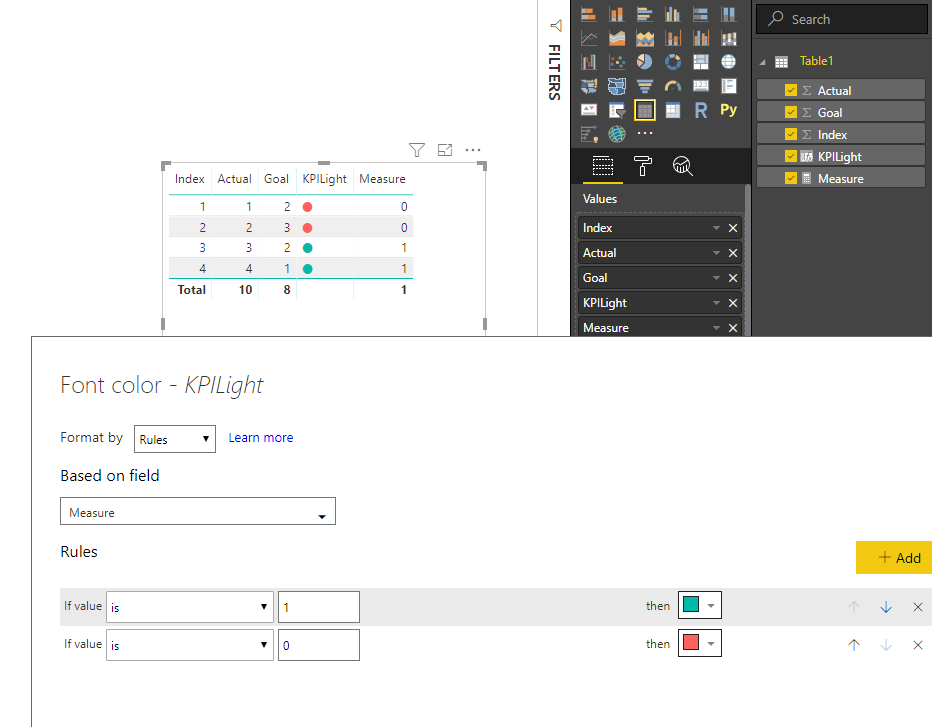
KPILight = UNICHAR(11044)
Please refer to my pbix for more details.
Best Regards
Maggie
Community Support Team _ Maggie Li
If this post helps, then please consider Accept it as the solution to help the other members find it more quickly.
Hey mate, try this number: 128308
Should work. : )
When I am using (11044) the size of the circle is very small and while I'm doing conditional formating the color changes for the circle.
If I use another UNICHAR value the color is not changing. Thanks in Advance
Hi @Anonymous
Whne i use UNICHAR(127761) , i meet the same error as you did.
But it can work if i use
KPILight = UNICHAR(11044)
Please refer to my pbix for more details.
Best Regards
Maggie
Community Support Team _ Maggie Li
If this post helps, then please consider Accept it as the solution to help the other members find it more quickly.
Hi,
It worked for me. But When I use UNICHAR(11044) instead of UNICHAR(122761), the size of the circle is geeting smaller. Is there anyway that I can get the same size as UNICHAR(122761). Please assist with it. Thank you.
@Anonymous Add a new column into your table as below
KPILight = UNICHAR(127761)
Then do Conditional Formatting based on your criteria for Font Colours.
Proud to be a PBI Community Champion
tried creating thea same using excel as source .. but when added the conditional formatting on the Font Color .. the coolor did not changed
| User | Count |
|---|---|
| 51 | |
| 37 | |
| 31 | |
| 21 | |
| 19 |
| User | Count |
|---|---|
| 136 | |
| 101 | |
| 58 | |
| 36 | |
| 35 |