cancel
Showing results for 
Search instead for 
Did you mean: 

Get Fabric Certified for FREE during Fabric Data Days. Don't miss your chance! Request now

Reply
Anonymous
Not applicable

Circular Dependency when adding custom columns

Hi All,

Basically, I get a circular dependency because I am creating a scoring system to put on a line graph. I am able to do what I want with a measure, but I can't get the measure into the line graph visualization that I need. 


Calculated column 1 comes from different collected metrics, and creates a score based on those metrics.

Calculated column 2 takes calculated column 1 sum + adds to that.

Calculated column 3 takes calculated 2 sum + adds to that.

Lastly, Calculated column 4 takes calculated colum 3 sum and add to that.


The plan is to then unpivot calculated columns 1,2,3,4 into a type, so I can then put them on a line graph with the axis being columns 1-4. 


Unfortunately, whenever I try to add calculated columns, even if I just do the calculated column 1 source formula and add it to calculated column 2, I get a circular dependency. 


Is there any ideas to solve this? 

1 ACCEPTED SOLUTION

Hi @Anonymous ,

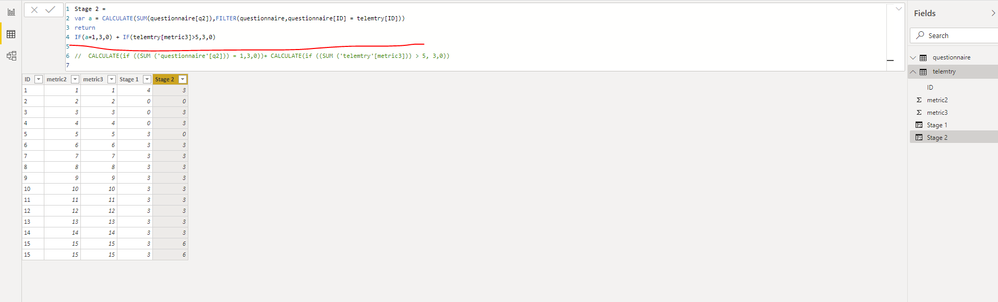
Sorry for the late reply, I think you can try using variables to avoid Circular Dependency.

11.PNG

Here is a demo, please try it:

https://qiuyunus-my.sharepoint.com/:u:/g/personal/pbipro_qiuyunus_onmicrosoft_com/EWSJ5bjTdUhPo1-WCEgWro8Bg0ABS34DXVqTI9IssR9-kw?e=Ph0vlu

Best Regards,
Community Support Team _ Joey
If this post helps, then please consider Accept it as the solution to help the other members find it more quickly.

View solution in original post

4 REPLIES 4
v-joesh-msft
Solution Sage
Solution Sage

Hi @Anonymous ,

I'm a little confused by your description. Kindly share your sample data and expected result if you don't have any Confidential Information.

Best Regards,
Community Support Team _ Joey
If this post helps, then please consider Accept it as the solution to help the other members find it more quickly.

Anonymous
Not applicable

Hi Joesh,

I do have some confidential info unfortunately, but I may be able to describe better and give examples.


I'm creating a scoring system that I want to put on a line graph, each point being a stage (4 stages/customer) so I cannot use measures as I can only do one measure on a line graph. However, measures do accurately calculate each stage. The main table that all the metrics link to (including this summary table) includes a customer identifier, so I'd be able to filter my report tailored to each customer.


Each stage adds the previous stage before. So, Stage one is calculated by this equation:

Stage 1 = CALCULATE(if ((SUM('questionnaire'[q1])) = 1,4,0))

+ Calculate(if ((SUM ('questionnaire'[q2])) = 1,3,0))
+ Calculate (if ((SUM ('questionnaire'[q3])) = 1,2,0))
+ Calculate (if ((SUM ('telemtry'[metric1])) > 4,3,0))
+ Calculate(if ((SUM ('telemetry'[metric2]))> 4,5,0))
+ Calculate (if ((SUM ('telemetry'[metric3])) > 50, 3,0))
+ Calculate (if ((SUM ('telemetry'[metric4])) > 5,2,0))
+ Calculate (IF ((SUM ('telemetry'[metric5])) > 100, 3,0))
 
Stage 2 =  = CALCULATE (('Line graph'[stage 1]) ## adding the stage1 to this score..
+ Calculate (if (Calculate (COUNTROWS('billingdata'),'billingdata'[specificSKU] = "specificproduct") > 1,2,0))
+ Calculate(if ((SUM ('telemetry'[metric6])) > 2,3,0))
+ Calculate (if ((SUM ('telemetry'[metric7])) > 4,-3,0))
+ Calculate (if ((SUM ('telemetry'[metric8])) > 3,5,0))
+ Calculate(if ((SUM ('questionnaire'[q4])) = 1,5,0))
+ Calculate (if ((SUM('questionnaire'[q5])) = 1, 5, 0))
+ Calculate (if ((SUM('questionnaire'[q6])) =1, 5, 0)))
 
When I try to add the second score in a calculated column, I get the circular dependency error

Hi @Anonymous ,

Sorry for the late reply, I think you can try using variables to avoid Circular Dependency.

11.PNG

Here is a demo, please try it:

https://qiuyunus-my.sharepoint.com/:u:/g/personal/pbipro_qiuyunus_onmicrosoft_com/EWSJ5bjTdUhPo1-WCEgWro8Bg0ABS34DXVqTI9IssR9-kw?e=Ph0vlu

Best Regards,
Community Support Team _ Joey
If this post helps, then please consider Accept it as the solution to help the other members find it more quickly.

parry2k
Super User
Super User

@Anonymous Read this post to get your answer quickly.

https://community.powerbi.com/t5/Community-Blog/How-to-Get-Your-Question-Answered-Quickly/ba-p/38490


Subscribe to the @PowerBIHowTo YT channel for an upcoming video on List and Record functions in Power Query!!

Learn Power BI and Fabric - subscribe to our YT channel - Click here: @PowerBIHowTo

If my solution proved useful, I'd be delighted to receive Kudos. When you put effort into asking a question, it's equally thoughtful to acknowledge and give Kudos to the individual who helped you solve the problem. It's a small gesture that shows appreciation and encouragement! ❤


Did I answer your question? Mark my post as a solution. Proud to be a Super User! Appreciate your Kudos 🙂
Feel free to email me with any of your BI needs.

Helpful resources

Announcements
Fabric Data Days Carousel

Fabric Data Days

Advance your Data & AI career with 50 days of live learning, contests, hands-on challenges, study groups & certifications and more!

October Power BI Update Carousel

Power BI Monthly Update - October 2025

Check out the October 2025 Power BI update to learn about new features.

FabCon Atlanta 2026 carousel

FabCon Atlanta 2026

Join us at FabCon Atlanta, March 16-20, for the ultimate Fabric, Power BI, AI and SQL community-led event. Save $200 with code FABCOMM.

Top Solution Authors