This time we’re going bigger than ever. Fabric, Power BI, SQL, AI and more. We're covering it all. You won't want to miss it.
Learn moreDid you hear? There's a new SQL AI Developer certification (DP-800). Start preparing now and be one of the first to get certified. Register now
Hi All,
Please help me to resolve circular dependency error while creating relationship between two tables.
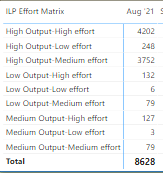
I want to rearrange the below given value in that particular order.
But by default it is coming in the below order.
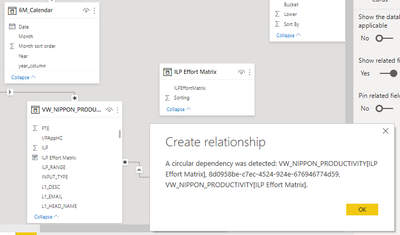
To acheive in the right order i created one more Table with this value by entering data and tried to create relationship with the main table. But it is throwing the error given below.
In the Above, VW_Nippon_Productivity is my main data table and ILP Effort Matrix table is created for sorting. I want to make relation between ILP Effort Matrix column of main table with "ILPEffortMatrix" column of ILP Effort Matrix table.
Any help on this would be highly appreciated.
Thanks,
Sagar
@sagarsahoo_123 , If you have created that table from this table try to use distinct on top of it.
Example
Distinct(All(Table[Col]))
Also, in the table shown above you can mark Sorting as a sort column
How to Create Sort Column and Solve Related Errors:
https://www.youtube.com/watch?v=KK1zu4MBb-c
Hello Amit,
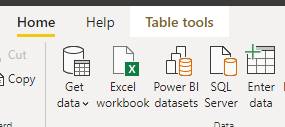
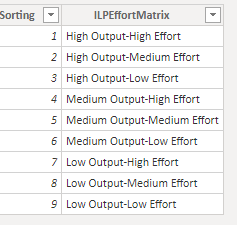
Actually I created a simple table manually by using Enter Data option given image below.
Then tried to create relationship with main table.But not sure why i am facing circular dependancy error. Tried your given approach as well but it could not solve the problem.
Any thing which i am missing here!Please suggest.
Regards,
Sagar
Check out the April 2026 Power BI update to learn about new features.
Sign up to receive a private message when registration opens and key events begin.
If you have recently started exploring Fabric, we'd love to hear how it's going. Your feedback can help with product improvements.
| User | Count |
|---|---|
| 36 | |
| 32 | |
| 27 | |
| 23 | |
| 16 |
| User | Count |
|---|---|
| 65 | |
| 50 | |
| 30 | |
| 25 | |
| 24 |