Don't miss your chance to take the Fabric Data Engineer (DP-600) exam for FREE! Find out how by attending the DP-600 session on April 23rd (pacific time), live or on-demand.
Learn moreNext up in the FabCon + SQLCon recap series: The roadmap for Microsoft SQL and Maximizing Developer experiences in Fabric. All sessions are available on-demand after the live show. Register now
Hello all! *I can't use calculated column because I'm getting the data by Streaming Direct Query on PBI online..
I would like to choose the variable value, for example..This is level fiter, and is selected "is = 2", sorry about the portuguese...
Measure A = //I don't know how to do it
Measure B =
IF{ table [Measure A] = 1; This does something;
IF{ table [Measure A] = 2; This does otherthing( Would select this if Measure A was working, as you can see at the image above);
IF{ table [Measure A] = 3; This is the command that I want to select via level filter;
IF{ table [Measure A] = 4; As this one...;
}
This is just a way I think can solve my problem, I want to select different functions into one measure( Measure B). And I want to insert Measure B in one visual table. Doesn't exist a way of inserting data into the report, right, like...
CALCULATING CAR SPEED
Insert distance:_______
Insert time:_______
CALCULATE
Thank you all,
Best Regards,
Diego
Solved! Go to Solution.
Hi @sirros_iot,
You need to have a reference to a column or another table that allows you to do it.
Regards,
MFelix
Regards
Miguel Félix
Proud to be a Super User!
Check out my blog: Power BI em PortuguêsRegards
Miguel Félix
Proud to be a Super User!
Check out my blog: Power BI em PortuguêsHi @sirros_iot,
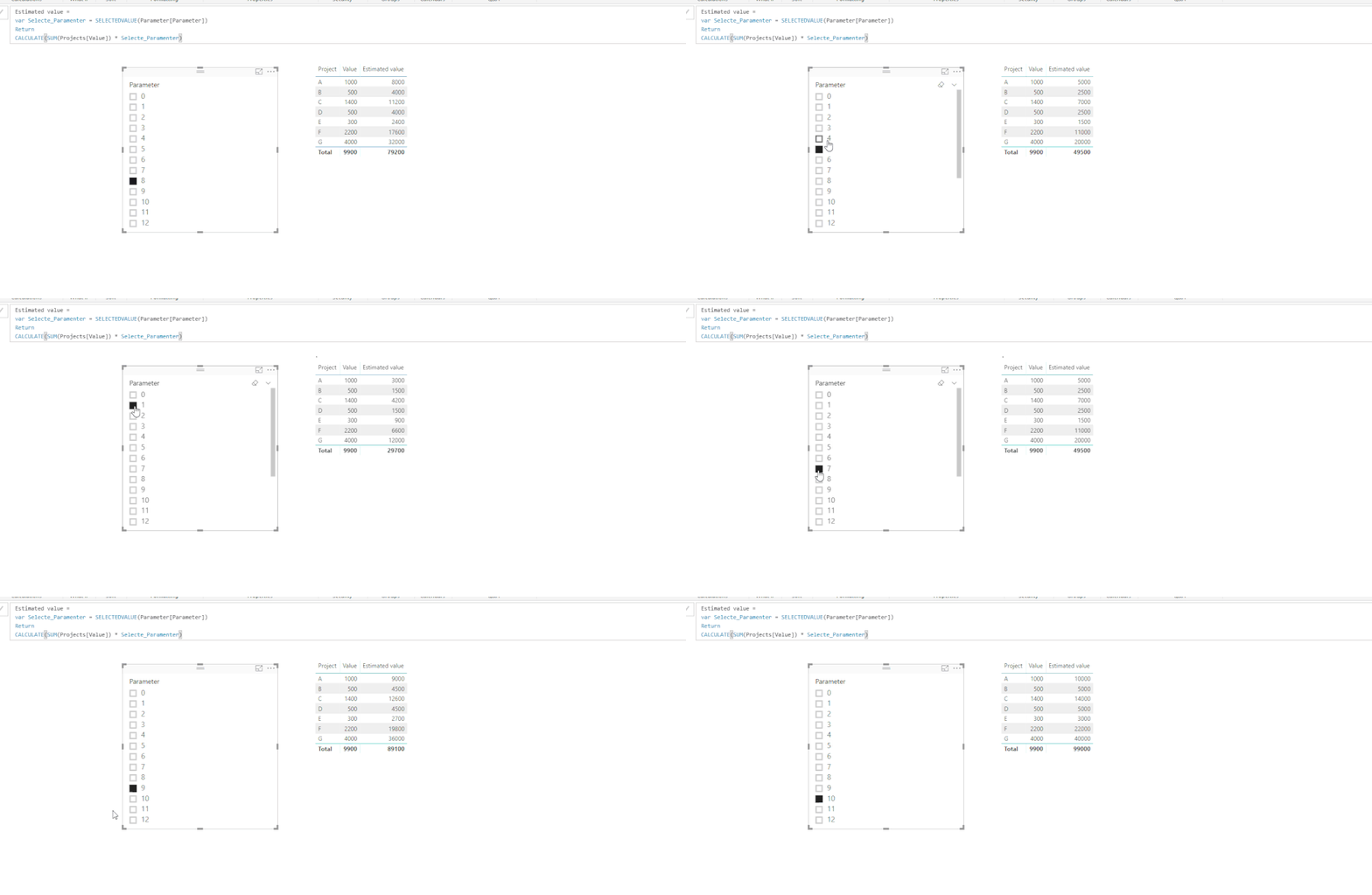
I created a PBIX file with a sample data, I have created a table with the What If option on the modeling tab,
Then created a measure with a variable that is based on the table created in the previous step, that selects the lue on the slicer.
This is just a simple example but it how it works.
Regards,
MFelix
Regards
Miguel Félix
Proud to be a Super User!
Check out my blog: Power BI em PortuguêsThank you for the reply @MFelix! That's what I would like to do!
But I think I can't create that parameter table.. I'm getting the data by Push Streaming Dataset
Do you know a way of doing that without creating any data?
Best Regards,
Diego
Hi @sirros_iot,
You need to have a reference to a column or another table that allows you to do it.
Regards,
MFelix
Regards
Miguel Félix
Proud to be a Super User!
Check out my blog: Power BI em PortuguêsIf you have recently started exploring Fabric, we'd love to hear how it's going. Your feedback can help with product improvements.
A new Power BI DataViz World Championship is coming this June! Don't miss out on submitting your entry.
| User | Count |
|---|---|
| 44 | |
| 43 | |
| 38 | |
| 19 | |
| 15 |
| User | Count |
|---|---|
| 67 | |
| 66 | |
| 31 | |
| 28 | |
| 24 |