Join us at FabCon Atlanta from March 16 - 20, 2026, for the ultimate Fabric, Power BI, AI and SQL community-led event. Save $200 with code FABCOMM.
Register now!Get Fabric Certified for FREE during Fabric Data Days. Don't miss your chance! Request now
Hello,
I'm having trouble getting Chinese characters to appear in Power BI. They show up properly in Oracle and also in Excel after exporting from Oracle. However, when I connect to the data using an ODBC connection, Power BI Desktop only shows upside down question marks. Is there anything I can do to fix this?
Thanks,
Chad
Hi @Trudgeon ,
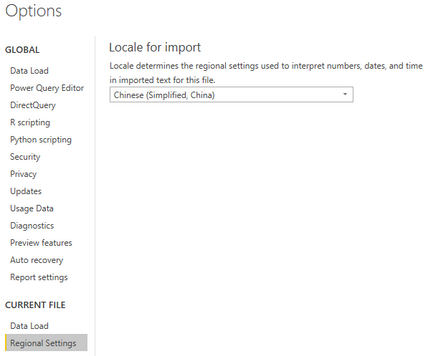
I can't reproduce your issue. Please try to change the region in regional settings.
File > Options and Setings > Options
If it doesn't work, please try to connect to Oracle directly in Power BI.
Best Regards,
Xue Ding
If this post helps, then please consider Accept it as the solution to help the other members find it more quickly.
Check out the November 2025 Power BI update to learn about new features.
Advance your Data & AI career with 50 days of live learning, contests, hands-on challenges, study groups & certifications and more!