cancel
Showing results for 
Search instead for 
Did you mean: 

The Power BI Data Visualization World Championships is back! Get ahead of the game and start preparing now! Learn more

Reply
AC_DATA
Frequent Visitor

Indicate RANK 1 Items Among Groups

I am trying to write some DAX for a calculated column that will return the top-ranked item in its group. In the case of the sample data below, I only want to consider records with the STATUS = "SOLD" and I want to indicate which record has the most recent value for DATE by ITEM.


Here is the sample data:

UID	ITEM	STATUS	DATE
1	APPLE	SOLD	8/4/2019
2	APPLE	SOLD	8/11/2019
3	APPLE	BOUGHT	8/19/2019
4	APPLE	SOLD	8/21/2019
5	APPLE	BOUGHT	8/17/2019
6	ORANGE	BOUGHT	7/29/2019
7	ORANGE	SOLD	8/6/2019
8	ORANGE	SOLD	7/26/2019
9	ORANGE	SOLD	7/24/2019
10	CHERRY	BOUGHT	8/17/2019
11	CHERRY	SOLD	8/15/2019
12	CHERRY	BOUGHT	8/11/2019
13	CHERRY	SOLD	7/31/2019
14	CHERRY	SOLD	7/26/2019
15	PEACH	SOLD	8/8/2019
16	PEACH	SOLD	7/23/2019
17	PEACH	SOLD	8/1/2019
18	BANANA	SOLD	8/2/2019
19	BANANA	BOUGHT	8/17/2019
20	GRAPE	SOLD	8/21/2019

And here is the desired outcome:

UID	ITEM	STATUS	DATE	RANK
1	APPLE	SOLD	8/4/2019	
2	APPLE	SOLD	8/11/2019	
3	APPLE	BOUGHT	8/19/2019	
4	APPLE	SOLD	8/21/2019	1
5	APPLE	BOUGHT	8/17/2019	
6	ORANGE	BOUGHT	7/29/2019	
7	ORANGE	SOLD	8/6/2019	1
8	ORANGE	SOLD	7/26/2019	
9	ORANGE	SOLD	7/24/2019	
10	CHERRY	BOUGHT	8/17/2019	
11	CHERRY	SOLD	8/15/2019	1
12	CHERRY	BOUGHT	8/11/2019	
13	CHERRY	SOLD	7/31/2019	
14	CHERRY	SOLD	7/26/2019	
15	PEACH	SOLD	8/8/2019	1
16	PEACH	SOLD	7/23/2019	
17	PEACH	SOLD	8/1/2019	
18	BANANA	SOLD	8/2/2019	1
19	BANANA	BOUGHT	8/17/2019	
20	GRAPE	SOLD	8/21/2019	1

Any help or direction would be appreciated.

2 ACCEPTED SOLUTIONS
AlB
Community Champion
Community Champion

Hi @AC_DATA 

Try this:

Col =
VAR Rank_ =
    RANKX (
        FILTER (
            Table1;
            Table1[ITEM] = EARLIER ( Table1[ITEM] )
                && Table1[STATUS] = "SOLD"
        );
        Table1[DATE];
        ;
        DESC
    )
RETURN
    IF ( Rank_ = 1 && Table1[STATUS] = "SOLD"; Rank_ )

Please mark as solved when we get to the solution and consider kudoing if posts are helpful.

Cheers  Datanaut


View solution in original post

dax
Community Support
Community Support

Hi Ac_DATA,

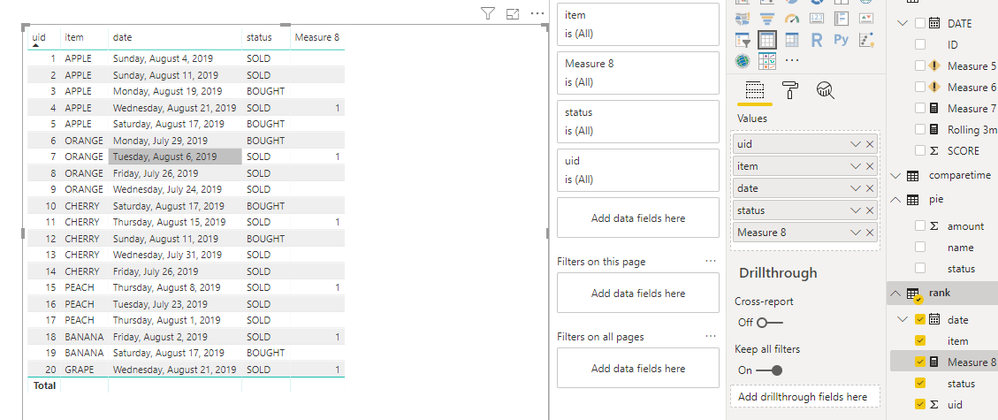
You also could try below measure

Measure 8 =
VAR maxd =
    CALCULATE (
        MAX ( 'rank'[date] ),
        FILTER ( ALLEXCEPT ( 'rank', 'rank'[item] ), 'rank'[status] = "SOLD" )
    )
RETURN
    IF ( MIN ( 'rank'[date] ) = maxd, 1, "" )

320.PNG

Best Regards,
Zoe Zhi

If this post helps, then please consider Accept it as the solution to help the other members find it more quickly.

View solution in original post

2 REPLIES 2
dax
Community Support
Community Support

Hi Ac_DATA,

You also could try below measure

Measure 8 =
VAR maxd =
    CALCULATE (
        MAX ( 'rank'[date] ),
        FILTER ( ALLEXCEPT ( 'rank', 'rank'[item] ), 'rank'[status] = "SOLD" )
    )
RETURN
    IF ( MIN ( 'rank'[date] ) = maxd, 1, "" )

320.PNG

Best Regards,
Zoe Zhi

If this post helps, then please consider Accept it as the solution to help the other members find it more quickly.

AlB
Community Champion
Community Champion

Hi @AC_DATA 

Try this:

Col =
VAR Rank_ =
    RANKX (
        FILTER (
            Table1;
            Table1[ITEM] = EARLIER ( Table1[ITEM] )
                && Table1[STATUS] = "SOLD"
        );
        Table1[DATE];
        ;
        DESC
    )
RETURN
    IF ( Rank_ = 1 && Table1[STATUS] = "SOLD"; Rank_ )

Please mark as solved when we get to the solution and consider kudoing if posts are helpful.

Cheers  Datanaut


Helpful resources

Announcements
Power BI DataViz World Championships

Power BI Dataviz World Championships

The Power BI Data Visualization World Championships is back! Get ahead of the game and start preparing now!

December 2025 Power BI Update Carousel

Power BI Monthly Update - December 2025

Check out the December 2025 Power BI Holiday Recap!

FabCon Atlanta 2026 carousel

FabCon Atlanta 2026

Join us at FabCon Atlanta, March 16-20, for the ultimate Fabric, Power BI, AI and SQL community-led event. Save $200 with code FABCOMM.