Join us at FabCon Atlanta from March 16 - 20, 2026, for the ultimate Fabric, Power BI, AI and SQL community-led event. Save $200 with code FABCOMM.
Register now!The Power BI Data Visualization World Championships is back! It's time to submit your entry. Live now!
Hi,
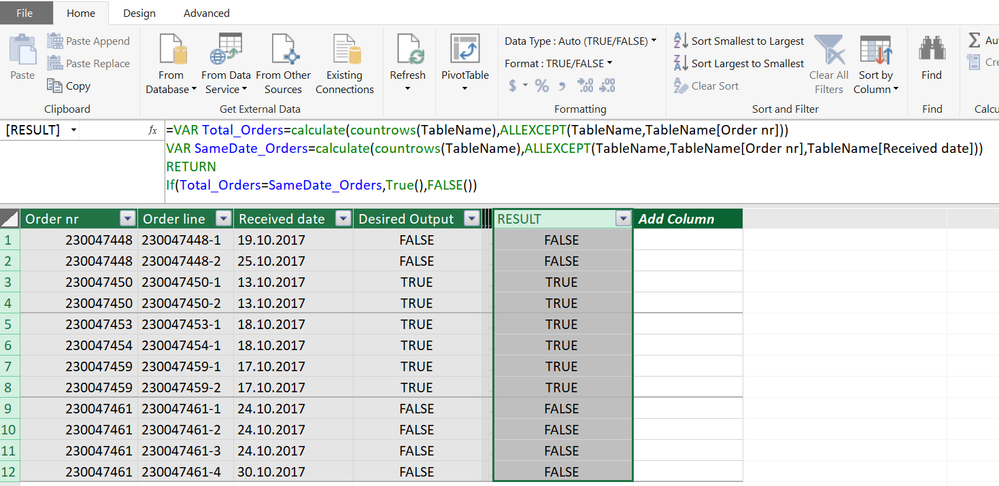
I would like to set up a function that will check whether the same date appears for each of the order numbers in the below table.
| Order nr | Order line | Received date | Desired Output |
| 230047448 | 230047448-1 | 19.10.2017 | False |
| 230047448 | 230047448-2 | 25.10.2017 | False |
| 230047450 | 230047450-1 | 13.10.2017 | True |
| 230047450 | 230047450-2 | 13.10.2018 | True |
| 230047453 | 230047453-1 | 18.10.2017 | True |
| 230047454 | 230047454-1 | 18.10.2017 | True |
| 230047459 | 230047459-1 | 17.10.2017 | True |
| 230047459 | 230047459-2 | 17.10.2017 | True |
| 230047461 | 230047461-1 | 24.10.2017 | False |
| 230047461 | 230047461-2 | 24.10.2017 | False |
| 230047461 | 230047461-3 | 24.10.2017 | False |
| 230047461 | 230047461-4 | 30.10.2017 | False |
For example, order number 230047448 has two order lines, received on the 19th and the 25th of October – desired output is “False”. The next order has the same received date on each of the order lines, hence desired output is “True”. If there is only one order line, it should return "True".
Appreciate any suggestions on this!
Amund
Solved! Go to Solution.
Hi @amuola
Try this calculated column
Desired Output =
VAR Total_Orders =
CALCULATE (
COUNTROWS ( TableName ),
ALLEXCEPT ( TableName, TableName[Order nr] )
)
VAR SameDate_Orders =
CALCULATE (
COUNTROWS ( TableName ),
ALLEXCEPT ( TableName, TableName[Order nr], TableName[Received date] )
)
RETURN
IF ( Total_Orders = SameDate_Orders, TRUE (), FALSE () )
Hi @amuola
Try this calculated column
Desired Output =
VAR Total_Orders =
CALCULATE (
COUNTROWS ( TableName ),
ALLEXCEPT ( TableName, TableName[Order nr] )
)
VAR SameDate_Orders =
CALCULATE (
COUNTROWS ( TableName ),
ALLEXCEPT ( TableName, TableName[Order nr], TableName[Received date] )
)
RETURN
IF ( Total_Orders = SameDate_Orders, TRUE (), FALSE () )
yes, it works, thank you so much! Could you please explain the formula and why this is working?
Regards Amund
Hi @amuola
Here is how it works
1) ALLEXCEPT ( TableName, TableName[Order nr] )
filters your table and returns the rows with the same Order Number as Current Row
2) ALLEXCEPT ( TableName, TableName[Order nr], TableName[Received date] )
filters your table and returns the rows with the same Order Number and same date as Current Row
You can try these in separate columns for learning
Total_Orders =
CALCULATE (
COUNTROWS ( TableName ),
ALLEXCEPT ( TableName, TableName[Order nr] )
)SameDate_Orders =
CALCULATE (
COUNTROWS ( TableName ),
ALLEXCEPT ( TableName, TableName[Order nr], TableName[Received date] )
)
excellent! Again, thank you so much.
Regards
Amund
The Power BI Data Visualization World Championships is back! It's time to submit your entry.
Check out the January 2026 Power BI update to learn about new features.
| User | Count |
|---|---|
| 56 | |
| 42 | |
| 41 | |
| 21 | |
| 21 |
| User | Count |
|---|---|
| 150 | |
| 107 | |
| 64 | |
| 36 | |
| 36 |