Join us at FabCon Atlanta from March 16 - 20, 2026, for the ultimate Fabric, Power BI, AI and SQL community-led event. Save $200 with code FABCOMM.
Register now!The Power BI Data Visualization World Championships is back! Get ahead of the game and start preparing now! Learn more
I have as a list (about 900) of values that I am interested in:
Genus Table:
| Genus of interest |
| Metopina |
| Neuroptera |
| Corynoptera |
| … |
In a separate table, I have free text (lab results). This is a very large dataset.
I want to search the free text to see if they have any value in the genus table, and return a new column with Yes/No (or True/False, whatever.)
Lab results table:
| freetext | Expected result |
| Colletotrichum sp. Disease symptoms | No |
| Corynoptera sp small fly | Yes |
| Indet. ID | No |
| Megaselia sp not known | No |
| Metopina sp Diptera fly | Yes |
| Neuroptera A. Lacewing eggs | Yes |
| … |
I tried modifying the solution from this post but it is returning an error for me:
= Table.AddColumn(#"Inserted Merged Column", "Genus", each List.First(List.Select(Genus Table, (x) => Text.Contains([freetext], x))))
I can write DAX pretty well but I don't know M at all so I've probably just mucked it up, but would appreciate some help 🙂
Solved! Go to Solution.
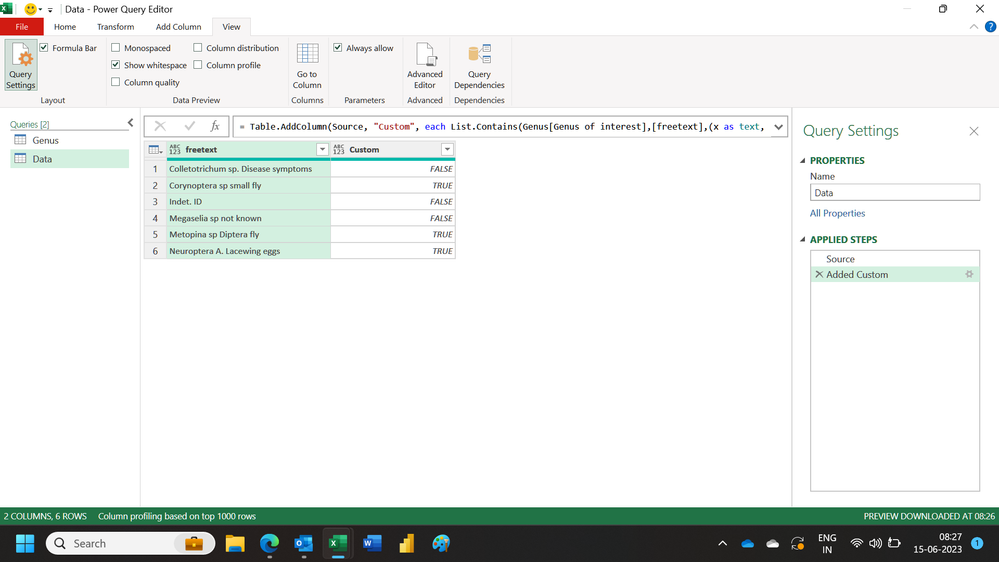
Hi,
This M code works
let
Source = Excel.CurrentWorkbook(){[Name="Data"]}[Content],
#"Added Custom" = Table.AddColumn(Source, "Custom", each List.Contains(Genus[Genus of interest],[freetext],(x as text, y as text)=>Text.Contains(y,x,Comparer.OrdinalIgnoreCase)))
in
#"Added Custom"
Hope this helps.
Hi,
This M code works
let
Source = Excel.CurrentWorkbook(){[Name="Data"]}[Content],
#"Added Custom" = Table.AddColumn(Source, "Custom", each List.Contains(Genus[Genus of interest],[freetext],(x as text, y as text)=>Text.Contains(y,x,Comparer.OrdinalIgnoreCase)))
in
#"Added Custom"
Hope this helps.
HI @Anonymous ,
Here's what I would do:
Please see attached pbix for details
The Power BI Data Visualization World Championships is back! Get ahead of the game and start preparing now!
| User | Count |
|---|---|
| 39 | |
| 37 | |
| 33 | |
| 32 | |
| 29 |
| User | Count |
|---|---|
| 132 | |
| 88 | |
| 82 | |
| 68 | |
| 64 |