Join us at FabCon Atlanta from March 16 - 20, 2026, for the ultimate Fabric, Power BI, AI and SQL community-led event. Save $200 with code FABCOMM.
Register now!Learn from the best! Meet the four finalists headed to the FINALS of the Power BI Dataviz World Championships! Register now
Hi everyone,
I'm trying to have a list of the SKUs that was selling for at least 3 consecutive months but they werent selling anything in thier fourth month.
I have made a measure to check for this but my measure is hard coding the month, I'm trying to find a way to do it dynamically regardless of which month the SKU started not sell.
This is my current measure,
Missing SKUs In October = IF(
SUMX('October SKUs',
FIND(
UPPER('October SKUs'[SKU]),
UPPER('July-September SKUs'[SKU])
,,0
)
) > 0,
"Available",
"Missing"
)
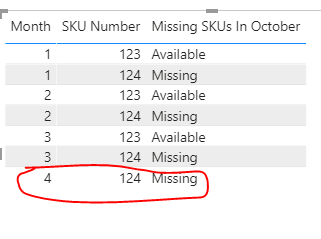
Just like the following example i'm trying to detect SKU number "123" in april.
| Month | SKU Number |
| 1 | 123 |
| 1 | 124 |
| 2 | 123 |
| 2 | 124 |
| 3 | 123 |
| 3 | 124 |
| 4 | 124 |
Solved! Go to Solution.
Hi, @Anonymous
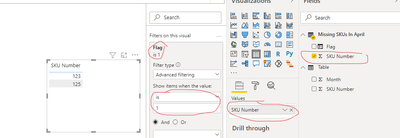
According to your description, you can follow my steps:
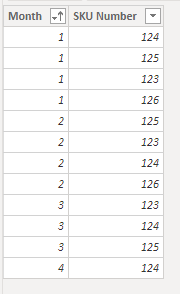
This is my test data:
Missing SKUs In April =
var _SKU=SUMMARIZE('Table',[SKU Number])
var _table=SELECTCOLUMNS(FILTER('Table',[Month]=4),"April SKU",[SKU Number])
var _Except=EXCEPT(_SKU,_table)
return _Except
Flag =
var _count=
COUNTX(FILTER('Table','Table'[Month]>=1&&'Table'[Month]<=3&&'Table'[SKU Number]='Missing SKUs In April'[SKU Number]),'Table'[SKU Number])
return
IF(_count>=3,1,0)
And you can get what you want.
You can download my test pbix file here
Best Regards,
Community Support Team _Robert Qin
If this post helps, then please consider Accept it as the solution to help the other members find it more quickly.
Hi, @Anonymous
According to your description, you can follow my steps:
This is my test data:
Missing SKUs In April =
var _SKU=SUMMARIZE('Table',[SKU Number])
var _table=SELECTCOLUMNS(FILTER('Table',[Month]=4),"April SKU",[SKU Number])
var _Except=EXCEPT(_SKU,_table)
return _Except
Flag =
var _count=
COUNTX(FILTER('Table','Table'[Month]>=1&&'Table'[Month]<=3&&'Table'[SKU Number]='Missing SKUs In April'[SKU Number]),'Table'[SKU Number])
return
IF(_count>=3,1,0)
And you can get what you want.
You can download my test pbix file here
Best Regards,
Community Support Team _Robert Qin
If this post helps, then please consider Accept it as the solution to help the other members find it more quickly.
Hi @Anonymous - I am not sure but will this below solution is what you looking for?
Missing SKUs In October = IF(SELECTEDVALUE('Table (2)'[SKU Number]) = 123,
"Available",
"Missing"
)
Hope this helps.
Cheers,
-Namish B
@Anonymous , with help from date table or use a logic get last three month
Rolling 3 = CALCULATE(distinctcount(Table[Month]),DATESINPERIOD('Date'[Date],EOMONTH(Sales[Sales Date]-1),-3,MONTH))
MTD= CALCULATE(distinctcount(Table[Month]),DATESMTD('Date'[Date]))
if(isblank([MTD]) && [Rolling 3] >=3 , 1, blank())
plot this with sku name
refer: Power BI — Month on Month with or Without Time Intelligence
https://medium.com/@amitchandak.1978/power-bi-mtd-questions-time-intelligence-3-5-64b0b4a4090e
To get the best of the time intelligence function. Make sure you have a date calendar and it has been marked as the date in model view. Also, join it with the date column of your fact/s. Refer :radacad sqlbi My Video Series Appreciate your Kudos.
Share feedback directly with Fabric product managers, participate in targeted research studies and influence the Fabric roadmap.
Check out the February 2026 Power BI update to learn about new features.
| User | Count |
|---|---|
| 49 | |
| 46 | |
| 35 | |
| 15 | |
| 14 |
| User | Count |
|---|---|
| 90 | |
| 75 | |
| 41 | |
| 26 | |
| 26 |