Share feedback directly with Fabric product managers, participate in targeted research studies and influence the Fabric roadmap.
Sign up nowGet Fabric certified for FREE! Don't miss your chance! Learn more
Good afternoon, I have two tables related by a multi-to-many related ID and I need to do date checks between different tables. Example:
Table 1:
| ID | Start date | End date |
| 1 | 01/04/2023 | 10/04/2023 |
| 1 | 15/04/2023 | 20/04/2023 |
| 2 | 01/04/2023 | 20/04/2023 |
| 3 | 02/04/2023 | 05/04/2023 |
Table 2:
| ID | Programming date | Type of visit | Date of visit |
| 1 | 10/04/2023 | A | 30/04/2023 |
| 1 | 10/04/2023 | B | 27/04/2023 |
| 1 | 20/04/2023 | B | 30/04/2023 |
| 2 | 19/04/2023 | A | 25/04/2023 |
| 3 | 06/04/2023 | B | 18/04/2023 |
| 3 | 08/04/2023 | A | 25/04/2023 |
What I need is:
The result would be something like this:
| ID | Start date (table 1) | End date (table 1) | Scheduled (Start Date ≤ Schedule Date ≤ End Date) | Date of visit | Type visit | Time to visit |
| 1 | 01/04/2023 | 10/04/2023 | Yes | 27/04/2023 | B | 17 |
| 1 | 15/04/2023 | 20/04/2023 | Yes | 30/04/2023 | B | 10 |
| 2 | 01/04/2023 | 20/04/2023 | Yes | 25/04/2023 | A | 5 |
| 3 | 02/04/2023 | 05/04/2023 | No |
I've tried multiple ways, but I'm not able to do it.
Thanks in advance.
Solved! Go to Solution.
Hi,
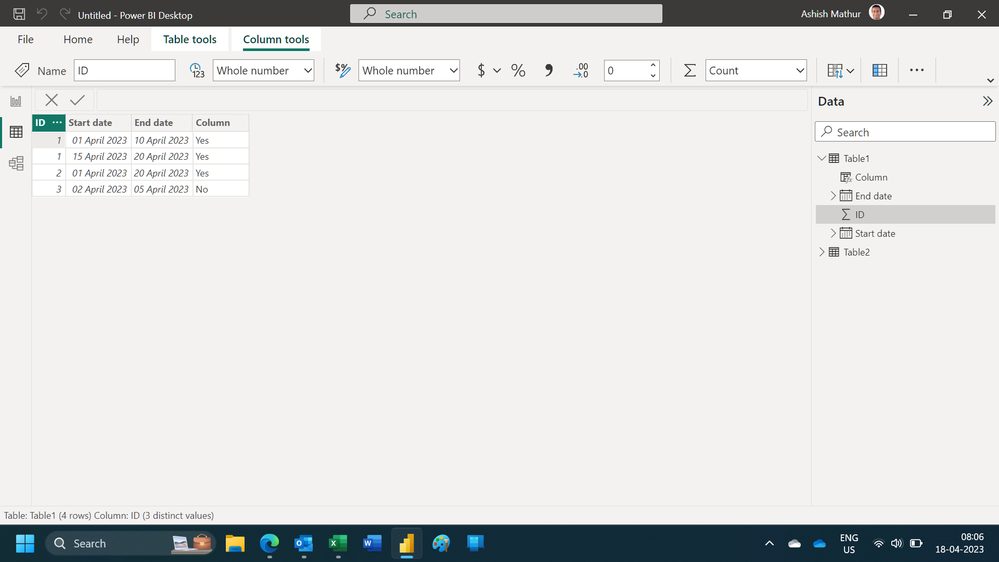
You can get the yes and no with this calculated column formula in Table1
Column = if(CALCULATE(COUNTROWS(Table2),FILTER(Table2,Table2[Programming date]>=EARLIER(Table1[Start date])&&Table2[Programming date]<=EARLIER(Table1[End date])&&Table2[ID]=EARLIER(Table1[ID])))>0,"Yes","No")
Hope this helps.
Good morning
Good morning
The answer is 27/04 and A because it is the one that has the least difference in dates with respect to the end date 20/04 and B. If it were B and 30, the time to visit would be 20.
Thank you!
Hi,
You can get the yes and no with this calculated column formula in Table1
Column = if(CALCULATE(COUNTROWS(Table2),FILTER(Table2,Table2[Programming date]>=EARLIER(Table1[Start date])&&Table2[Programming date]<=EARLIER(Table1[End date])&&Table2[ID]=EARLIER(Table1[ID])))>0,"Yes","No")
Hope this helps.
Hi,
I cannot understand the date of viit column in the third table. For ID1, why should the answer be 27/4 for the first instance? Why is it not 30/4?
Hi @Syndicate_Admin ,
I do not understand your output. Isn't it wrong?
1-Why visit type A for ID 1 is not in the output?
2-How is your relationship crossfiltering behavior? Both? From Table 1 to Table 2 or table 2 to table 1?
3- You want to see only the "YES" values? Please provide exact output based on your sample data.
Regards,
Loran
If you love stickers, then you will definitely want to check out our Community Sticker Challenge!
Check out the January 2026 Power BI update to learn about new features.
| User | Count |
|---|---|
| 64 | |
| 63 | |
| 48 | |
| 21 | |
| 18 |
| User | Count |
|---|---|
| 118 | |
| 117 | |
| 38 | |
| 36 | |
| 27 |