Don't miss your chance to take the Fabric Data Engineer (DP-600) exam for FREE! Find out how by watching the DP-600 session on-demand now through April 28th.
Learn moreJoin the FabCon + SQLCon recap series. Up next: Power BI, Real-Time Intelligence, IQ and AI, and Data Factory take center stage. All sessions are available on-demand after the live show. Register now
I want to write a measure to check if a column contains certain numerical values that I specify. These values are something like "2022, 2021, 2019" and may change.
I looked at various formulas and it looks like CONTAINS(Table, ColumnName, Value) can be used for this. But how do I specify something like {2022, 2021, 2019} in the Value argument? I want to store this as a variable so that it can be changed easily later instead of writing extensive if else statements.
If CONTAINS is in fact not suitable, I would appreciate an alternative solution. I've looked for hours and couldnt find anything similar to m code's List.ContainsAny({1, 2, 3, 4, 5}, {3, 9}).
Solved! Go to Solution.
Hi @Nie ,
According to your description, here are my steps you can follow as a solution.
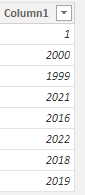
(1) This is my test data.
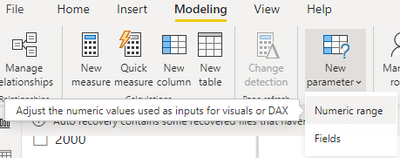
(2) Create a parameter of type number.
(3) Then we can create a measure.
Measure =
var _a = SELECTCOLUMNS('Parameter',"Value",[Parameter])
var _b = ADDCOLUMNS(_a,"Flag",IF([Value] in SELECTCOLUMNS('Table',"Target",[Column1]),1,0))
var _c = COUNTX(_a,[Value])
return SUMX(_b,[Flag])=_c
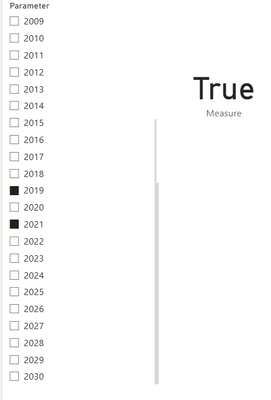
(4)Then the result is as follows.
Best Regards,
Neeko Tang
If this post helps, then please consider Accept it as the solution to help the other members find it more quickly.
Hi @Nie ,
According to your description, here are my steps you can follow as a solution.
(1) This is my test data.
(2) Create a parameter of type number.
(3) Then we can create a measure.
Measure =
var _a = SELECTCOLUMNS('Parameter',"Value",[Parameter])
var _b = ADDCOLUMNS(_a,"Flag",IF([Value] in SELECTCOLUMNS('Table',"Target",[Column1]),1,0))
var _c = COUNTX(_a,[Value])
return SUMX(_b,[Flag])=_c
(4)Then the result is as follows.
Best Regards,
Neeko Tang
If this post helps, then please consider Accept it as the solution to help the other members find it more quickly.
Thank you Neeko!
Check out the April 2026 Power BI update to learn about new features.
If you have recently started exploring Fabric, we'd love to hear how it's going. Your feedback can help with product improvements.
A new Power BI DataViz World Championship is coming this June! Don't miss out on submitting your entry.
| User | Count |
|---|---|
| 45 | |
| 38 | |
| 34 | |
| 21 | |
| 17 |
| User | Count |
|---|---|
| 65 | |
| 62 | |
| 31 | |
| 26 | |
| 25 |