Join us at FabCon Atlanta from March 16 - 20, 2026, for the ultimate Fabric, Power BI, AI and SQL community-led event. Save $200 with code FABCOMM.
Register now!The Power BI Data Visualization World Championships is back! Get ahead of the game and start preparing now! Learn more
I have a variable (ART) that is sorted by date (ART_ST) and Company ID (Company_RecID) and I am wanting to have a chart that shows ART by month instead of just showing by year.
Table - This is the information before I click the chart button.
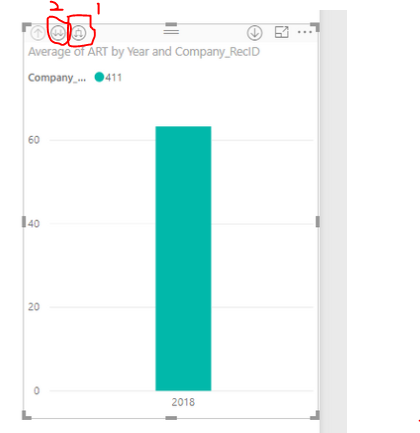
Chart - Instead of the X-Axis displaying 2018 I want it to display January, Feburary, March, ect...
Solved! Go to Solution.
@slounsbury,
Click the first highlighted button to drill down your chart, you will get YearMonth as X-Axis, click the second highlighted button to drill down your chart, you will get Month as X-Axis.
Regards,
Lydia
@slounsbury,
Click the first highlighted button to drill down your chart, you will get YearMonth as X-Axis, click the second highlighted button to drill down your chart, you will get Month as X-Axis.
Regards,
Lydia
The Power BI Data Visualization World Championships is back! Get ahead of the game and start preparing now!
Check out the November 2025 Power BI update to learn about new features.
| User | Count |
|---|---|
| 59 | |
| 43 | |
| 42 | |
| 23 | |
| 17 |
| User | Count |
|---|---|
| 190 | |
| 122 | |
| 96 | |
| 66 | |
| 47 |