Join us at FabCon Atlanta from March 16 - 20, 2026, for the ultimate Fabric, Power BI, AI and SQL community-led event. Save $200 with code FABCOMM.
Register now!Vote for your favorite vizzies from the Power BI Dataviz World Championship submissions. Vote now!
I need to create a chart in Power BI that I have been easily creating in Excel for many years.
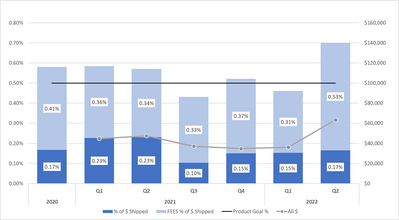
I need a Stacked Column and Line on the 1st Y Axis showing % and a Line with markers showing $ on the Second Y Axis, with Quarter/Year on the X Axis.
I've attemped YouTube instructional videos and the examples given are either more complicated or to simple for my chart requirements.
Charticulator is apparenly too complicated for me. Is there anyone who could walk me though this?
@RobRayborn Should be able to use the default stacked column chart and line visual. Post some sample data and I can walk you through it.
The attached chart shows Stacked column with Goal line %s on 1 Y axis and Line with markers showing $ on the second Y Axis
please see attached chart
Vote for your favorite vizzies from the Power BI World Championship submissions!
If you love stickers, then you will definitely want to check out our Community Sticker Challenge!
Check out the January 2026 Power BI update to learn about new features.
| User | Count |
|---|---|
| 64 | |
| 53 | |
| 42 | |
| 20 | |
| 17 |
| User | Count |
|---|---|
| 124 | |
| 105 | |
| 44 | |
| 32 | |
| 24 |