
Get certified for free when you join Fabric Data Days 2026 and dive into Fabric, Power BI, SQL, AI, and other essential data skills.
Join nowJuly 7 - July 17 | Round 2 of the Power BI Dataviz World Championships. Don't miss your chance! Learn more
Hi there ,
I have a data as below ;
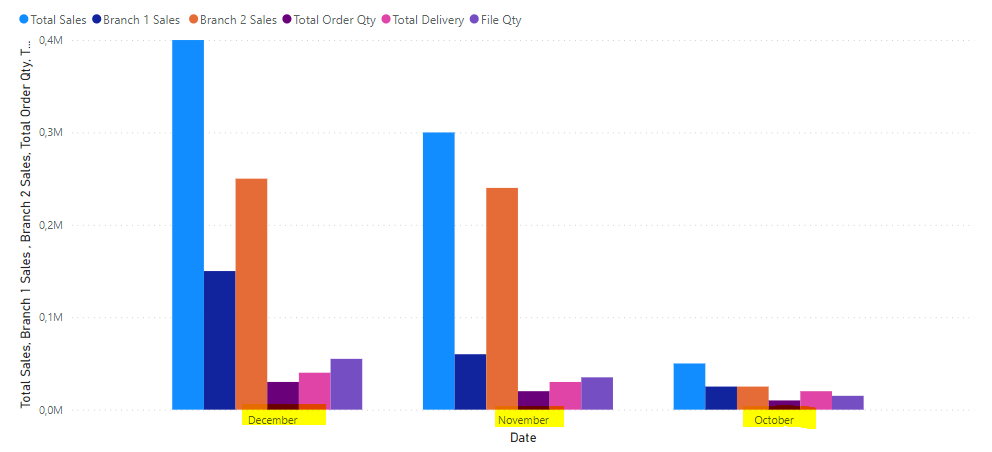
When i create a chart on power bi , datas are showed together based on months as below
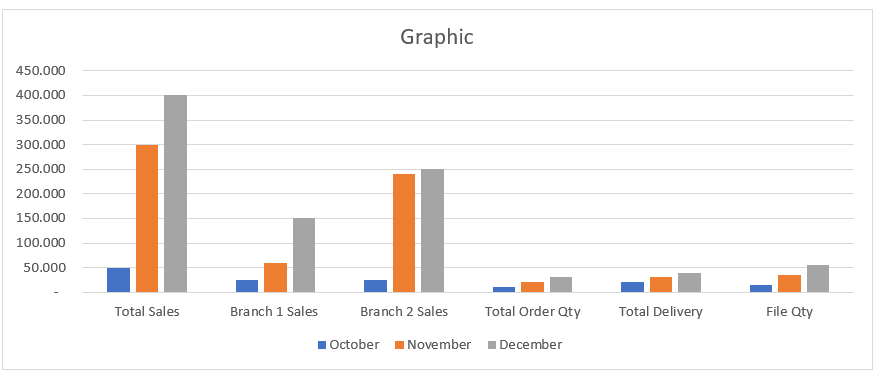
But i want to show datas as below based on their names groupped first then based on month , could you pls telll me how can i manage below seem on power bi ... thanks in advance
Solved! Go to Solution.
I was hoping Field Parameters could be used to quickly solve this but the result wasn't quite what you requested. Instead I put your Categories into a table and added a measure to extract the values from your table.
1. Category table (DAX), Seq should be used as sorting column:
Categories = DATATABLE(
"Category", STRING,
"Seq", INTEGER,
{
{"Total Sales", 1},
{"Branch 1 Sales", 2},
{"Branch 2 Sales", 3},
{"Total Order Qty", 4},
{"Total Delivery", 5},
{"File Qty", 6}
}
)
2. Measure (DAX):
Measure = SWITCH(SELECTEDVALUE(Categories[Category]),
"Total Sales", SUM('Table'[Total Sales]),
"Branch 1 Sales", SUM('Table'[Branch 1 Sales]),
"Branch 2 Sales", SUM('Table'[Branch 2 Sales]),
"Total Order Qty", SUM('Table'[Total Order Qty]),
"Total Delivery", SUM('Table'[Total Delivery]),
"File Qty", SUM('Table'[File Qty])
)
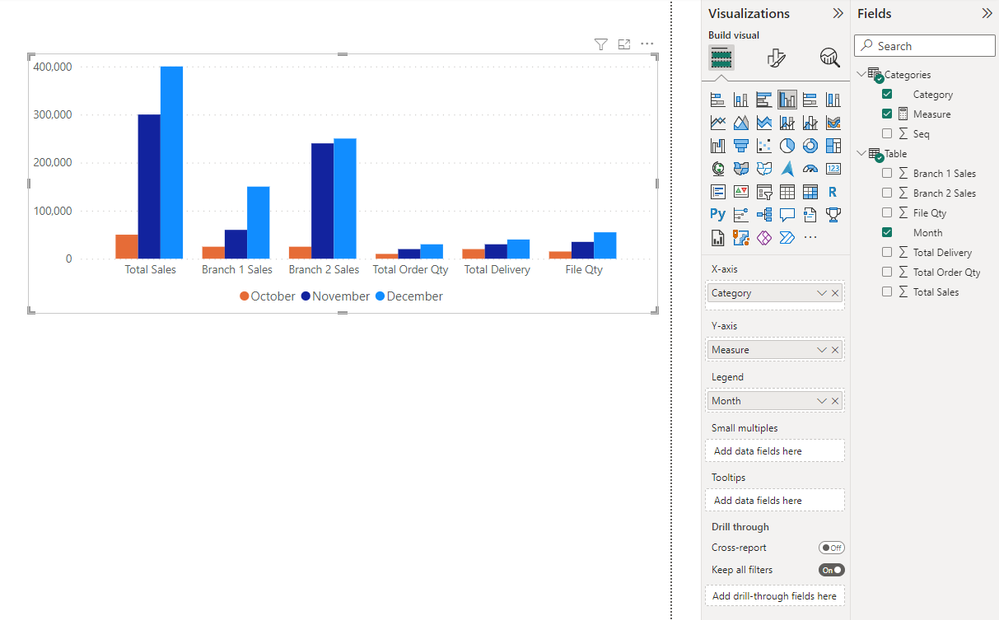
3. Use Clustered Column Chart visual with 'Categories'[Category] as x-axis, 'Categories'[Measure] as y-axis and 'Table'[Month] as legend.
I was hoping Field Parameters could be used to quickly solve this but the result wasn't quite what you requested. Instead I put your Categories into a table and added a measure to extract the values from your table.
1. Category table (DAX), Seq should be used as sorting column:
Categories = DATATABLE(
"Category", STRING,
"Seq", INTEGER,
{
{"Total Sales", 1},
{"Branch 1 Sales", 2},
{"Branch 2 Sales", 3},
{"Total Order Qty", 4},
{"Total Delivery", 5},
{"File Qty", 6}
}
)
2. Measure (DAX):
Measure = SWITCH(SELECTEDVALUE(Categories[Category]),
"Total Sales", SUM('Table'[Total Sales]),
"Branch 1 Sales", SUM('Table'[Branch 1 Sales]),
"Branch 2 Sales", SUM('Table'[Branch 2 Sales]),
"Total Order Qty", SUM('Table'[Total Order Qty]),
"Total Delivery", SUM('Table'[Total Delivery]),
"File Qty", SUM('Table'[File Qty])
)
3. Use Clustered Column Chart visual with 'Categories'[Category] as x-axis, 'Categories'[Measure] as y-axis and 'Table'[Month] as legend.
In Power Query, if you select the first column (Date?) and choose Unpivot other columns, you will get 3 columns that can be pulled on to a column chart to get what you want
Join us in Barcelona for FabCon and SQLCon, the Fabric, Power BI, SQL, and AI community event. Save €200 with code FABCMTY200.
Join Fabric Data Days 2026: 60 days of free live/on-demand sessions, challenges, study groups, and certification opportunities.
| User | Count |
|---|---|
| 23 | |
| 19 | |
| 18 | |
| 17 | |
| 13 |
| User | Count |
|---|---|
| 60 | |
| 52 | |
| 47 | |
| 40 | |
| 38 |