Join us at FabCon Atlanta from March 16 - 20, 2026, for the ultimate Fabric, Power BI, AI and SQL community-led event. Save $200 with code FABCOMM.
Register now!Learn from the best! Meet the four finalists headed to the FINALS of the Power BI Dataviz World Championships! Register now
Hello everyone
On my rapport i have one table and one graph when i clic on a specific value on my graph my data in my table only show what is linked to it ,meanwhile if i do the opposite the graph still shows every data
any idea why ?
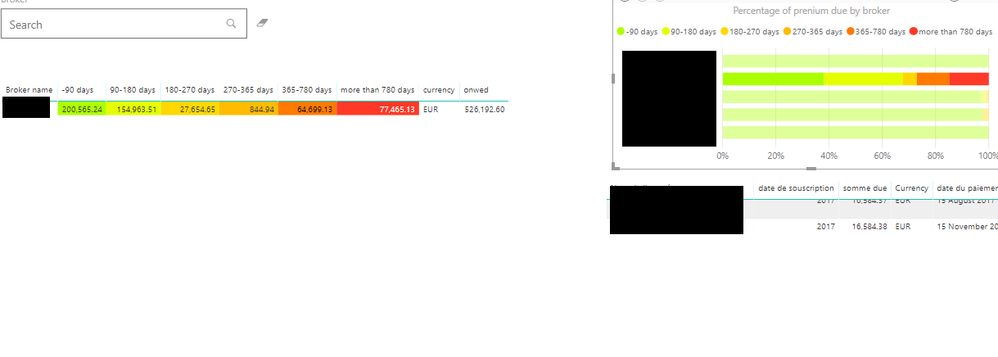
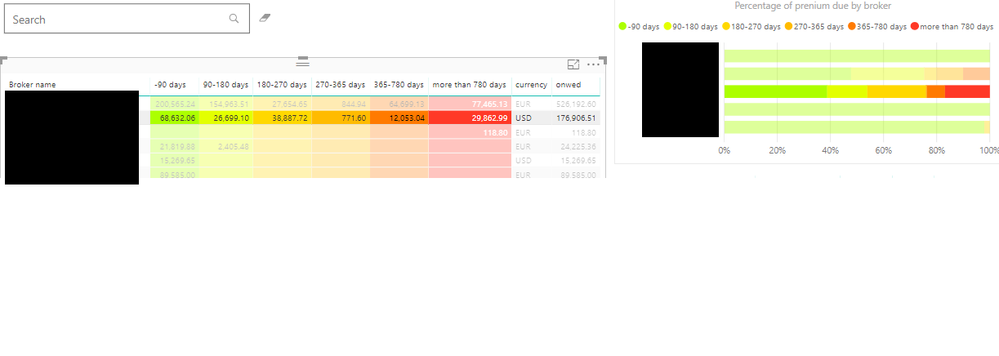
here are some picture of what i got
when i clic on my graph
when i clic on my tablethanks in advance
Solved! Go to Solution.
Hi,
You should select the table and than click on "format" in the visual tools of the table. In format, you can find "edit interactions". It is useful to manage the interactions between tables and graphs.
When you click on "edit interactions", you have to go on your graph and select filter or highlight button. At the end, you still click on "edit interactions" and it should work.
Hi,
You should select the table and than click on "format" in the visual tools of the table. In format, you can find "edit interactions". It is useful to manage the interactions between tables and graphs.
When you click on "edit interactions", you have to go on your graph and select filter or highlight button. At the end, you still click on "edit interactions" and it should work.
thanks for taking the time to register to answer me 🙂
Share feedback directly with Fabric product managers, participate in targeted research studies and influence the Fabric roadmap.
Check out the February 2026 Power BI update to learn about new features.
| User | Count |
|---|---|
| 61 | |
| 54 | |
| 39 | |
| 16 | |
| 14 |
| User | Count |
|---|---|
| 98 | |
| 82 | |
| 35 | |
| 30 | |
| 25 |