Don't miss your chance to take the Fabric Data Engineer (DP-700) exam on us!
Learn moreWe've captured the moments from FabCon & SQLCon that everyone is talking about, and we are bringing them to the community, live and on-demand. Starts on April 14th. Register now
Hello everyone
On my rapport i have one table and one graph when i clic on a specific value on my graph my data in my table only show what is linked to it ,meanwhile if i do the opposite the graph still shows every data
any idea why ?
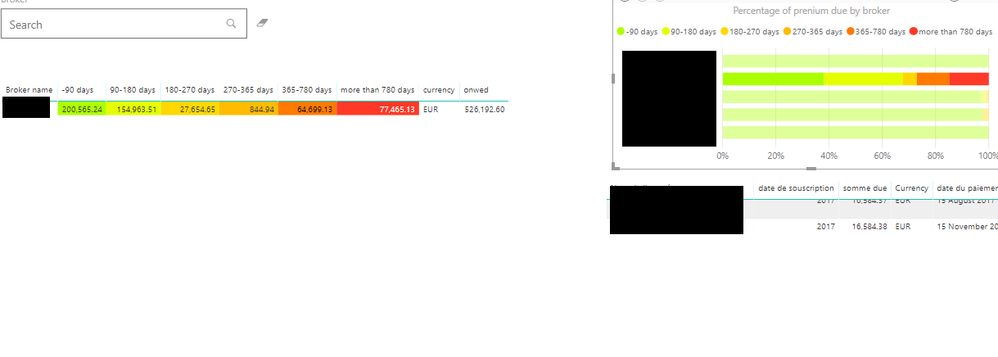
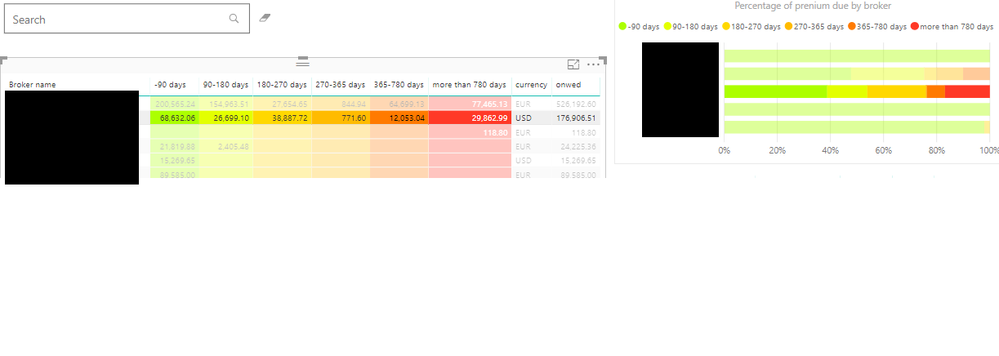
here are some picture of what i got
when i clic on my graph
when i clic on my tablethanks in advance
Solved! Go to Solution.
Hi,
You should select the table and than click on "format" in the visual tools of the table. In format, you can find "edit interactions". It is useful to manage the interactions between tables and graphs.
When you click on "edit interactions", you have to go on your graph and select filter or highlight button. At the end, you still click on "edit interactions" and it should work.
Hi,
You should select the table and than click on "format" in the visual tools of the table. In format, you can find "edit interactions". It is useful to manage the interactions between tables and graphs.
When you click on "edit interactions", you have to go on your graph and select filter or highlight button. At the end, you still click on "edit interactions" and it should work.
thanks for taking the time to register to answer me 🙂
If you have recently started exploring Fabric, we'd love to hear how it's going. Your feedback can help with product improvements.
A new Power BI DataViz World Championship is coming this June! Don't miss out on submitting your entry.
Share feedback directly with Fabric product managers, participate in targeted research studies and influence the Fabric roadmap.
| User | Count |
|---|---|
| 53 | |
| 35 | |
| 31 | |
| 19 | |
| 17 |
| User | Count |
|---|---|
| 75 | |
| 72 | |
| 39 | |
| 35 | |
| 23 |