Don't miss your chance to take the Fabric Data Engineer (DP-600) exam for FREE! Find out how by watching the DP-600 session on-demand now through April 28th.
Learn moreJoin the FabCon + SQLCon recap series. Up next: Power BI, Real-Time Intelligence, IQ and AI, and Data Factory take center stage. All sessions are available on-demand after the live show. Register now
I have a table as below:
| Country | Cost | Percentage |
| Africa pacific region | 1k | 95% |
| Asia Region | 2k | 96% |
| Europe Region | 3k | 97% |
| Latin America Region | 4k | 98% |
Here i want to change the country column fileds as like below :
| Country | Cost | Percentage |
| AFR | 1k | 95% |
| ASR | 2k | 96% |
| EUR | 3k | 97% |
| LAR | 4k | 98% |
Can someone please with this.
Thanks in advance.
Solved! Go to Solution.
Hi @Sambidha ,
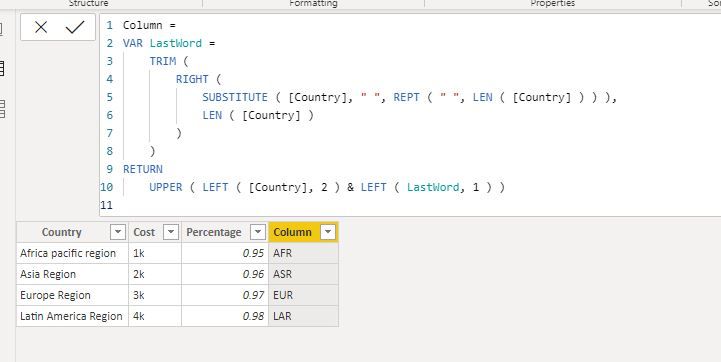
You can try to create a calculated column like so:
Column =
VAR LastWord =
TRIM (
RIGHT (
SUBSTITUTE ( [Country], " ", REPT ( " ", LEN ( [Country] ) ) ),
LEN ( [Country] )
)
)
RETURN
UPPER ( LEFT ( [Country], 2 ) & LEFT ( LastWord, 1 ) )
Best regards
Icey
If this post helps,then consider Accepting it as the solution to help other members find it faster.
Hi @Sambidha ,
You can try to create a calculated column like so:
Column =
VAR LastWord =
TRIM (
RIGHT (
SUBSTITUTE ( [Country], " ", REPT ( " ", LEN ( [Country] ) ) ),
LEN ( [Country] )
)
)
RETURN
UPPER ( LEFT ( [Country], 2 ) & LEFT ( LastWord, 1 ) )
Best regards
Icey
If this post helps,then consider Accepting it as the solution to help other members find it faster.
Let me know if this helps (also, be mindful that Replace Values is case sensitive)
Proud to be a Super User!
There are a couple ways of doing this.
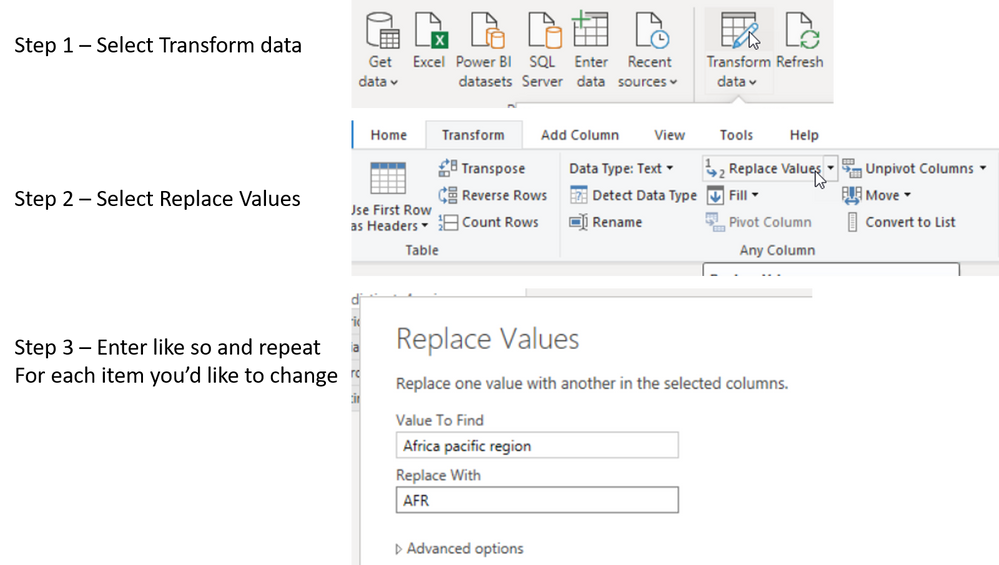
If you go into Power Query, in the Transform tab, replace values and replace the longer names entirely with the abbreviations.
Or you create a table that has the current names with a new column added to house the abbreviations and then you have this as a linked Dimension table.
Proud to be a Super User!
Hi,
Can you please help me with the query.
Thanks.
Of course, give me five mins and I'll have a step through ready for you
Proud to be a Super User!
Check out the April 2026 Power BI update to learn about new features.
If you have recently started exploring Fabric, we'd love to hear how it's going. Your feedback can help with product improvements.
A new Power BI DataViz World Championship is coming this June! Don't miss out on submitting your entry.
| User | Count |
|---|---|
| 44 | |
| 38 | |
| 34 | |
| 20 | |
| 16 |
| User | Count |
|---|---|
| 68 | |
| 65 | |
| 30 | |
| 26 | |
| 25 |