cancel
Showing results for 
Search instead for 
Did you mean: 

Next up in the FabCon + SQLCon recap series: The roadmap for Microsoft SQL and Maximizing Developer experiences in Fabric. All sessions are available on-demand after the live show. Register now

Reply
Sambidha
New Member

Changing multiple row names

I have a table as below: 

CountryCostPercentage
Africa pacific region1k95%
Asia Region2k96%
Europe Region3k97%
Latin America Region4k98%


Here i want to change the country column fileds as like below : 

CountryCostPercentage
AFR1k95%
ASR2k96%
EUR3k97%
LAR4k98%


Can someone please with this.

Thanks in advance.

1 ACCEPTED SOLUTION
Icey
Community Support
Community Support

Hi @Sambidha ,


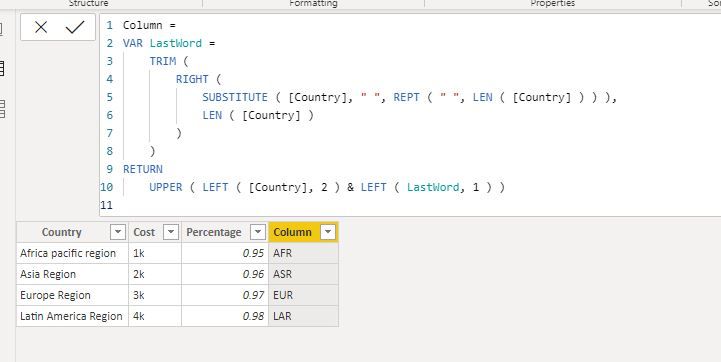
You can try to create a calculated column like so:

Column =
VAR LastWord =
    TRIM (
        RIGHT (
            SUBSTITUTE ( [Country], " ", REPT ( " ", LEN ( [Country] ) ) ),
            LEN ( [Country] )
        )
    )
RETURN
    UPPER ( LEFT ( [Country], 2 ) & LEFT ( LastWord, 1 ) )

country.JPG


Best regards

Icey


If this post helps,then consider Accepting it as the solution to help other members find it faster.

View solution in original post

5 REPLIES 5
Icey
Community Support
Community Support

Hi @Sambidha ,


You can try to create a calculated column like so:

Column =
VAR LastWord =
    TRIM (
        RIGHT (
            SUBSTITUTE ( [Country], " ", REPT ( " ", LEN ( [Country] ) ) ),
            LEN ( [Country] )
        )
    )
RETURN
    UPPER ( LEFT ( [Country], 2 ) & LEFT ( LastWord, 1 ) )

country.JPG


Best regards

Icey


If this post helps,then consider Accepting it as the solution to help other members find it faster.

Daviejoe
Memorable Member
Memorable Member

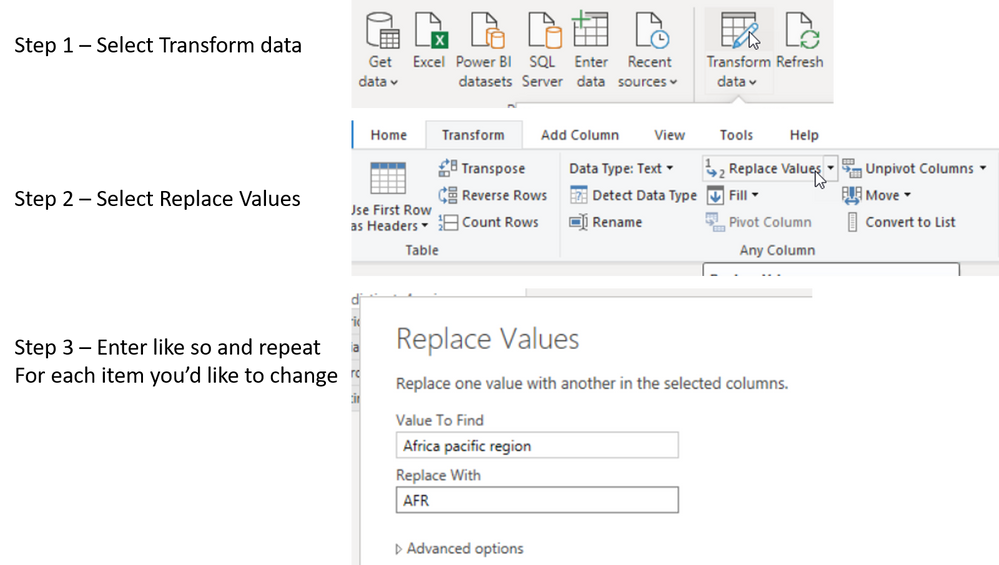
Let me know if this helps (also, be mindful that Replace Values is case sensitive)


Replace Values.png


Did I answer your question? Mark my post as a solution!

Proud to be a Super User!


Daviejoe
Memorable Member
Memorable Member

There are a couple ways of doing this.


If you go into Power Query, in the Transform tab, replace values and replace the longer names entirely with the abbreviations.


Or you create a table that has the current names with a new column added to house the abbreviations and then you have this as a linked Dimension table.


Did I answer your question? Mark my post as a solution!

Proud to be a Super User!


Hi,

Can you please help me with the query.

Thanks.

Of course, give me five mins and I'll have a step through ready for you


Did I answer your question? Mark my post as a solution!

Proud to be a Super User!


Helpful resources

Announcements
New to Fabric survey Carousel

New to Fabric Survey

If you have recently started exploring Fabric, we'd love to hear how it's going. Your feedback can help with product improvements.

Power BI DataViz World Championships carousel

Power BI DataViz World Championships - June 2026

A new Power BI DataViz World Championship is coming this June! Don't miss out on submitting your entry.

Join our Fabric User Panel

Join our Fabric User Panel

Share feedback directly with Fabric product managers, participate in targeted research studies and influence the Fabric roadmap.

March Power BI Update Carousel

Power BI Community Update - March 2026

Check out the March 2026 Power BI update to learn about new features.